WebRTC帧率调整策略
原文出处:WebRTC帧率调整策略
与实时视频相关参数包含:帧率、码率、时延、抖动等。帧率体现了视频的流畅性,要想达到较好的流畅性体验要求——网络视频帧率不低于24帧,视频会议帧率不低于15帧。在实际开发中,我们遇到了不少问题,主要包括:
- 发送端帧率较低
- 接收端帧率较低
- 帧率波动较大
本文主要研究WebRTC中的帧率调整策略,解决上述实际开发中帧率较低的问题,以期达到较好的流畅性体验。
帧率计算方法
帧率并非恒定值,帧率大小反映的是每秒多少视频帧的统计值。在视频会议中,同一路视频流发送端的帧率和接收端的帧率并不相同。对于发送端帧率,我们需要明确:发送端输出帧率不等于摄像头采集帧率,编码器实际输入帧率不等于摄像头采集帧率,发送端帧率为编码器输出帧率。
发送端帧率
摄像头采集帧率决定了发送端输入帧率的最大值。当采集的视频数据传送到编码器时,受制于编码器性能和系统硬件性能,编码器的实际输入帧率并不等于摄像头的采集帧率。摄像头采集帧率和编码器输入帧率共同决定了发送端的帧率。在WebRTC中的统计信息展现的是摄像头的采集帧率(作为输入帧率)和编码器的输出帧率(作为输出帧率)。
1、发送端输入帧率计算
WebRTC在_“webrtc/video/vie_encoder.cc”_文件EncodeTask类中统计了摄像头的采集帧率——发送端输入帧率:
bool Run() override {
  vie_encoder_->stats_proxy_->OnIncomingFrame(frame_.width(),frame_.height());
  return true;
}
2、编码器输入帧率计算
为了计算编码器的实际输入帧率,WebRTC维持了一个大小为kFrameCountHistorySize的数组$$T_f$$,该数组用于保存最新的FrameCountHistorySize个帧放入数组的时间戳信息。帧率计算fps公式如下: $$fps=\frac{N_f\times 1000.0f}{T_f[0]-T_f[N_f]} \qquad {N_f:\ max(T_{now}-T_f[N_f]) < kFrameHistoryWinMs}$$
其中,
- kFrameCountHistorySize一般取值为90,kFrameCountHistorySize 一般取值为2000;
- $$N_f$$是使$$N_f:\ max(T_{now}-T_f[N_f]) < kFrameHistoryWinMs$$成立的最大序列号;
- $$T_{now}$$为当前时间,$$T_f[0]=T_{now}$$是数组内newest帧的时间戳,$$T_f[kFrameCountHistorySize]$$为数组内现存oldest帧的时间戳;
- 当$$N_f==0$$时,不执行该公式,帧率保持上一次计算的结果。
在WebRTC中,上述公式在“webrtc/modules/video_coding/media_optimization.cc”文件MediaOptimization类中实现。
void ProcessIncomingFrameRate(int64_t now) {
  int32_t num = 0, nr_of_frames = 0;
  for (num = 1; num < (kFrameCountHistorySize - 1); ++num) {
    if (incoming_frame_times_[num] <= 0 ||
        /* don't use data older than 2 s */
        now - incoming_frame_times_[num] > kFrameHistoryWinMs) {
      break;
    } else {
      nr_of_frames++;
    }
  }
  if (num > 1) {
    const int64_t diff =
        incoming_frame_times_[0] - incoming_frame_times_[num - 1];
    incoming_frame_rate_ = 0.0;  /* No frame rate estimate available. */
    if (diff > 0) {
      incoming_frame_rate_ = nr_of_frames * 1000.0f / static_cast<float>(diff);
    }
  }
}
3、编码器输出帧率计算
为了计算编码器的实际输出帧率,WebRTC维护了一个kBitrateAverageWinMs时间段内的已编码帧的数组$$T_f$$,依据下列公式来计算实际码率:
$$ fps=\frac{90000 \times (sizeof(T_f)-1) + \frac{T_{diff}}{2}}{T_{diff}} $$
其中,
- $$T_{diff}=T_f[back]-T_f[front]$$,表示数组$$T_f$$最大的时间间隔,当$$T_{diff}<0$$时,$$fps=sizeof(T_f)$$;
- $$sizeof(T_f)$$表示数组$$T_f$$的大小,当$$sizeof(T_f)<=1$$时,$$fps=sizeof(T_f)$$。
在WebRTC中,上述公式在“webrtc/modules/video_coding/media_optimization.cc”文件MediaOptimization类中实现。
void MediaOptimization::PurgeOldFrameSamples(int64_t now_ms) {
  while (!encoded_frame_samples_.empty()) {
    if (now_ms - encoded_frame_samples_.front().time_complete_ms >
        kBitrateAverageWinMs) {
      encoded_frame_samples_.pop_front();
    } else {
      break;
    }
  }
}

void MediaOptimization::UpdateSentFramerate() {
  if (encoded_frame_samples_.size() <= 1) {
    avg_sent_framerate_ = encoded_frame_samples_.size();
    return;
  }
  int denom = encoded_frame_samples_.back().timestamp -
              encoded_frame_samples_.front().timestamp;
  if (denom > 0) {
    avg_sent_framerate_ =
        (90000 * (encoded_frame_samples_.size() - 1) + denom / 2) / denom;
  } else {
    avg_sent_framerate_ = encoded_frame_samples_.size();
  }
}
接收端帧率
在WebRTC中,将接收端帧率分为了三种:网络接收帧率——接收端输入帧率、解码器输出帧率、视频渲染帧率。
1、网络接收帧率
网络接收帧率统计的是接收端接收到网络发送过来的视频帧帧率。在完整接收到一帧数据后,由FrameBuffer类调用ReceiveStatisticsProxy::OnCompleteFrame()来统计。具体代码如下:
void OnCompleteFrame(bool is_keyframe,
                    size_t size_bytes) {
  int64_t now_ms = clock_->TimeInMilliseconds();
  frame_window_.insert(std::make_pair(now_ms, size_bytes));
  int64_t old_frames_ms = now_ms - kRateStatisticsWindowSizeMs;
  while (!frame_window_.empty() &&
        frame_window_.begin()->first < old_frames_ms) {
    frame_window_accumulated_bytes_ -= frame_window_.begin()->second;
    frame_window_.erase(frame_window_.begin());
  }
  size_t framerate =
      (frame_window_.size() * 1000 + 500) / kRateStatisticsWindowSizeMs;
  stats_.network_frame_rate = static_cast<int>(framerate);
}
2、解码器输出帧率
WebRTC实现了RateStatistics来统计解码器输出帧率,在编码结束后由VideoReceiveStream调用ReceiveStatisticsProxy::OnDecodedFrame()来统计。具体代码如下:
void OnDecodedFrame() {
  uint64_t now = clock_->TimeInMilliseconds();
  rtc::CritScope lock(&crit_);
  ++stats_.frames_decoded;
  decode_fps_estimator_.Update(1, now);
  stats_.decode_frame_rate = decode_fps_estimator_.Rate(now).value_or(0);
}
3、视频渲染帧率
WebRTC实现了RateStatistics来统计视频渲染帧率,在视频渲染结束后由VideoReceiveStream调用ReceiveStatisticsProxy::OnRenderedFrame()来统计。具体代码如下:
void OnRenderedFrame(const VideoFrame& frame) {
  uint64_t now = clock_->TimeInMilliseconds();
  rtc::CritScope lock(&crit_);
  renders_fps_estimator_.Update(1, now);
  stats_.render_frame_rate = renders_fps_estimator_.Rate(now).value_or(0);
  ++stats_.frames_rendered;
}
发送端帧率策略
影响发送端帧率的主要因素包含:视频采集(摄像头/桌面)帧率、编码器性能。
视频采集帧率策略
摄像头是视频采集的来源,其帧率决定了视频会议帧率的上限。与摄像头采集相关的参数包含:像素格式、帧率和分辨率。下表列出了ThinkPadT440P自带摄像头支持的部分视频格式:
| 格式 | 分辨率 | 帧率 |
|---|---|---|
| MJPG | 1280x720 | 30 |
| MJPG | 640x360 | 30 |
| YUY2 | 1280x720 | 10 |
| YUY2 | 640x360 | 30 |
可以看出对于YUY2格式,1280x720的帧率仅为10帧,要想达到30帧必须要采用MJPG格式。这是因为,同样是1280x720分辨率,30帧YUY2和MJPG格式需要传输的数据量分别为:
- YUY2:1280x720x30x2x8=421Mbps
- MJPG:1280x720x30x3x8/20=32Mbps
YUY2需要的传输带宽过大,所以很多摄像头对于RGB、YUV等格式1280x720仅支持10帧。然而10帧是远远不能够满足视频会议的帧率需求的,因此在选择视频采集规格时,需要注意像素格式、帧率和分辨率的权衡。在实际应用中,我们可以采集MJPG格式1280x720x30视频规格,然后在应用层转换为YUV格式。WebRTC在“webrtc/modules/video_capture/video_capture_impl.cc”的VideoCaptureImpl类中实现了转换:
if (frameInfo.codecType == kVideoCodecUnknown) {
  /* Not encoded, convert to I420. */
  const VideoType commonVideoType =
            RawVideoTypeToCommonVideoVideoType(frameInfo.rawType);
  if (frameInfo.rawType != kVideoMJPEG && CalcBufferSize(commonVideoType, width,
                                  abs(height)) != videoFrameLength) {
    return -1;
  }
  int stride_y = width, stride_uv = (width + 1) / 2;
  int target_width = width, target_height = height;
  rtc::scoped_refptr<I420Buffer> buffer = I420Buffer::Create(
      target_width, abs(target_height), stride_y, stride_uv, stride_uv);
  const int conversionResult = ConvertToI420(
      commonVideoType, videoFrame, 0, 0, width, height, videoFrameLength,
      apply_rotation ? _rotateFrame : kVideoRotation_0, buffer.get());
}
最终得到的YUV格式的视频数据会被送到编码器中被编码,需要注意:不是所有的视频数据都会被编码器编码,详细内容将在下一节介绍。
采集编码丢帧策略
受限于系统硬件性能和编码器性能,视频采集图片的速度有可能比编码器编码速度快,这将导致多余的图片帧在编码器任务队列中累积。由于视频会议需要较低的时延,编码器必须要及时处理最新的帧,此时WebRTC采取丢帧策略——当有多个帧在编码器任务队列时,只编码最新的一帧。WebRTC在“webrtc/video/vie_encoder.cc”文件EncodeTask类中实现了该策略:
bool Run() override {
  ++vie_encoder_->captured_frame_count_;
  if (--vie_encoder_->posted_frames_waiting_for_encode_ == 0) {
    vie_encoder_->EncodeVideoFrame(frame_, time_when_posted_us_);
  } else {
    /* There is a newer frame in flight. Do not encode this frame. */
    LOG(LS_VERBOSE) << "Incoming frame dropped due to that the encoder is blocked.";
    ++vie_encoder_->dropped_frame_count_;
  }
  return true;
}
可以看出,由于编码器是阻塞的,如果编码器性能或系统硬件性能较差,编码器会丢掉因阻塞而累积的帧,进而导致发送端帧率降低。在具体使用场景中,这往往会导致两种现象:
- 接收端黑屏:如果发送端一开始就卡死在编码器中,接收端会一直黑屏,直到第一个帧编码完成;
- 接收端卡顿:如果发送端运行后经常阻塞在编码器中,接收端会卡顿,严重影响视频质量。
因此,摄像头采集帧率并不等于编码器的实际输入帧率,MediaOptimization类中得到的编码器实际输入帧率,需要在下次编码前设置为编码器的输入帧率。
恒定码率丢帧策略
除了上文所述的采集编码丢帧策略,WebRTC还实现了一种漏桶算法的变体,用于跟踪何时应该主动丢帧,以避免编码器无法保持其比特率时,产生过高的比特率。漏桶算法的示意图如下:
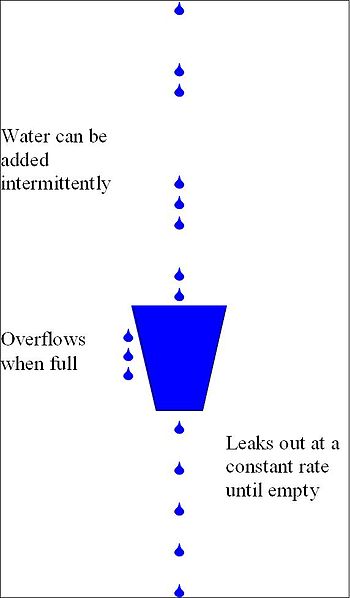
漏桶算法的实现位于“webrtc/modules/video_coding/frame_dropper.cc”中的FrameDropper类,其实现了三个关键方法:
- Fill()
- Leak()
- DropFrame()
从字面上可以看出,这三个方法对应于上图所示漏桶算法的三个操作。这三个方法都在MediaOptimization类被调用。
首先,来看看FrameDropper类的核心参数:
- 漏桶容积:accumulator_max_,其值为target-bps×kLeakyBucketSizeSeconds,随目标码率改变而改变;
- 漏桶累积:accumulator_,其表示漏桶累积的字节数,每次Fill()时增加,每次Leak()时减少,其最大值为target-bps×kAccumulatorCapBufferSizeSecs;
- 丢帧率:drop_ratio_,其为一个指数滤波器,使丢帧率保持一个平滑的变化过程,每次Leak()后更新丢帧率;
- 关键帧率:key_frame_ratio_,其为一个指数滤波器,使关键帧率保持一个平滑的变化过程,每次Fill()后更新;
- 差分帧码率:delta_frame_size_avg_kbits_,其为一个指数滤波器,使关键帧率保持一个平滑的变化过程,每次Fill()后更新。
其次,为了防止关键帧和较大的差分帧立即溢出,进而导致后续较小的帧出现较高丢帧,关键帧和较大的差分帧是不会被立即在桶中累计。相反,这些较大的帧会在漏桶中累计前,会分成若干小块,进而在_Leak()_操作中逐次累计这些小块,来防止较关键帧和较大的差分帧立即溢出。FrameDropper类增加了额外的几个参数来实现该策略:
- large_frame_accumulation_spread_:大帧最大拆分块数,四舍五入取整;
- large_frame_accumulation_count_:大帧剩余拆分块数,四舍五入取整;
- large_frame_accumulation_chunk_size_:单个块尺寸,其值为framesize/large_frame_accumulation_count_。
最后,来看看FrameDropper类的核心操作:
1、Fill()
当视频帧被编码后,MediaOptimization类会调用Fill()方法来填充漏桶。调用顺序很简单,主要关注Fill()方法的实现——将大帧拆分为large_frame_accumulation_count_个小块,并不累加accumulator_;将小帧直接累计accumulator_。Fill()方法同时需要更新key_frame_ratio_和delta_frame_size_avg_kbits_,用以计算大帧拆分块数和大帧判断。具体实现如下:
void Fill(size_t framesize_bytes, bool delta_frame) {
  float framesize_kbits = 8.0f * static_cast<float>(framesize_bytes) / 1000.0f;
  if (!delta_frame) {
    if (large_frame_accumulation_count_ == 0) {
      if (key_frame_ratio_.filtered() > 1e-5 &&
          1 / key_frame_ratio_.filtered() < large_frame_accumulation_spread_) {
        large_frame_accumulation_count_ =
            static_cast<int32_t>(1 / key_frame_ratio_.filtered() + 0.5);
      } else {
        large_frame_accumulation_count_ =
            static_cast<int32_t>(large_frame_accumulation_spread_ + 0.5);
      }
      large_frame_accumulation_chunk_size_ =
          framesize_kbits / large_frame_accumulation_count_;
      framesize_kbits = 0;
    }
  } else {
    if (delta_frame_size_avg_kbits_.filtered() != -1 &&
        (framesize_kbits >
        kLargeDeltaFactor * delta_frame_size_avg_kbits_.filtered()) &&
        large_frame_accumulation_count_ == 0) {
      large_frame_accumulation_count_ =
          static_cast<int32_t>(large_frame_accumulation_spread_ + 0.5);
      large_frame_accumulation_chunk_size_ =
          framesize_kbits / large_frame_accumulation_count_;
      framesize_kbits = 0;
    } else {
      delta_frame_size_avg_kbits_.Apply(1, framesize_kbits);
    }
    key_frame_ratio_.Apply(1.0, 0.0);
  }
  accumulator_ += framesize_kbits;
  CapAccumulator();
}
2、Leak()
Leak()操作按照编码器输入帧率的频率来执行,每次Leak的大小为target_bps/input_fps,每次Leak时需要判断是否需要累计Fill()方法拆分的块,进而更新drop_ratio_。drop_ratio_的更新遵循下列原则:
- 当accumulator_ > 1.3f accumulator_max_,drop_ratio_基数调整为0.8f*,提高丢帧率调整加速度;
- 当accumulator_ < 1.3f accumulator_max_,drop_ratio_基数调整为0.9f*,降低丢帧率调整加速度。
实现代码如下:
void Leak(uint32_t input_framerate) {
  float expected_bits_per_frame = target_bitrate_ / input_framerate;
  if (large_frame_accumulation_count_ > 0) {
    expected_bits_per_frame -= large_frame_accumulation_chunk_size_;
    --large_frame_accumulation_count_;
  }
  accumulator_ -= expected_bits_per_frame;
  if (accumulator_ < 0.0f) {
    accumulator_ = 0.0f;
  }

  if (accumulator_ > 1.3f * accumulator_max_) {
    /* Too far above accumulator max, react faster */
    drop_ratio_.UpdateBase(0.8f);
  } else {
    /* Go back to normal reaction */
    drop_ratio_.UpdateBase(0.9f);
  }
  if (accumulator_ > accumulator_max_) {
    /* We are above accumulator max, and should ideally
    * drop a frame. Increase the dropRatio and drop
    * the frame later.
    */
    if (was_below_max_) {
      drop_next_ = true;
    }
    drop_ratio_.Apply(1.0f, 1.0f);
    drop_ratio_.UpdateBase(0.9f);
  } else {
    drop_ratio_.Apply(1.0f, 0.0f);
  }
  was_below_max_ = accumulator_ < accumulator_max_;
}
3、DropFrame()
DropFrame()操作用来判断是否需要将输入到编码器的这一帧丢弃,其利用drop_ratio_来使丢帧率保持一个平滑的变化过程。当drop_ratio_.filtered() >= 0.5f时,表明连续丢弃多个帧(至少一个帧);当0.0f < drop_ratio_.filtered() < 0.5f_时,表明多个帧才会丢弃一个帧。具体的丢帧策略见实现:
bool FrameDropper::DropFrame() {
  if (drop_ratio_.filtered() >= 0.5f) {
    float denom = 1.0f - drop_ratio_.filtered();
    if (denom < 1e-5) {
      denom = 1e-5f;
    }
    int32_t limit = static_cast<int32_t>(1.0f / denom - 1.0f + 0.5f);
    int max_limit = static_cast<int>(incoming_frame_rate_ * max_drop_duration_secs_);
    if (limit > max_limit) {
      limit = max_limit;
    }
    if (drop_count_ < 0) {
      drop_count_ = -drop_count_;
    }
    if (drop_count_ < limit) {
      drop_count_++;
      return true;
    } else {
      drop_count_ = 0;
      return false;
    }
  } else if (drop_ratio_.filtered() > 0.0f && drop_ratio_.filtered() < 0.5f) {
    float denom = drop_ratio_.filtered();
    if (denom < 1e-5) {
      denom = 1e-5f;
    }
    int32_t limit = -static_cast<int32_t>(1.0f / denom - 1.0f + 0.5f);
    if (drop_count_ > 0) {
      drop_count_ = -drop_count_;
    }
    if (drop_count_ > limit) {
      if (drop_count_ == 0) {
        drop_count_--;
        return true;
      } else {
        drop_count_--;
        return false;
      }
    } else {
      drop_count_ = 0;
      return false;
    }
  }
  drop_count_ = 0;
  return false;
}
接收端帧率策略
影响接收端帧率的主要因素包含:网络状况、解码器性能、渲染速度。
网络状况导致丢帧
网络因素对实时视频流的影响十分严重,当网络出现拥塞,导致较高的丢包率,明显的现象就是视频接收端帧率降到很低。比较严重时,接收端接收帧率可能只有几帧,导致无法进行正常的视频通话。WebRTC在_“webrtc/modules/video_coding/packet_buffer.cc”_的PacketBuffer中,将接收到的RTP包组合成一个完整的视频帧。之后,该完整的帧会被送到“webrtc/modules/video_coding/rtp_frame_reference_finder.cc”_的RtpFrameReferenceFinder中。一个完整的帧可能是关键帧,也可能是参考帧,RtpFrameReferenceFinder类中关键帧直接送到解码器中处理。而对于参考帧,会判断其是否连续,若不连续会一直暂存在队列中,直到连续——送到解码器,或者下一个关键帧来了——从队列中删除。两个类相应的操作见下面两个函数:
bool PacketBuffer::InsertPacket(VCMPacket* packet) {
}
void RtpFrameReferenceFinder::ManageFrameGeneric(std::unique_ptr<RtpFrameObject> frame,
                                                int picture_id) {
}
视频会议软件通常会采用NACK和FEC等手段来降低丢包对视频通话质量的影响。同时,解码器一定时间内,没有收到可解码数据,会向发送端请求I帧,这也就在一定程度上保证帧率不会过于低。这部分代码实现与“webrtc/video/video_receive_stream.cc”的VideoReceiveStream类中:
void VideoReceiveStream::Decode() {
  static const int kMaxWaitForFrameMs = 3000;
  std::unique_ptr<video_coding::FrameObject> frame;
  video_coding::FrameBuffer::ReturnReason res =
      frame_buffer_->NextFrame(kMaxWaitForFrameMs, &frame);
  if (res == video_coding::FrameBuffer::ReturnReason::kStopped)
    return;
  if (frame) {
    if (video_receiver_.Decode(frame.get()) == VCM_OK)
      rtp_stream_receiver_.FrameDecoded(frame->picture_id);
  } else {
    RequestKeyFrame();
  }
}
解码导致丢帧
看一下WebRTC内调用解码模块的代码,就可以看出WebRTC解码导致失败的可能原因。这部分代码位于“webrtc/modules/video_coding/video_receiver.cc”,实现如下:
int32_t Decode(const VCMEncodedFrame& frame) {
  /* Decode a frame */
  int32_t ret = _decoder->Decode(frame, clock_->TimeInMilliseconds());
  /* Check for failed decoding, run frame type request callback if needed. */
  bool request_key_frame = false;
  if (ret < 0) {
    if (ret == VCM_ERROR_REQUEST_SLI) {
      return RequestSliceLossIndication(
          _decodedFrameCallback.LastReceivedPictureID() + 1);
    } else {
      request_key_frame = true;
    }
  } else if (ret == VCM_REQUEST_SLI) {
    ret = RequestSliceLossIndication(
        _decodedFrameCallback.LastReceivedPictureID() + 1);
  }
  if (!frame.Complete() || frame.MissingFrame()) {
    request_key_frame = true;
    ret = VCM_OK;
  }
  if (request_key_frame) {
    rtc::CritScope cs(&process_crit_);
    _scheduleKeyRequest = true;
  }
  return ret;
}
通过上面代码可以看出,如果解码器无法将接收到的数据解码,要么发送SLI要么发送PLI,请求重新发送关键帧。从SLI/PLI发出到收到可解码的关键帧这个时间间隔内,接收端的帧率会比正常情况低。
渲染导致丢帧
在实际应用中,经过WebRTC处理后显示的帧率较大,但最终的显示效果却比较差,能够感觉到明显的卡顿。这就和应用软件的渲染有关。研究不深,暂不撰写。