WebRTC源码分析-呼叫建立过程2
原文出处:WebRTC源码分析-呼叫建立过程之四(上)(创建并添加本地音频轨到PeerConnection)
目录
- 引言
- 音频轨创建和添加
- 2.1 音频源AudioSource的创建
- 2.1.1 音频源继承树
- 2.1.2 近端音频源LocalAudioSource
- 2.1.3 远端音频源RemoteAudioSource
- 2.2 创建音频轨AudioTrack
- 2.2.1 音频轨继承树
- 2.3 添加音频轨AudioTrack到PeerConnection
- 2.3.1 PeerConnection::FindSenderForTrack
- 2.3.2 PeerConnection::AddTrackUnifiedPlan
- 2.3.3 PeerConnection::UpdateNegotiationNeeded
- 2.3.3.1 PC的信令状态——SignalingState
- 2.3.3.2 是否需要协商?——CheckIfNegotiationIsNeeded()
- 2.3.4 StatsCollector::AddTrack
- 总结
1. 引言
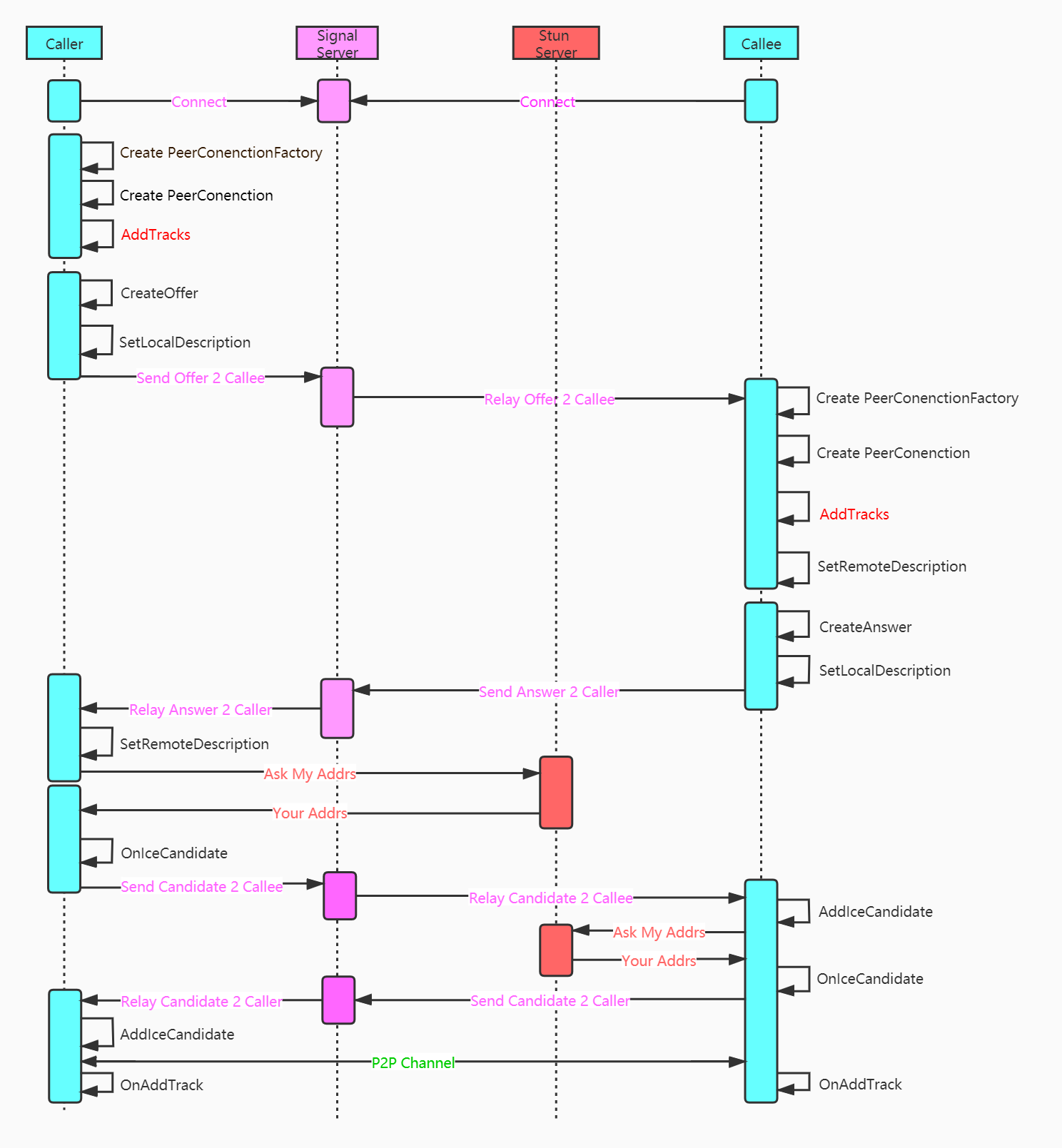
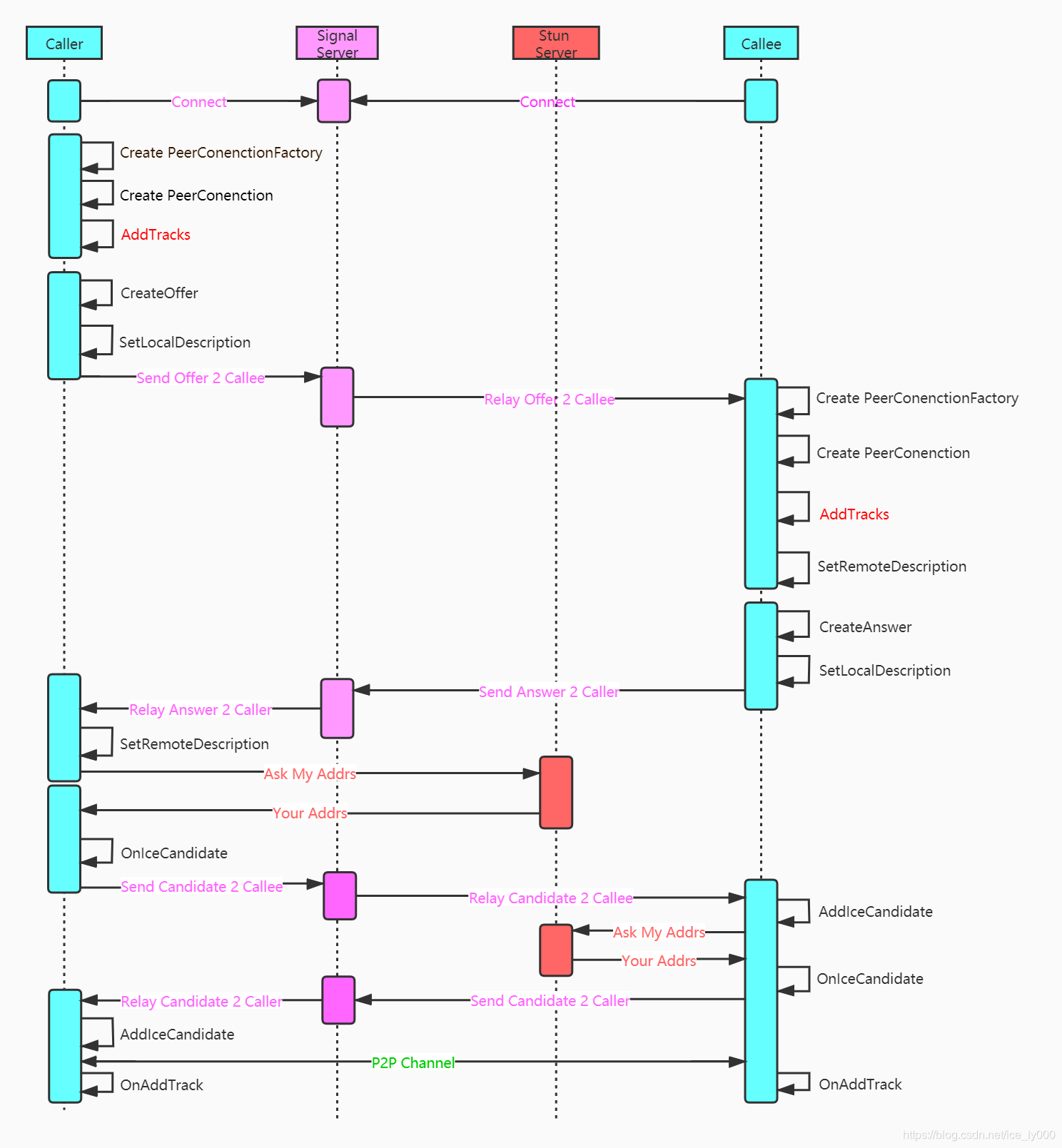
创建完PeerConnectionFactory 和 PeerConnection这两个API层的操盘对象之后,紧接着需要初始化本地的媒体,也即创建本地的音频轨、视频轨、数据通道,并将这些本地的媒体轨道添加到PeerConnection对象中。如图中红色标注所示。
本文将详细描述上述轨道的创建细节 以及 轨道被添加到PeerConnection中的存储情况。
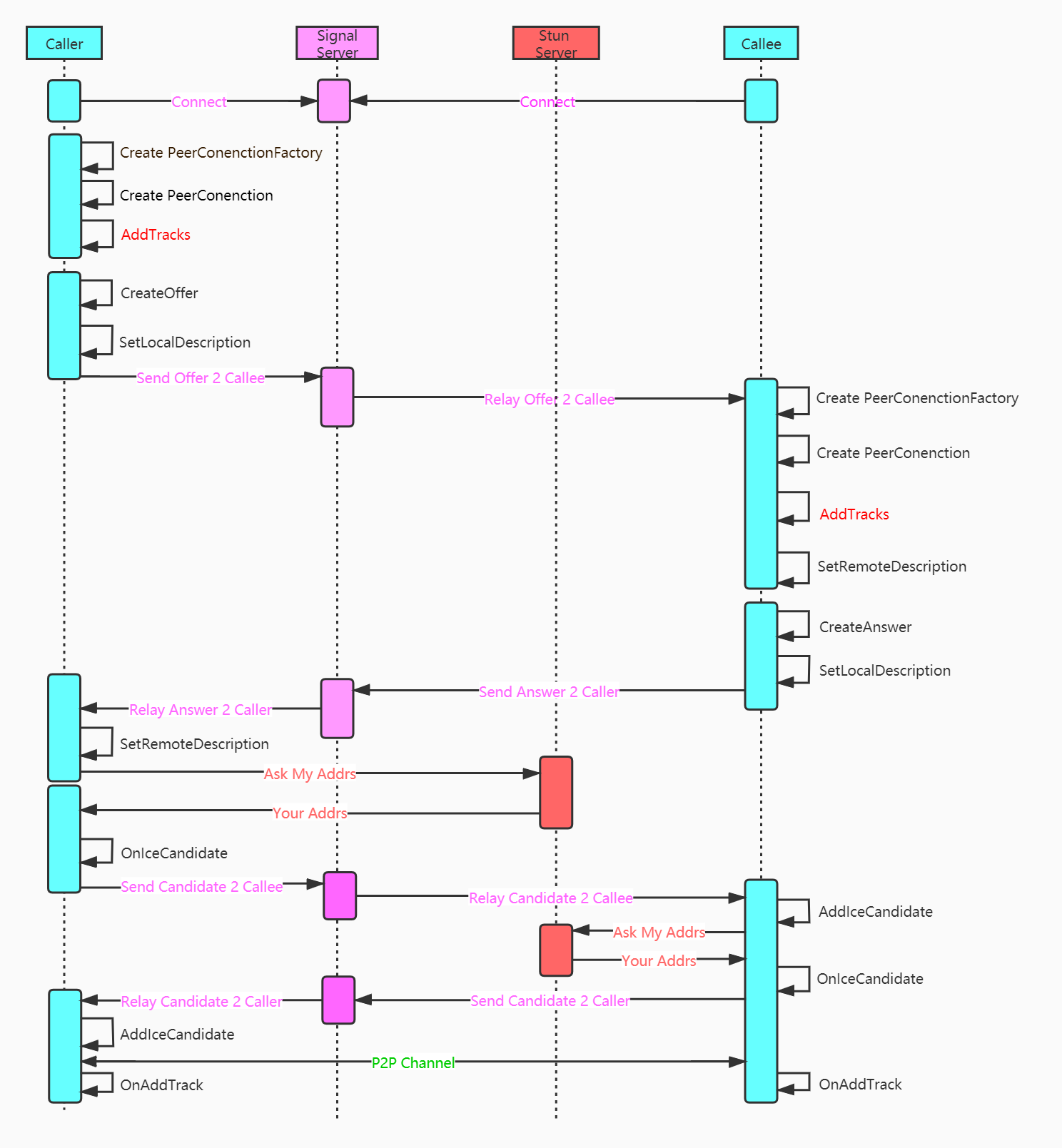
2. 音频轨创建和添加
WebRTC的示例工程中使用如下几行代码实现AudioTrack的创建 && 添加AudioTrack到PeerConnection中。
rtc::scoped_refptr<webrtc::AudioTrackInterface> audio_track(
    peer_connection_factory_->CreateAudioTrack(
        kAudioLabel, peer_connection_factory_->CreateAudioSource(
                          cricket::AudioOptions())));
auto result_or_error = peer_connection_->AddTrack(audio_track, {kStreamId});
- 视频轨对象肯定实现了rtc::RefCountInterface接口,因为最后被智能指针对象audio_track所持有
- PeerConnectionFactory.CreateAudioTrack方法用来创建音频轨,音频轨实现了AudioTrackInterface接口;
- PeerConnectionFactory.CreateAudioSource方法用来创建音频源,并作为创建音频轨的参数,传递给音频轨对象。音频源对象实现了AudioSourceInterface接口
2.1 音频源AudioSource的创建
rtc::scoped_refptr<AudioSourceInterface>
PeerConnectionFactory::CreateAudioSource(const cricket::AudioOptions& options) {
  RTC_DCHECK(signaling_thread_->IsCurrent());
  rtc::scoped_refptr<LocalAudioSource> source(
      LocalAudioSource::Create(&options));
  return source;
}

rtc::scoped_refptr<LocalAudioSource> LocalAudioSource::Create(
    const cricket::AudioOptions* audio_options) {
  rtc::scoped_refptr<LocalAudioSource> source(
      new rtc::RefCountedObject<LocalAudioSource>());
  source->Initialize(audio_options);
  return source;
}

void LocalAudioSource::Initialize(const cricket::AudioOptions* audio_options) {
  if (!audio_options)
    return;
  options_ = *audio_options;
}
上述是本地音频源创建过程,由源码可知,创建的本地音频轨实体对象是LocalAudioSource,并且创建该对象后进行了初始化——>将音频选项对象传递给了LocalAudioSource进行存储。
2.1.1 音频源继承树
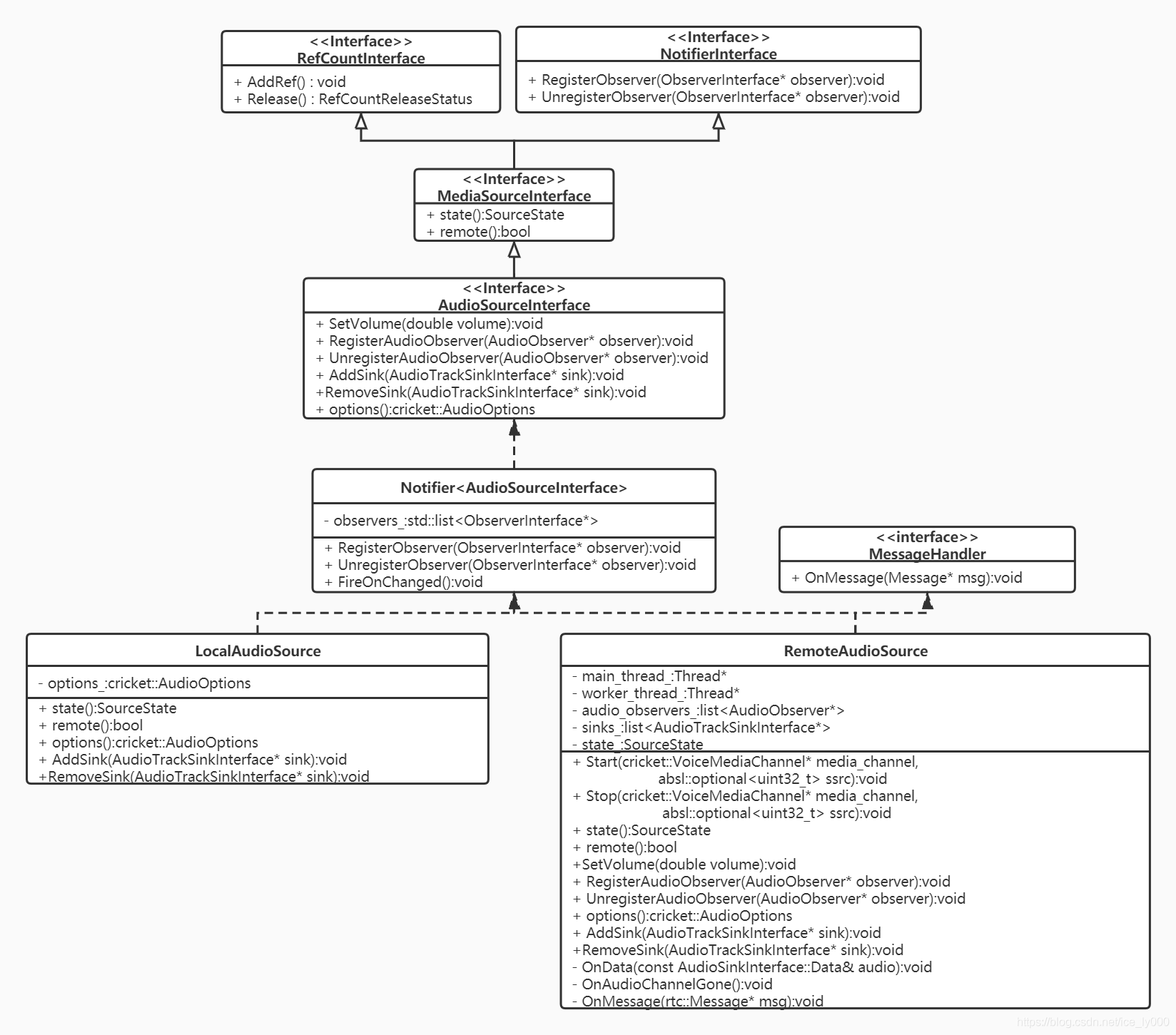
由上面的继承树,从上至下分析,我们可以获知如下几点信息:
- 继承接口RefCountInterface:表明音频源是一个引用计数对象。使用时将配合智能指针scoped_ptr 和 模板RefCountedObject<>一起使用,如同上面源码所示。详细分析见:WebRTC源码分析——引用计数系统
- 继承接口NotifierInterface:表明音频源是一个通知者NotifierInterface对象,通过继承该接口,实现注册关注音频源的观察者ObserverInterface对象。那么,观察者观察什么?音频源作为通知者,向观察者通知什么呢?——>通知音频源的状态改变。
- 继承接口MediaSourceInterface:表明音频源首先是一个媒体源,像视频源也是一个媒体源。提供媒体源两个基本属性:媒体源的状态——SourceState(kInitializing, kLive, kEnded, kMuted);本地源还是远端源?
- 继承接口AudioSourceInterface:音频源基础接口。提供了设置音量,获取音频选项AudioOptions的能力;提供了注册/注销音频观察者的接口,可以获知音量变化;提供了注册/注销音频轨Sink的接口,让音频数据可以从Source流向Sink;
- 实体类Notifier
:提供了NotifierInterface接口的实现,维护需要观察音频源状态改变的观察者列表,并在源状态改变时,挨个通知观察者列表中的观察者 - 最终的实体类有LocalAudioSource 和 RemoteAudioSource两类,分别代表本地音频源、远端的音频源。
PS1:有三套注册/注销接口,分别是:
- RegisterObserver/UnregisterObserver:注册源状态变化的观察者,当源的SourceState发生改变时,将调用观察者的OnChanged()方法,来通知观察者;
- RegisterAudioObserver/UnregisterAudioObserver:注册音量大小变化的的观察者,当音频源音量大小改变时,将通过调用观察者OnSetVolume(double volume)方法,来通知观察者;
- AddSink/RemoveSink:注册音频数据的接收者,当源产生音频数据时,将通过调用
Sink的OnData(const void* audio_data, int bits_per_sample, int sample_rate, size_t number_of_channels, size_t number_of_frames)方法,让音频数据从源流入Sink。
2.1.2 近端音频源LocalAudioSource
WebRTC中,近端原始音视频数据总是要经过 “采集->音视频源->音频轨” 这样一条路径,至少视频数据是严格按照该条路径输出的。我们来看看近端音频的情况——LocalAudioSource
class LocalAudioSource : public Notifier<AudioSourceInterface> {
 public:
  // Creates an instance of LocalAudioSource.
  static rtc::scoped_refptr<LocalAudioSource> Create(
      const cricket::AudioOptions* audio_options);

  SourceState state() const override { return kLive; }
  bool remote() const override { return false; }

  const cricket::AudioOptions options() const override { return options_; }

  void AddSink(AudioTrackSinkInterface* sink) override {}
  void RemoveSink(AudioTrackSinkInterface* sink) override {}

 protected:
  LocalAudioSource() {}
  ~LocalAudioSource() override {}

 private:
  void Initialize(const cricket::AudioOptions* audio_options);

  cricket::AudioOptions options_;
};
源码如上所示,在本地创建轨道时所使用的音频源对象是LocalAudioSource。仔细查看LocalAudioSource类的代码,可以知道该音频源实质上什么也没有做:既没有与音频设备建立联系,从音频设备处获取采集的音频数据,也没有实质的提供注册Sink的方法,更没有向注册的Sink推送数据。由此可知,本地的音频数据的流转跟LocalAudioSource其实没什么关系,这个是我非常纳闷的一点,因为LocalAudioSource看起来像是一个没有完成、或者说是废弃的类,但示例中正常使用了,并且近端音频数据还是正常流转的。那么肯定是走了别的路径。
当前,音频设备模块ADM是被音频引擎VoiceEngine所持有的,因此,音频数据采集开始,最初的位置可能就是VoiceEngine。后续将专门出一篇文章来分析介绍近端音频流转。
2.1.3 远端音频源RemoteAudioSource
与LocalAudioSource不一样,代表远端音频源的RemoteAudioSource类是真实有效的类,提供了继承树上所有接口和功能的实现。
远端音频源从哪儿获取数据?又将数据推向何处? RemoteAudioSource::AudioDataProxy类的对象可以携带RemoteAudioSource对象被注册到VoiceEngine中,从那得到从远端收到的音频数据;RemoteAudioSource又可以向注册到其中的Sink列表进一步扇出音频数据。具体看如下源码:
class RemoteAudioSource::AudioDataProxy : public AudioSinkInterface {
 public:
  explicit AudioDataProxy(RemoteAudioSource* source) : source_(source) {
    RTC_DCHECK(source);
  }
  ~AudioDataProxy() override { source_->OnAudioChannelGone(); }

  // AudioSinkInterface implementation.
  void OnData(const AudioSinkInterface::Data& audio) override {
    source_->OnData(audio);
  }

 private:
  const rtc::scoped_refptr<RemoteAudioSource> source_;

  RTC_DISALLOW_IMPLICIT_CONSTRUCTORS(AudioDataProxy);
};

void RemoteAudioSource::OnData(const AudioSinkInterface::Data& audio) {
  // Called on the externally-owned audio callback thread, via/from webrtc.
  rtc::CritScope lock(&sink_lock_);
  for (auto* sink : sinks_) {
    sink->OnData(audio.data, 16, audio.sample_rate, audio.channels,
                 audio.samples_per_channel);
  }
}
2.2 创建音频轨AudioTrack
rtc::scoped_refptr<AudioTrackInterface> PeerConnectionFactory::CreateAudioTrack(
    const std::string& id,
    AudioSourceInterface* source) {
  RTC_DCHECK(signaling_thread_->IsCurrent());
  rtc::scoped_refptr<AudioTrackInterface> track(AudioTrack::Create(id, source));
  return AudioTrackProxy::Create(signaling_thread_, track);
}

rtc::scoped_refptr<AudioTrack> AudioTrack::Create(
    const std::string& id,
    const rtc::scoped_refptr<AudioSourceInterface>& source) {
  return new rtc::RefCountedObject<AudioTrack>(id, source);
}

AudioTrack::AudioTrack(const std::string& label,
                       const rtc::scoped_refptr<AudioSourceInterface>& source)
    : MediaStreamTrack<AudioTrackInterface>(label), audio_source_(source) {
  if (audio_source_) {
    audio_source_->RegisterObserver(this);
    OnChanged();
  }
}

void AudioTrack::OnChanged() {
  RTC_DCHECK(thread_checker_.IsCurrent());
  if (audio_source_->state() == MediaSourceInterface::kEnded) {
    set_state(kEnded);
  } else {
    set_state(kLive);
  }
}
- PeerConnectionFactory::CreateAudioTrack、AudioTrack::Create、AudioTrack::AudioTrack三步创建了AudioTrack类的实体对象,这是音频轨的实体类对象。
- 向应用层返回的是AudioTrack的代理对象AudioTrackProxy,这是为了WebRTC中防止线程乱入所作的常规操作,正如PeerConnectionFactory 和 PeerConnection那样——WebRTC源码分析-线程安全之Proxy,防止线程乱入
- AudioTrack对象注册为它相关音频源的观察者,从而获取相关音频源的状态通知,在通知中查看音频源的状态,从而同步更新轨道的状态。
2.2.1 音频轨继承树
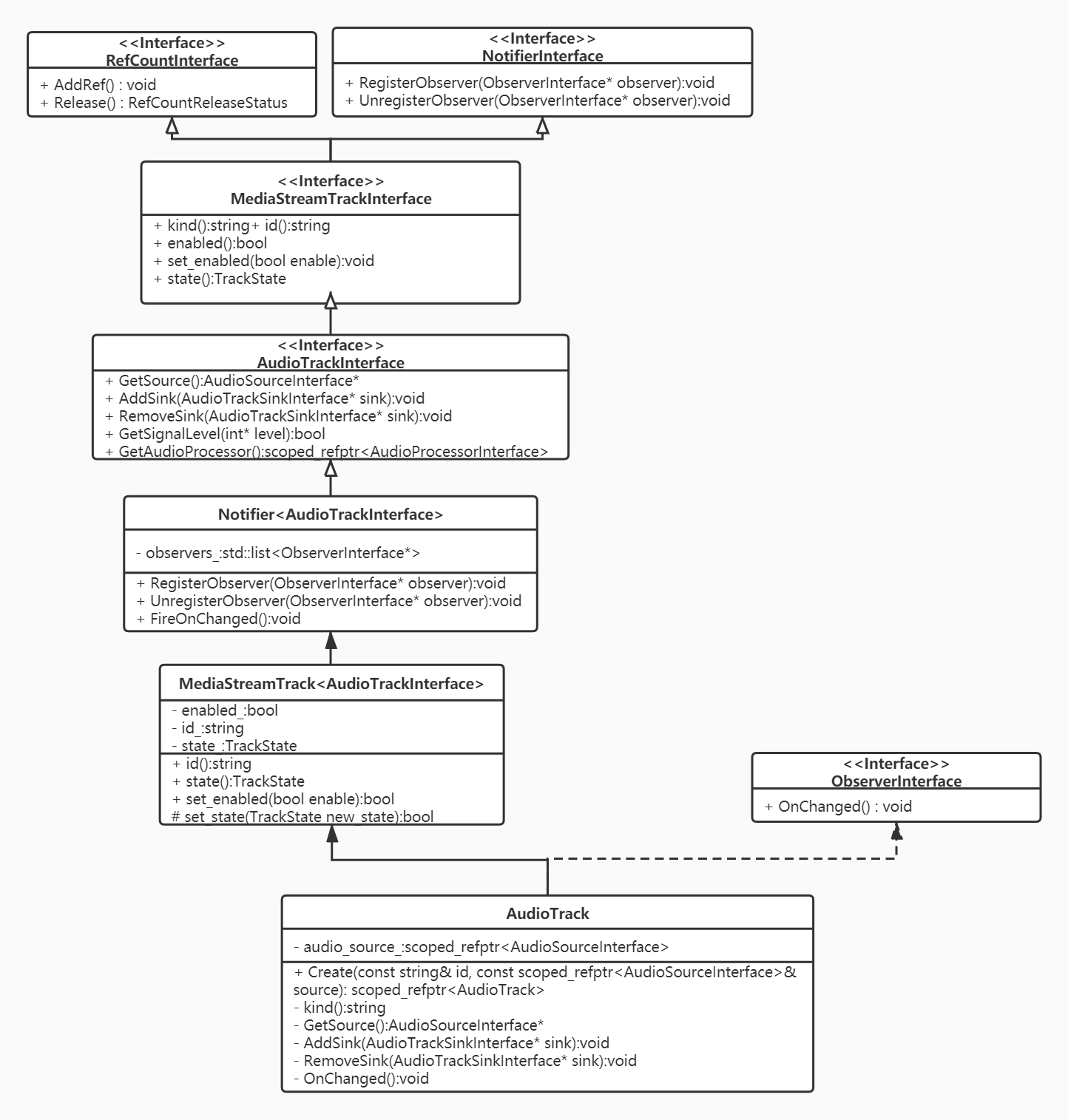
从上面的继承图上,分析出以下要点:
- 继承接口ObserverInterface: 让音频轨成为一个观察者。正如前文所述,在音频轨创建时,音频轨会注册为相关的音频源的观察者。
- 继承接口NotifierInterface: 让音频轨同时又成为一个通知者。当音频轨的状态改变时,将通知关注音频轨状态的观察者,这些观察者通过继承树上的MediaStreamTrack
所提供的注册/注销/通知 接口来实现音频轨道的状态跟踪。 - 继承接口RefCountInterface: 让音频轨成为引用计数对象。
- 继承接口MediaStreamTrackInterface: 音频轨首先必须是媒体轨,视频轨也继承该接口。该接口提供媒体轨道的基本属性接口:媒体类别,使能,轨道状态等。
- 继承接口AudioTrackInterface: 提供注册/注销音频轨Sink的接口,让音频数据能进一步的从音频轨流向外部对象。
- 中间对象MediaStreamTrack
&& MediaStreamTrack :分别提供底层接口的具体实现。 - 实体类AudioTrack:进一步提供底层接口的一些实现,是创建的音频轨实体对象。
2.3 添加音频轨AudioTrack到PeerConnection
PeerConnection::AddTrack方法提供两个入参:媒体轨道Track以及媒体流id向量。暗示了WebRTC中一个概念:一个媒体轨道MediaTrack逻辑上可以归属多个媒体流MediaStream。入参stream_ids向量在SDP中会以msid参数出现,一个msid表示逻辑上的一个媒体流。往后,我们可以看到媒体Track会被添加到一个RtpSender中,stream_ids也会存储在RtpSender中。
在继续往下分析前,需要先略微分析下SDP,对SDP中的msid、mid做一个简单的介绍
a=group:BUNDLE audio video data
a=msid-semantic: WMS h1aZ20mbQB0GSsq0YxLfJmiYWE9CBfGch97C
m=audio 9 UDP/TLS/RTP/SAVPF 111 103 104 9 0 8 106 105 13 126
a=mid:audio
a=ssrc:18509423 msid:h1aZ20mbQB0GSsq0YxLfJmiYWE9CBfGch97C 15598a91-caf9-4fff-a28f-3082310b2b7a
m=video 9 UDP/TLS/RTP/SAVPF 100 101 107 116 117 96 97 99 98
a=mid:video
a=ssrc:3463951252 msid:h1aZ20mbQB0GSsq0YxLfJmiYWE9CBfGch97C ead4b4e9-b650-4ed5-86f8-6f5f5806346d
m=application 9 DTLS/SCTP 5000
a=mid:data
上述是一个被简化的SDP数据,从中简要的总结如下几点知识,可以辅助我们去理解后续的内容(我们总是基于Unified Plan这种SDP格式进行讨论,因为Plan B这种格式大多数情况下已经被弃用):
- mid: 一个mLine(即m=* section)在WebRTC中与一个RtpTranceiver对象对应(track会存储于RtpTranceiver的RtpSender中),RtpTranceiver对象的mid属性与SDP的mLine的属性a=mid:xxx对应。当然RtpTranceiver只能存储音频、视频轨道。应用数据通道得另算。
- a=group:BUNDLE audio video data 是一个全局性的描述,表示mid为audio video data的这三个mLine所表征的媒体数据要绑定传输,也即对应网络传输层的一个连接来收发包。
- msid: a=msid-semantic: WMS h1aZ20mbQB0GSsq0YxLfJmiYWE9CBfGch97C 也是一个全局性的描述,告知了这个会话中存在几个逻辑上的媒体流,WMS表示WebRTC Media Stream。此处只有一个,流id为h1aZ20mbQB0GSsq0YxLfJmiYWE9CBfGch97C。
- mLine的a=msid=xxx的属性表示了该mline所对应地媒体轨道逻辑上所属的流,可以同时属于多个流。示例上,音频轨和视频轨均属于流h1aZ20mbQB0GSsq0YxLfJmiYWE9CBfGch97C。其后跟随的是轨道的id。
PeerConnection::AddTrack源码如下:
RTCErrorOr<rtc::scoped_refptr<RtpSenderInterface>> PeerConnection::AddTrack(
    rtc::scoped_refptr<MediaStreamTrackInterface> track,
    const std::vector<std::string>& stream_ids) {
  // 1 进行一些条件判断
  // 1.1 必须在信令线程
  RTC_DCHECK_RUN_ON(signaling_thread());
  TRACE_EVENT0("webrtc", "PeerConnection::AddTrack");
  // 1.2 轨道不能为空,必须是音频 or 视频轨
  if (!track) {
    LOG_AND_RETURN_ERROR(RTCErrorType::INVALID_PARAMETER, "Track is null.");
  }
  if (!(track->kind() == MediaStreamTrackInterface::kAudioKind ||
        track->kind() == MediaStreamTrackInterface::kVideoKind)) {
    LOG_AND_RETURN_ERROR(RTCErrorType::INVALID_PARAMETER,
                         "Track has invalid kind: " + track->kind());
  }
  // 1.3 PeerConnection的信令状态机不能是closed
  if (IsClosed()) {
    LOG_AND_RETURN_ERROR(RTCErrorType::INVALID_STATE,
                         "PeerConnection is closed.");
  }
  // 2 遍历PeerConnection.RtpTransceiver列表.RtpSender列表,
  //   查看当前的track是否在某个RtpSender中,存在则不能重复添加
  if (FindSenderForTrack(track)) {
    LOG_AND_RETURN_ERROR(
        RTCErrorType::INVALID_PARAMETER,
        "Sender already exists for track " + track->id() + ".");
  }
  // 3 根据SDP采用UnifiedPlan还是Plan B决定如何添加Track到PeerConnection的成员中
  auto sender_or_error =
      (IsUnifiedPlan() ? AddTrackUnifiedPlan(track, stream_ids)
                       : AddTrackPlanB(track, stream_ids));

  if (sender_or_error.ok()) {
      // 4 是否需要进行重新协商
    UpdateNegotiationNeeded();
    // 5 添加轨道到统计数据收集器
    stats_->AddTrack(track);
  }
  return sender_or_error;
}
添加轨道到PeerConnection过程如上源码分为5个步骤:
- 检查状态和入参;
- 遍历PeerConnection的存储轨道的成员,确定当前轨道是否已在PeerConnection中,防止重复添加同一个track;
- 根据SDP采用UnifiedPlan还是Plan B决定如何添加Track到PeerConnection的成员中;
- 判断是否需要进行重新协商;
- 添加轨道到统计数据收集器。
接下来将对2~5这4个步骤都进行详细的梳理。
2.3.1 PeerConnection::FindSenderForTrack
防止重复添加同一个track,从PeerConnection保存track的字段中查找当前的track是否已存在,存在则返回对应的RtpSender,否则返回空指针。
rtc::scoped_refptr<RtpSenderProxyWithInternal<RtpSenderInternal>>
PeerConnection::FindSenderForTrack(MediaStreamTrackInterface* track) const {
  for (const auto& transceiver : transceivers_) {
    for (auto sender : transceiver->internal()->senders()) {
      if (sender->track() == track) {
        return sender;
      }
    }
  }
  return nullptr;
}
PeerConnection对象有个成员std::vector<rtc::scoped_refptr<RtpTransceiverProxyWithInternal<RtpTransceiver>>>transceivers_;
该成员是一个RtpTransceiver向量。每个RtpTransceiver代表sdp中同一个mLine的所包含的a=ssrc的音频轨 or 视频轨 or数据(因为,一个mLine只能表示一种媒体类型)。由于sdp中可能会有多个mLine,因此,PeerConnection中需要包含多个RtpTransceiver,以上述向量成员transceivers_来保存
由于SDP的Plan B格式下,本地要发送的多个相同媒体类型的轨道(a=ssrc不同)可能会属于同一个mLine,因此,RtpTransceiver包含一个RtpSender的向量 ,每个RtpSender会存储其中一个轨道。当SDP采用Unified Plan时,RtpTransceiver的RtpSender向量实质上只会存在一个RtpSender,为了兼容PlanB的格式才会存在多个RtpSender。
RtpTransceiver即可以代表本地轨道数据的发送器,又能代表接收远端轨道数据的接收器。因此,RtpTransceiver还包含一个RtpReceiver的向量。远端的轨道会被存储在RtpTransceiver的某个RtpReceiver中。
上述查找本地Track的过程就遍历了每个RtpTransceiver对象的每个RtpSender中的track的地址,看是否是同一个。 关于RtpTransceiver类的阐述可见——WebRTC源码分析——RtpTransceiver类
2.3.2 PeerConnection::AddTrackUnifiedPlan
添加track到PeerConnection,根据SDP采用Unified Plan还是Plan B。由于Plab B大概率要被遗弃,因此,当前只分析Unified Plan。
RTCErrorOr<rtc::scoped_refptr<RtpSenderInterface>>
PeerConnection::AddTrackUnifiedPlan(
    rtc::scoped_refptr<MediaStreamTrackInterface> track,
    const std::vector<std::string>& stream_ids) {
  // 1 查找是否存在可复用的RtpTransceiver
  auto transceiver = FindFirstTransceiverForAddedTrack(track);

  // 2 存在,添加track到该复用的RtpTransceiver,并修改必要的属性
  if (transceiver) {
    RTC_LOG(LS_INFO) << "Reusing an existing "
                     << cricket::MediaTypeToString(transceiver->media_type())
                     << " transceiver for AddTrack.";
    // 2.1 设置RtpTransceiver的方向,注意不能将接收方向覆盖掉,即如果接收方向是存在的,
    //     则必须保留,因此有如下的判断。
    if (transceiver->direction() == RtpTransceiverDirection::kRecvOnly) {
      transceiver->internal()->set_direction(
          RtpTransceiverDirection::kSendRecv);
    } else if (transceiver->direction() == RtpTransceiverDirection::kInactive) {
      transceiver->internal()->set_direction(
          RtpTransceiverDirection::kSendOnly);
    }
    // 2.2 添加track到对应的sender
    transceiver->sender()->SetTrack(track);
    // 2.3 设置RtpSender的流id
    transceiver->internal()->sender_internal()->set_stream_ids(stream_ids);
    // 2.4 设置重用标识
    transceiver->internal()->set_reused_for_addtrack(true);

  // 3 不存在,创建新的RtpTransceiver,添加track到新的RtpTransceiver
  } else {
      // 3.1 得到与轨道一致的媒体类型
    cricket::MediaType media_type =
        (track->kind() == MediaStreamTrackInterface::kAudioKind
             ? cricket::MEDIA_TYPE_AUDIO
             : cricket::MEDIA_TYPE_VIDEO);
    RTC_LOG(LS_INFO) << "Adding " << cricket::MediaTypeToString(media_type)
                     << " transceiver in response to a call to AddTrack.";
    // 3.2 得到或新建RtpSender的id,可以与track的id相同,但是不能与其他
    //     RtpSender的id重复,否则创建一个新的UUID作为RtpSender的唯一标识。
    std::string sender_id = track->id();
    // Avoid creating a sender with an existing ID by generating a random ID.
    // This can happen if this is the second time AddTrack has created a sender
    // for this track.
    if (FindSenderById(sender_id)) {
      sender_id = rtc::CreateRandomUuid();
    }
    // 3.3 创建新的RtpSender,传入track
    auto sender = CreateSender(media_type, sender_id, track, stream_ids, {});
    // 3.4 创建新的RtpReceiver,无track
    auto receiver = CreateReceiver(media_type, rtc::CreateRandomUuid());
    // 3.5 根据新的RtpSender,RtpReceiver创建新的RtpTransceiver
    transceiver = CreateAndAddTransceiver(sender, receiver);
    // 3.6 设置RtpTransceiver创建标识
    transceiver->internal()->set_created_by_addtrack(true);
    // 3.7 新创建的RtpTransceiver的方向设置为既接收又发送
    transceiver->internal()->set_direction(RtpTransceiverDirection::kSendRecv);
  }
  return transceiver->sender();
}
大致过程就是判断是否存在可复用的RtpTransceiver,存在则添加track到可复用的RtpTransceiver,否则新建一个RtpTransceiver,添加进去。同时注意,需要修改RtpTransceiver的一些属性。
如何判断该RtpTransceiver是可复用的?判断依据是什么?
rtc::scoped_refptr<RtpTransceiverProxyWithInternal<RtpTransceiver>>
PeerConnection::FindFirstTransceiverForAddedTrack(
    rtc::scoped_refptr<MediaStreamTrackInterface> track) {
  RTC_DCHECK(track);
  for (auto transceiver : transceivers_) {
    if (!transceiver->sender()->track() &&
        cricket::MediaTypeToString(transceiver->media_type()) ==
            track->kind() &&
        !transceiver->internal()->has_ever_been_used_to_send() &&
        !transceiver->stopped()) {
      return transceiver;
    }
  }
  return nullptr;
}
如上源码所示,给本地track可复用的RtpTransceiver必须满足以下几个条件
- 由于是Unified Plan,那么通过RtpTransceiver的sender()来获取RtpSender,sender()方法将断言当前是否是Unified Plan,是否RtpTransceiver的RtpSender向量size为1,取该唯一的RtpSender,并判断存储的track是否为空,不为空,表示sender已经有track存在,不可复用。
- 判断track的媒体类型是否跟该RtpTransceiver的媒体类型一致(音频、视频、数据三类),RtpTransceiver只可存储媒体类型一致的轨道,不相同则不可复用。
- 判断RtpTransceiver之前的方向是不是被设置为包含发送(即kSendRecv or kSendOnly),若设置过,则不可复用。
- 判断RtpTransceiver是否调用过Stop,如果RtpTransceiver已经停止过,则不复用。
2.3.3 PeerConnection::UpdateNegotiationNeeded
UpdateNegotiationNeeded()方法在往PC中添加/移除轨道、添加/移除流、添加/移除RtpTransceiver、应用local/remote sdp、状态需要进行回滚到KStable时都会被调用,经过各种条件检测后,更新PC的内部成员is_negotiation_needed_。更新后若is_negotiation_needed_为真,那么表示需要重新协商。
void PeerConnection::UpdateNegotiationNeeded() {
  RTC_DCHECK_RUN_ON(signaling_thread());
  // 1 如果是Plan B则需要协商,直接通知外部的观察者需要重新协商,不需要关注本方法的功能:
  //   检查有无重新协商的必要,更新字段is_negotiation_needed_。 后续分析将忽略Plan B
  //   时如何处理,因为Plan B将被遗弃。
  if (!IsUnifiedPlan()) {
    Observer()->OnRenegotiationNeeded();
    return;
  }

  // 2 对PC的信令状态机的状态进行判断。
  // 2.1 PC的信令状态为kClosed,表示会话已经被关闭了,无协商的必要了
  if (IsClosed())
    return;
  // 2.2 PC的信令状态没有处于kStable(初始化状态),也不需判断是否需要进行协商
  if (signaling_state() != kStable)
    return;

  // 3. 使用CheckIfNegotiationIsNeeded()判断是否需要重新协商
  // NOTE
  // The negotiation-needed flag will be updated once the state transitions to
  // "stable", as part of the steps for setting an RTCSessionDescription.
  bool is_negotiation_needed = CheckIfNegotiationIsNeeded();

  // 4. 根据之前是否需要协商的状态,以及当前是否需要协商的结论,进行不同的响应
  //    只有当false——>true的状态时,直接通知观察者进行重新协商。
  // 4.1 如果当前结论不需要协商,则is_negotiation_needed_更新为false,返回
  if (!is_negotiation_needed) {
    is_negotiation_needed_ = false;
    return;
  }
  // 4.2 如果当前需要协商,之前也是需要协商的状态,那就不必进行状态更新了
  if (is_negotiation_needed_)
    return;
  // 4.3 如果当前需要协商,之前时不需要协商的状态,那么更新为需要进行协商,同时通知观察者
  //     进行协商——即,调用观察者的OnRenegotiationNeeded()方法。
  is_negotiation_needed_ = true;
  Observer()->OnRenegotiationNeeded();
}
根据源码分析可以得出以下结论:
- 只有PC的信令状态处于稳定状态KStable时,我们认为有重新协商的必要;
- CheckIfNegotiationIsNeeded()方法进行当前是否需要重新协商的检查;
- 如果是否需要协商的状态由false——>true,那么直接通知观察者进行协商。
上述源码以及论述中,提到了PC信令状态,以及方法 CheckIfNegotiationIsNeeded(),接下来进行一定程度的讨论。
2 .3.3.1 PC的信令状态——SignalingState
PC根据JESP会话进行程度,维护了一个信令状态机,状态迁移图如下所示:
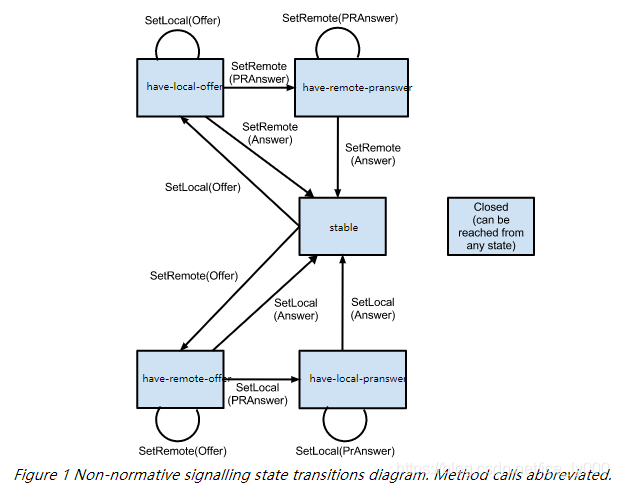
各个状态代表的含义如下表格所示:
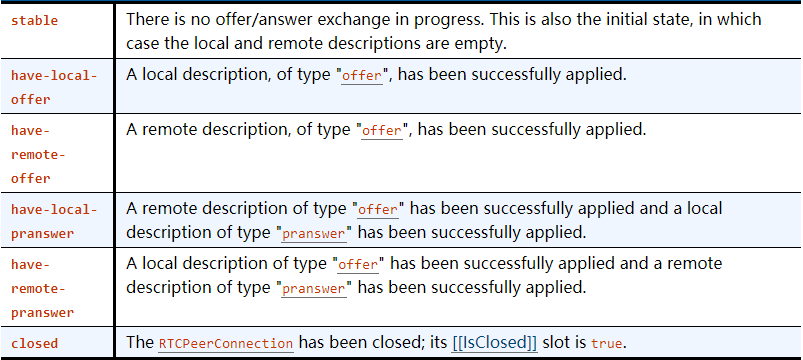
从呼叫和被呼端的视角分别去跟踪这个状态机会更好理解:
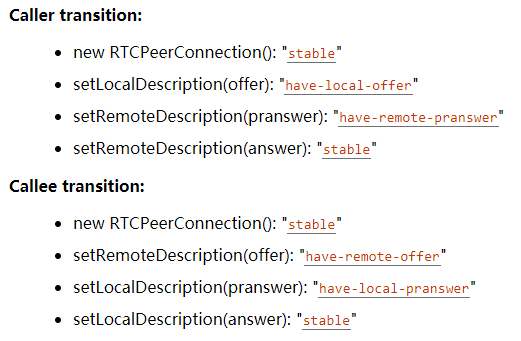
PS: 参阅 https://w3c.github.io/webrtc-pc/#dom-rtcsignalingstate
2.3.3.2 是否需要协商?——CheckIfNegotiationIsNeeded()
是否需要重新协商?依据是什么?问这个问题之前,我们需要搞清楚另外一个问题,即协商的内容是什么?我们知道WebRTC中协商的内容是多样的媒体信息,传输信息,具体可见文章:WebRTC56版本SDP详细解析
协商的手段是收集sdp数据进行互换来达成的,而webrtc中收集sdp数据时,pc用本地会话对象和远端会话对象来存储sdp数据,这些数据的来源就是我们的PC中的ice相关信息,rtptranceiver对象等等,当应用层添加删除轨道等操作时,相应的数据来源会发生变化,但是这个变化并不会同步到存储sdp的近端/远端会话对象中,如此带来了信息的差异。此时,我们就需要重新进行协商,让会话对象存储的信息与数据源保持一致。
bool PeerConnection::CheckIfNegotiationIsNeeded() {
  RTC_DCHECK_RUN_ON(signaling_thread());
  // 1. If any implementation-specific negotiation is required, as described at
  // the start of this section, return true.

  // 2. If connection's [[RestartIce]] internal slot is true, return true.
  //    如果有ICE的凭证了,则是需要协商的
  if (local_ice_credentials_to_replace_->HasIceCredentials()) {
    return true;
  }

  // 3. Let description be connection.[[CurrentLocalDescription]].
  //    如果还没有本地的SDP,则是需要协商的
  const SessionDescriptionInterface* description = current_local_description();
  if (!description)
    return true;

  // 4. If connection has created any RTCDataChannels, and no m= section in
  // description has been negotiated yet for data, return true.
  //    如果创建了DataChannel,但是sdp中没有对应的mLine,则需要协商。
  if (data_channel_controller_.HasSctpDataChannels()) {
    if (!cricket::GetFirstDataContent(description->description()->contents()))
      return true;
  }

  // 5. For each transceiver in connection's set of transceivers, perform the
  // following checks:
  //    对PC中的每个Rtptranceiver进行如下判断:
  for (const auto& transceiver : transceivers_) {
    // 获取Rtptranceiver在local sdp中的mline内容描述结构体ContentInfo
    const ContentInfo* current_local_msection =
        FindTransceiverMSection(transceiver.get(), description);
    // 获取Rtptranceiver在remote sdp中的mline内容描述结构体ContentInfo
    const ContentInfo* current_remote_msection = FindTransceiverMSection(
        transceiver.get(), current_remote_description());

    // 5.3 If transceiver is stopped and is associated with an m= section,
    // but the associated m= section is not yet rejected in
    // connection.[[CurrentLocalDescription]] or
    // connection.[[CurrentRemoteDescription]], return true.
    //     如果Rtptranceiver已经是停止状态,但是在local sdp或者是remote sdp中
    //     不处于rejected状态,也即是有效的,这状况显然是不对的,因此需要进行协商。
    if (transceiver->stopped()) {
      if (current_local_msection && !current_local_msection->rejected &&
          ((current_remote_msection && !current_remote_msection->rejected) ||
           !current_remote_msection)) {
        return true;
      }
      continue;
    }

    // 5.1 If transceiver isn't stopped and isn't yet associated with an m=
    // section in description, return true.
    //     如果Rtptranceiver没有停止,并且在本地SDP中没有相应的mline,那么肯定需要
    //     进行协商
    if (!current_local_msection)
      return true;

    const MediaContentDescription* current_local_media_description =
        current_local_msection->media_description();
    // 5.2 If transceiver isn't stopped and is associated with an m= section
    // in description then perform the following checks:
    // 如果Rtptranceiver没有停止,并且也与本地sdp的mline进行了关联,那么获取对应的
    // MediaContentDescription进行更细节性的排查

    // 5.2.1 If transceiver.[[Direction]] is "sendrecv" or "sendonly", and the
    // associated m= section in description either doesn't contain a single
    // "a=msid" line, or the number of MSIDs from the "a=msid" lines in this
    // m= section, or the MSID values themselves, differ from what is in
    // transceiver.sender.[[AssociatedMediaStreamIds]], return true.
    // 如果Rtptranceiver包含有效的RtpSender(即Rtptranceiver的方向包含send方向)
    // 但是SDP中与其关联的mline没有包含单独的a=msid行,或者mline的a=msid行的msid值与
    // Rtptranceiver的RtpSender的关联的媒体流id值不一致。需要进行协商
    if (RtpTransceiverDirectionHasSend(transceiver->direction())) {
      //如果mline所属流ID数量为0,即不归属于某个流,则需要进行协商
      if (current_local_media_description->streams().size() == 0)
        return true;
      //遍历并提取所有关联的流ID到临时向量保存
      std::vector<std::string> msection_msids;
      for (const auto& stream : current_local_media_description->streams()) {
        for (const std::string& msid : stream.stream_ids())
          msection_msids.push_back(msid);
      }
      //若sender所属的流,ID数量和ID值与sdp中抽取的不一致,则需要进行协商。
      std::vector<std::string> transceiver_msids =
          transceiver->sender()->stream_ids();
      if (msection_msids.size() != transceiver_msids.size())
        return true;

      absl::c_sort(transceiver_msids);
      absl::c_sort(msection_msids);
      if (transceiver_msids != msection_msids)
        return true;
    }

    // 5.2.2 If description is of type "offer", and the direction of the
    // associated m= section in neither connection.[[CurrentLocalDescription]]
    // nor connection.[[CurrentRemoteDescription]] matches
    // transceiver.[[Direction]], return true.
    //
    // 本地sdp为offer sdp(即当前pc为呼叫发起方),Rtptranceiver的mid必须
    // 在本地sdp中有对应的mline,在远端sdp中也应该有对应的mline。并且Rtptranceiver的
    // 方向必须与本地sdp mline中的方向一致,与远端sdp mline中的方向相反。
    if (description->GetType() == SdpType::kOffer) {
      if (!current_remote_description())
        return true;

      if (!current_remote_msection)
        return true;

      RtpTransceiverDirection current_local_direction =
          current_local_media_description->direction();
      RtpTransceiverDirection current_remote_direction =
          current_remote_msection->media_description()->direction();
      if (transceiver->direction() != current_local_direction &&
          transceiver->direction() !=
              RtpTransceiverDirectionReversed(current_remote_direction)) {
        return true;
      }
    }

    // 5.2.3 If description is of type "answer", and the direction of the
    // associated m= section in the description does not match
    // transceiver.[[Direction]] intersected with the offered direction (as
    // described in [JSEP] (section 5.3.1.)), return true.
    //
    // 本地sdp为answer sdp(即当前pc为被呼方),那么远端sdp为offer sdp
    // 此时,近端sdp的mline的方向如果与 “Rtptranceiver方向&&远端mline方向的交集”
    // 不一致,则需要进行协商(此处较难理解,应反复斟酌)
    if (description->GetType() == SdpType::kAnswer) {
      // 远端sdp不存在,则需要进行协商
      if (!remote_description())
        return true;
      // 获取远端sdp,也即offer sdp中对应的mline描述
      const ContentInfo* offered_remote_msection =
          FindTransceiverMSection(transceiver.get(), remote_description());
      // 如果远端offser sdp中mline描述存在,则获取mline中描述的方向,否则认为offer sdp
      // 中该mline是无效的。
      RtpTransceiverDirection offered_direction =
          offered_remote_msection
              ? offered_remote_msection->media_description()->direction()
              : RtpTransceiverDirection::kInactive;

     // 近端sdp的mline的方向如果与 “Rtptranceiver方向&&远端mline方向的交集”
    // 不一致,则需要进行协商
      if (current_local_media_description->direction() !=
           // 求二者方向的交集
          (RtpTransceiverDirectionIntersection(
              transceiver->direction(),
              // 先对远端offer sdp的mline方向取反
              RtpTransceiverDirectionReversed(offered_direction)))) {
        return true;
      }
    }
  }
}
2.3.4 StatsCollector::AddTrack
void StatsCollector::AddTrack(MediaStreamTrackInterface* track) {
  if (track->kind() == MediaStreamTrackInterface::kAudioKind) {
    CreateTrackReport(static_cast<AudioTrackInterface*>(track), &reports_,
                      &track_ids_);
  } else if (track->kind() == MediaStreamTrackInterface::kVideoKind) {
    CreateTrackReport(static_cast<VideoTrackInterface*>(track), &reports_,
                      &track_ids_);
  } else {
    RTC_NOTREACHED() << "Illegal track kind";
  }
}
将该轨道纳入统计数据收集器,如此,可以出具关于该track的统计数据报表。详细分析可见后续WebRTC关于数据统计的分析,此处不赘述。
3. 总结
经过上述长篇论述,我们大致对WebRTC中的音频源,音频轨的继承结构,创建过程有了大致的了解;并且对PC如何添加、存储音频轨有了比较深刻的理解;同时,当音频轨被添加到PC中后,我们需要判断PC中近远端SDP会话对象 与 RtpTranceiver中保存的信息是否一致,从而决定了是否需要进行重新协商。有一些观点需要再次强调,也有一些疑惑需要列举出来,以备往后源码分析中一一解惑。
- WebRTC的有个重要的观念:媒体数据总是由“源”流向“轨道”,然后再从“轨道”流出。疑惑的点在于,近端的源LocalAudioSource根本没有提供这样的能力,那么近端的音频数据流转是如何实现的仍然是个谜团。
- WebRTC中使用SDP进行数据交换,有两种格式的SDP:Unified Plan 和 Plan B。目前,已经大多转向使用Unified Plan,因此,往后的源码分析都只分析Unified Plan。
- Unified Plan格式下,RtpTranceiver具有一个RtpSender和一个RtpReceiver,分别用来存储本地发送Track和接收对端数据的Track,RtpTranceiver以mLine的形式出现的本地SDP中,也会出现在远端SDP中,RtpTranceiver反应在近远端的mLine具有相同的mid,但RtpTranceiver方向在近远端SDP中必须有相反方向的属性,比如近端SDP中是SendOnly,则远端SDP中肯定是RecvOnly。
- 文中也详细的论述了为什么添加轨道到PC将触发重新协商,详细分析了需要进行重新协商的条件是如何判断的——SDP对象与构建SDP对象所需要的信息源,二者之间信息不对等,不匹配时就需要重新协商,让SDP对象中存储的数据与信息源相一致。
原文出处:WebRTC源码分析-呼叫建立过程之四(中)(创建并添加本地视频轨到PeerConnection)
目录
- 引言
- 视频轨道的创建和添加
- 2.1 视频源的创建
- 2.1.1 创建视频采集
- 2.1.1.1 视频采集UML
- 2.1.1.2 采集模块的内部数据流
- 2.1.2 创建视频源
- 2.1.3 创建视频轨源
- 2.2 视频轨的创建
- 2.2.1 PeerConnection::CreateVideoTrack
- 2.2.2 视频轨的继承树
- 2.3 视频数据的流动
- 2.4 添加视频轨到PeerConnection
- 3 总结
1. 引言
创建完PeerConnectionFactory 和 PeerConnection这两个API层的操盘对象之后,紧接着需要初始化本地的媒体,也即创建本地的音频轨、视频轨、数据通道,并将这些本地的媒体轨道添加到PeerConnection对象中。如图中红色标注所示。
本文将详细描述上述视频轨道的创建细节 以及 轨道被添加到PeerConnection中的存储情况。
2. 视频轨道的创建和添加
rtc::scoped_refptr<CapturerTrackSource> video_device =
    CapturerTrackSource::Create();
if (video_device) {
  rtc::scoped_refptr<webrtc::VideoTrackInterface> video_track_(
      peer_connection_factory_->CreateVideoTrack(kVideoLabel, video_device));
  main_wnd_->StartLocalRenderer(video_track_);

  result_or_error = peer_connection_->AddTrack(video_track_, {kStreamId});
  if (!result_or_error.ok()) {
    RTC_LOG(LS_ERROR) << "Failed to add video track to PeerConnection: "
                      << result_or_error.error().message();
  }
} else {
  RTC_LOG(LS_ERROR) << "OpenVideoCaptureDevice failed";
}
- 创建视频轨道源——CapturerTrackSource是示例工程中实现了VideoTrackSourceInterface接口的应用层类,非WebRTC内部提供的对象。该类不是直接实现VideoSourceInterface接口,而是VideoTrackSourceInterface接口。
- 创建视频轨——PeerConnectionFactory::CreateVideoTrack。
- 添加视频轨到PeerConnection——PeerConnection::AddTrack。
2.1 视频源的创建
rtc::scoped_refptr<CapturerTrackSource> video_device =
      CapturerTrackSource::Create();

static rtc::scoped_refptr<CapturerTrackSource> Create() {
  // 1. 预设视频参数
  const size_t kWidth = 640;
  const size_t kHeight = 480;
  const size_t kFps = 30;
  std::unique_ptr<webrtc::test::VcmCapturer> capturer;
  // 2. 获取视频设备信息对象info,并获取机器上视频设备个数
  std::unique_ptr<webrtc::VideoCaptureModule::DeviceInfo> info(
      webrtc::VideoCaptureFactory::CreateDeviceInfo());
  if (!info) {
    return nullptr;
  }
  int num_devices = info->NumberOfDevices();
  // 3. 枚举音频设备,查找支持预设视频参数的设备,创建对应的视频源,然后创建对应的轨道源
  for (int i = 0; i < num_devices; ++i) {
    // 3.1 创建满足预设视频参数的视频源对象VcmCapturer
    capturer = absl::WrapUnique(
        webrtc::test::VcmCapturer::Create(kWidth, kHeight, kFps, i));
    // 3.2 创建视频轨源对象CapturerTrackSource
    if (capturer) {
      return new rtc::RefCountedObject<CapturerTrackSource>(
          std::move(capturer));
    }
  }

  return nullptr;
}
从上创建视频源的代码可以知道如下几点:
- 通过设备信息类VideoCaptureModule::DeviceInfo获取音视频设备个数
- 需要根据预设的视频参数宽高,帧率去创建视频源对象VcmCapturer,一旦音频源对象VcmCapturer创建成功,则认为找到了底层适用于该预设视频参数的音频采集VideoCapture设备。
- 以创建的视频源对象VcmCapturer为入参,构建视频轨源对象CapturerTrackSource。VcmCapturer成为CapturerTrackSource的私有成员。
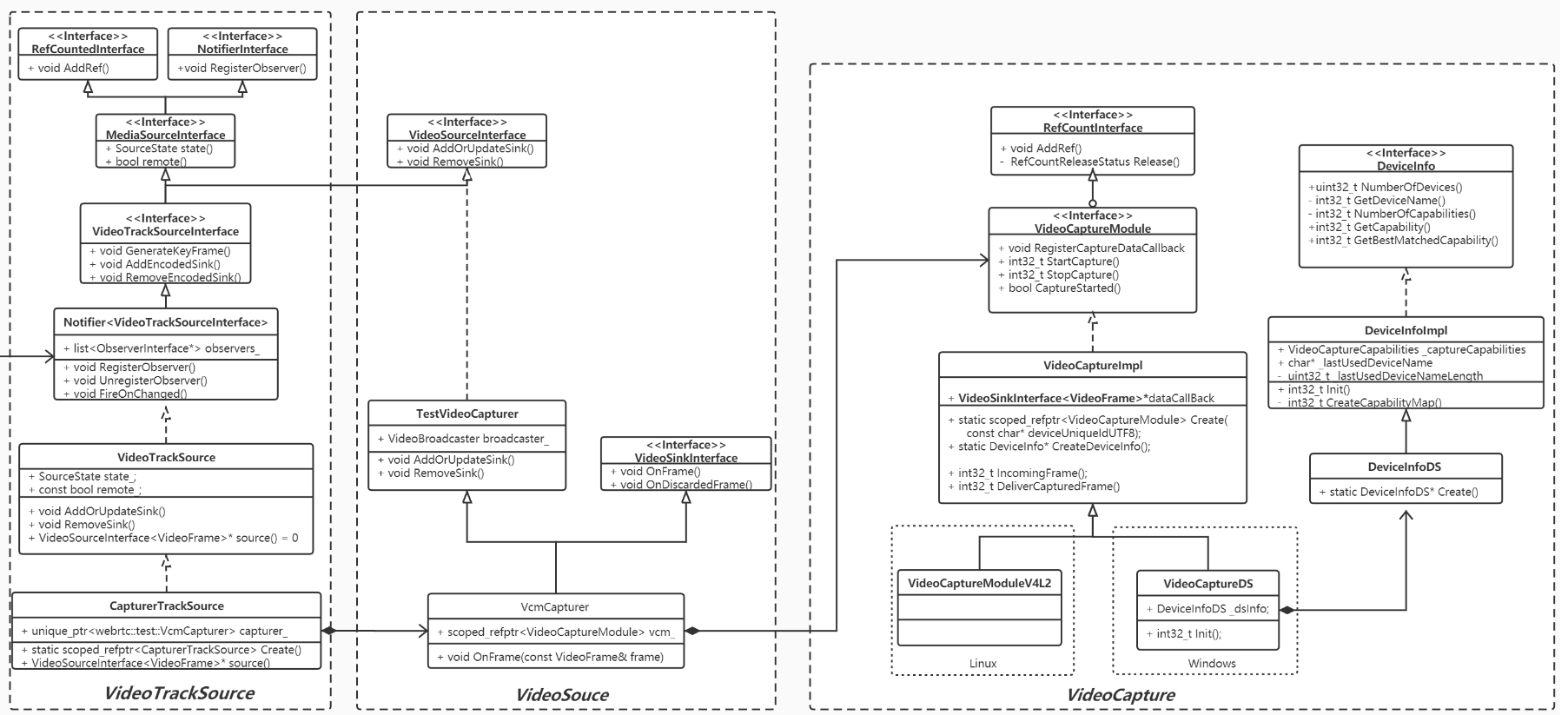
CapturerTrackSource、VcmCapturer、VideoCapture对象的继承树,以及这三者的关系如下UML类图所示:
2.1.1 创建视频采集
视频采集模块是数据流水线的起始点,负责从视频源采集原始视频帧,推送给流水线的下一站:可以是本地渲染模块进行本地回显,也可以是编码模块进行数据编码压缩。
视频源可以是摄像头,也可以是桌面、窗口抓屏(远程桌面,基于视频流的电子白板等应用),甚至可以是磁盘上的视频文件,图片文件。WebRTC中提供了基于摄像头的视频采集框架,是本文要讨论的重点。当然WebRTC也提供了桌面,窗口抓屏框架,这套框架对外所提供的接口与基于摄像头的采集接口有所不同。整个视频流水线建立是以摄像头采集接口为基础的,从而导致这么个问题:当需要将抓屏数据当做视频源往外推送时,需要使用适配器模式来实现一套基于摄像头的视频采集接口。
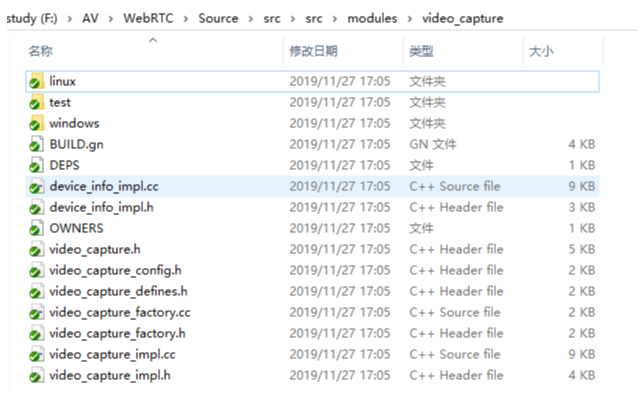
视频采集模块是平台相关的模块,MacOS/IOS一般使用AVFoundation框架或者QuikTime框架,Linux平台一般使用V4L2库,Android上一般使用Camera1或者Camera2框架,Windows平台则使用DS(DirectShow)或者是MF(MediaFoundation)。由于WebRTC是个非常活跃的工程,代码架构一直在不停的变动之中,比如2019年4月份的代码还有VideoCaptureMF的代码,并且还注释着Vista及以上的版本建议使用MediaFoundation采集框架,而2019年11月份的代码MediaFoundation相关的代码已经被移除。再比如MacOs/IOS,Android的相关代码已经被移动到sdk/objc和sdk/android目录下。本文以modules/video_capture下的代码来做阐述,平台无关的代码在该直接目录下,平台相关的实现在modules/video_capture/windows,modules/video_capture/linux目录下,如图所示:
2.1.1.1 视频采集UML
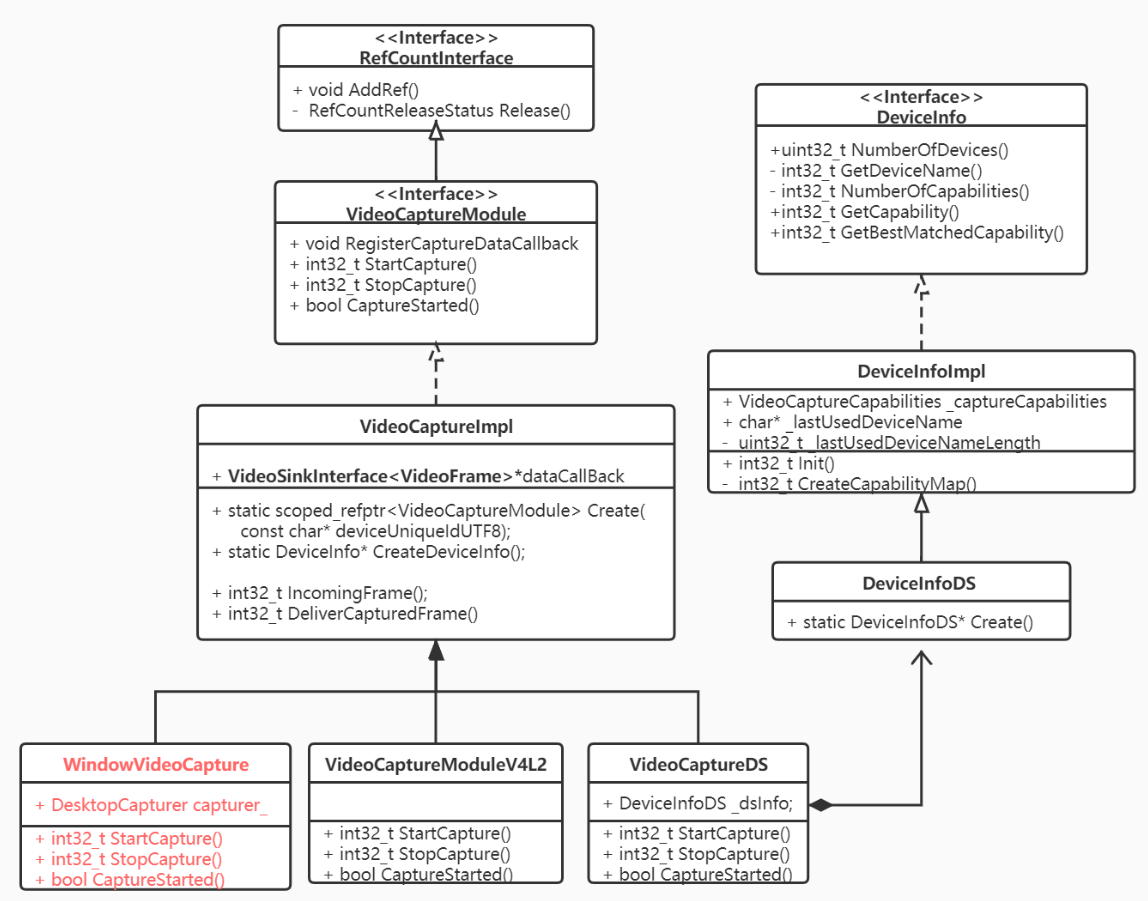
DeviceInfo接口提供了设备枚举相关功能,其平台相关子类实例以组合的形式提供给VideoCapture。
- 枚举设备个数,获取某个设备名称。
- 枚举某个设备所支持的所有能力(VideoCaptureCapability: 分辨率,最大帧率,颜色空间,是否逐行扫描)
- 获取某个设备的所有能力中与外部设置的能力最匹配的那个能力。
VideoCaptureModule视频采集模块的虚基类,它定义一系列视频采集的通用接口函数:
- Start/StopCapture用来开始/结束视频采集(平台相关);
- CaptureStarted用来判断当前capture运行状态(平台相关);
- Register/DeCaptureDataCallback用来注册/注销数据回调模块(平台无关);
- Set/GetApplyRotation用来设置视频旋转角度(平台无关)。
VideoCaptureImpl类是VideoCaptureModule的实现子类。做了3个事:
- 声明静态Ctreate方法,用于创建平台相关的VideoCaptureImpl子类,在Windows平台上为VideoCaptureDS,在Linux平台上实现的子类是VideoCaptureV4L2。该方法一处声明,多处实现,在相应平台编译时,只会加载对应平台的实现代码;
- 平台相关的接口,留待平台相关的子类中实现,主要是开始/结束视频采集;
- 实现平台无关的接口:注册视频数据回调,应用视频旋转相关函数。其中注册数据回调将一个实现了VideoSinkInterface
接口的对象赋予 VideoCaptureImpl::_dataCallBack成员。当采集模块得到一帧视频数据,就可以通过该对象的OnFrame()方法推送出来。
2.1.1.2 采集模块的内部数据流
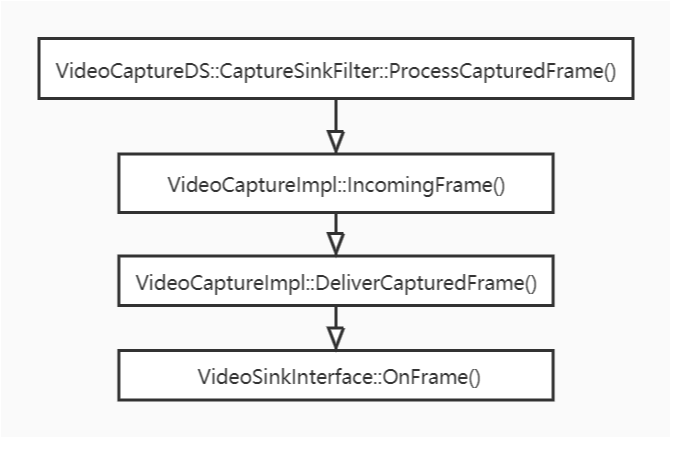
- 以VideoCaptureDS为例,平台相关的采集模块采集到一帧视频后,平台相关的函数ProcessCapturedFrame()方法进行处理。ProcessCapturedFrame()将视频帧直接传递给VideoCaptureImpl::IncomingFrame()方法
- VideoCaptureImpl::IncomingFrame()方法将对视频帧按需求进行旋转,并利用libyuv库转换成I420类型,再给视频帧加上NTP时间戳。经过上述处理后,IncomingFrame()将视频帧进一步传递给VideoCaptureImpl::DeliverCapturedFrame()
- VideoCaptureImpl::DeliverCapturedFrame()将调用VideoSinkInterface::OnFrame(),将视频帧传递给回调对象
_dataCallBack,即数据的下一站,从而将视频帧推送出采集模块。
2.1.2 创建视频源
VcmCapturer是创建的视频源对象,虽然从名字上来看像是视频采集类,但实质上它实现了VideoSourceInterface接口。我们认为其是一个视频 源。
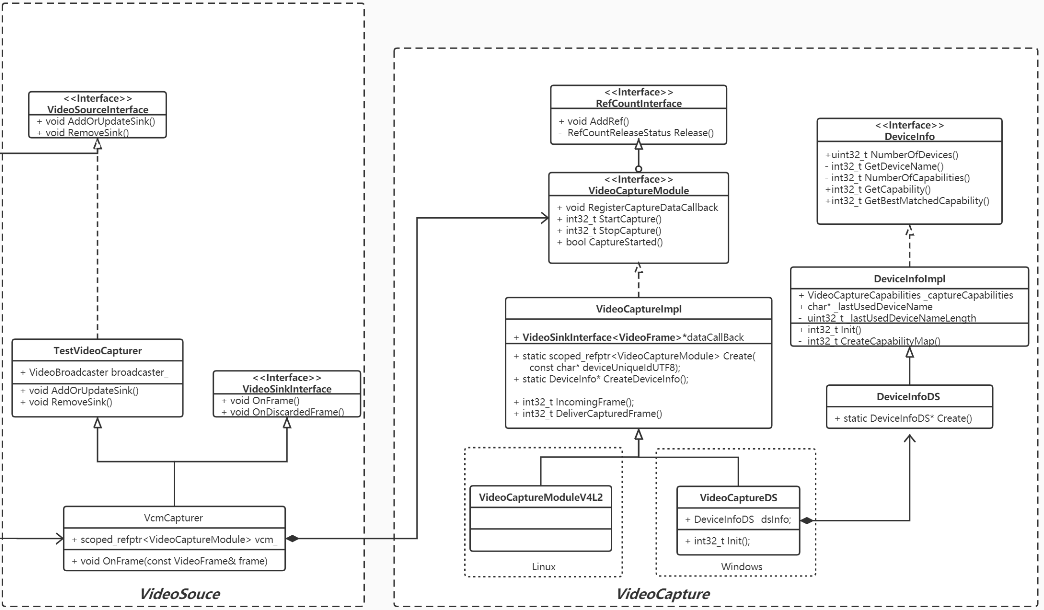
VideoCaptureModule作为数据源头组合到视频源对象VcmCapturer中,同时VcmCapturer又实现了VideoSinkInterface
VcmCapturer在构造成功时就会启动VideoCaptureModule进行视频采集。
视频源VcmCapturer持有一个非常重要的成员VideoBroadcaster对象,该对象的UML类图如下。
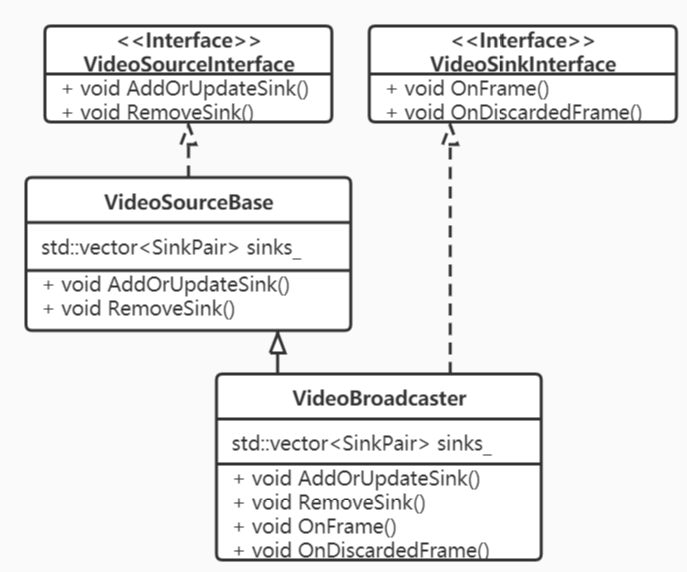
一方面VideoBroadcaster实现了VideoSinkInterface接口,成为一个Sink,这样VideoSource得到采集模块的视频帧后,首先会流入到内部的VideoBroadcaster成员对象,而非直接从VideoSource流出;另一方面VideoSource和VideoBroadcaster都实现了VideoSourceInterface接口,对外VideoSource作为视频源存在,向数据流下一站提供注册方法AddOrUpdateSink();该方法内部调用VideoBroadcaster的AddOrUpdateSink(),从而将数据流下一站VideoSink注册到VideoBroadcaster,存入成员std::vector
为什么要如此设计?因为,在WebRTC 1.0的官方规范中说明了一个视频源是可以被多个视频轨共用的。通过上述方式可以实现共用的概念。
2.1.3 创建视频轨源
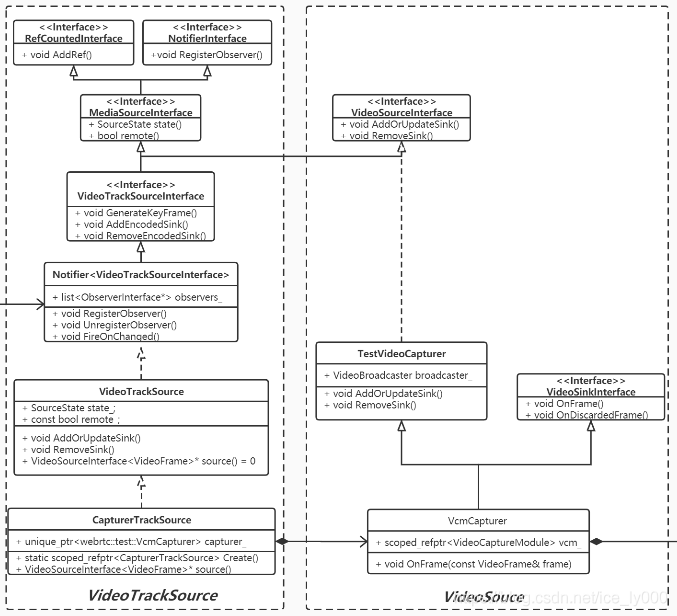
VideoTrackSource没有实现VideoSinkInterface接口,因此,实质上视频数据是不会流入到VideoTrackSource中的,但其组合了VideoSource对象,并且实现了VideoSourceInterface接口,添加到VideoTrackSource中的VideoSink会被添加到VideoSource,然后进一步添加到VideoBroadcast中。对外部来说,VideoTrackSource就是视频源。
VideoTrackSource另外实现了视频源状态相关的接口,以及状态通告相关的接口NotifierInterface,用于向更高一层(VideoTrack)通告视频源的状态。
2.2 视频轨的创建
2.2.1 PeerConnection::CreateVideoTrack
rtc::scoped_refptr<webrtc::VideoTrackInterface> video_track_(
    peer_connection_factory_->CreateVideoTrack(kVideoLabel, video_device));

rtc::scoped_refptr<VideoTrackInterface> PeerConnectionFactory::CreateVideoTrack(
    const std::string& id,
    VideoTrackSourceInterface* source) {
  RTC_DCHECK(signaling_thread_->IsCurrent());
  rtc::scoped_refptr<VideoTrackInterface> track(
      VideoTrack::Create(id, source, worker_thread_));
  return VideoTrackProxy::Create(signaling_thread_, worker_thread_, track);
}

rtc::scoped_refptr<VideoTrack> VideoTrack::Create(
    const std::string& id,
    VideoTrackSourceInterface* source,
    rtc::Thread* worker_thread) {
  rtc::RefCountedObject<VideoTrack>* track =
      new rtc::RefCountedObject<VideoTrack>(id, source, worker_thread);
  return track;
}

VideoTrack::VideoTrack(const std::string& label,
                       VideoTrackSourceInterface* video_source,
                       rtc::Thread* worker_thread)
    : MediaStreamTrack<VideoTrackInterface>(label),
      worker_thread_(worker_thread),
      video_source_(video_source),
      content_hint_(ContentHint::kNone) {
  video_source_->RegisterObserver(this);
}
由上视频轨创建过程可知,
- 我们最终创建的实体视频轨是VideoTrack这个类的对象,但是向应用层返回的是相对应的代理对象VideoTrackProxy,这是WebRTC防止线程乱入的常规操作,原因不再多赘述。
- 另外由代理对象的构建方式可知,VideoTrack的部分方法需要在信令线程执行,部分方法需要在工作者线程执行。
- VideoTrack成为源的观察者,可以获知源的状态改变。
2.2.2 视频轨的继承树
如下是VideoTrack类的UML类图。
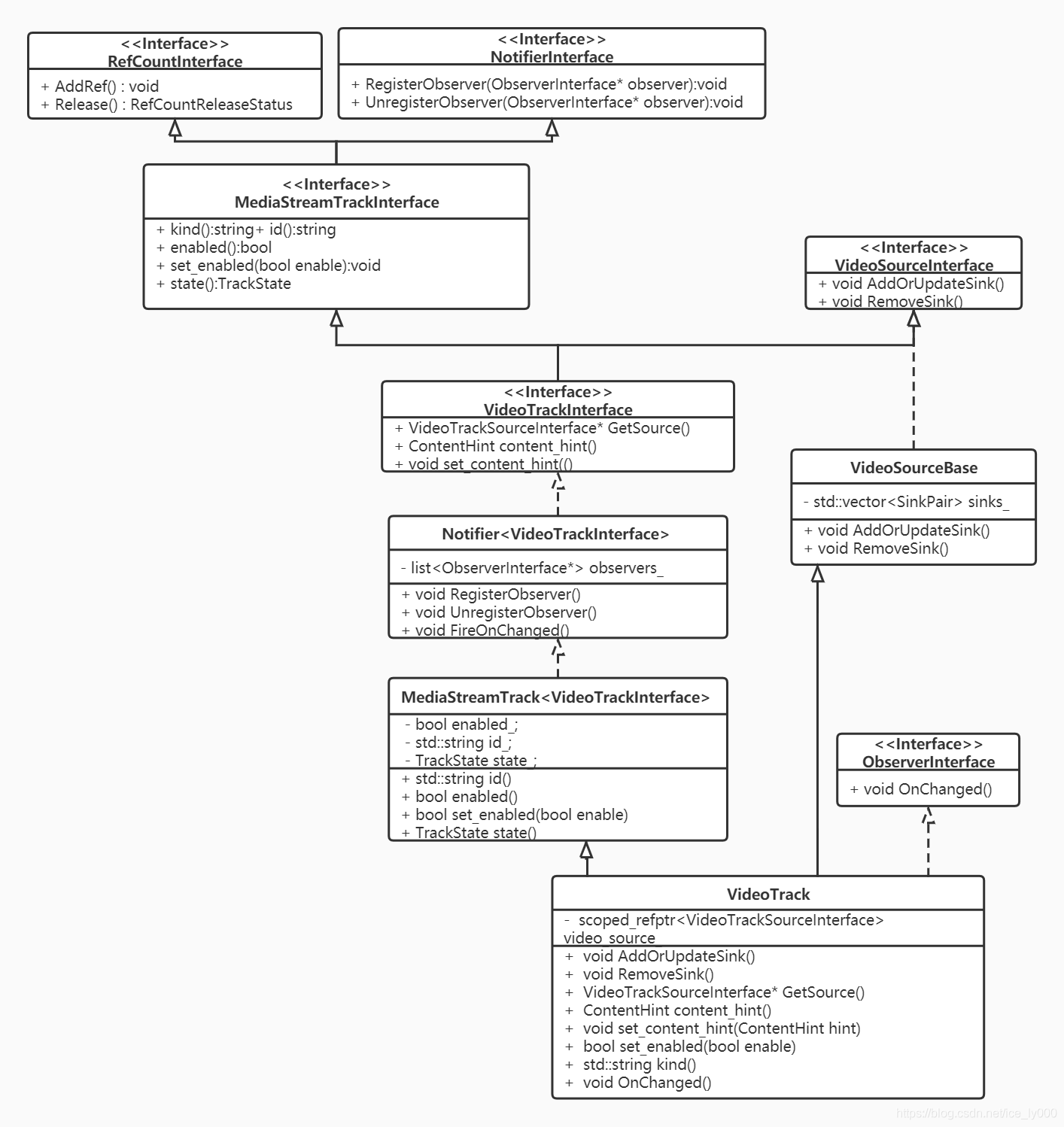
从上VideoTrack类的UML类图我们可以得知如下几个结论:
- VideoTrack一方面要实现ObserverInterface接口,让自己可以成为视频源的观察者,让自己的状态可以随着源的状态进行同步改变;另一方面又要实现NotifierInterface接口,让自己成为一个通知者,当自己的状态改变时,能够通知那些观察自己状态变化的对象。
- 如同VideoTrackSource一般,VideoTrack也没有实现VideoSinkInterface接口,因此,视频数据也不会流入到VideoTrack中,但其组合了VideoTrackSource,并且间接实现了VideoSourceInterface接口。想要从VideoTrack中获取视频流的站点,只要实现VideoSinkInterface接口,通过VideoTrack的AddOrUpdateSink()注册进来即可,因为该VideoSink会经过VideoTrackSource->VideoSource->VideoBroadcaster,最终可以从VideoBroadcaster获得视频流。
- VideoTrack还实现了VideoTrackInterface接口,其中提供了一个重要的属性:ContentHint。这个属性告知编码器在码率降低时,应该如何应对:降低帧率?降低分辨率?对于桌面采集应用来说,我们应该设置该属性为kDetailed或者是kText,这样编码器编码该视频流的时候不会降低分辨率,量化参数qp值也不会设置的过大。
- 我认为VideoTrack没有直接继承实现VideoSourceInterface接口,或者像AudioTrack那样直接提供AddOrUpdateSink/RemoveSink方法,而是继承了VideoSourceBase类,这样,往VideoTrack中的添加的VideoSink在VideoBroadcaster保存一份,也会在VideoTrack中保存一份。在VideoTrack保存这一份实质上没有什么作用,并且这样的继承关系跟AudioTrack的继承关系不对称,毫无美感而言。
2.3 视频数据的流动
纵观上述几个对象,我们可以得出如下的类图:
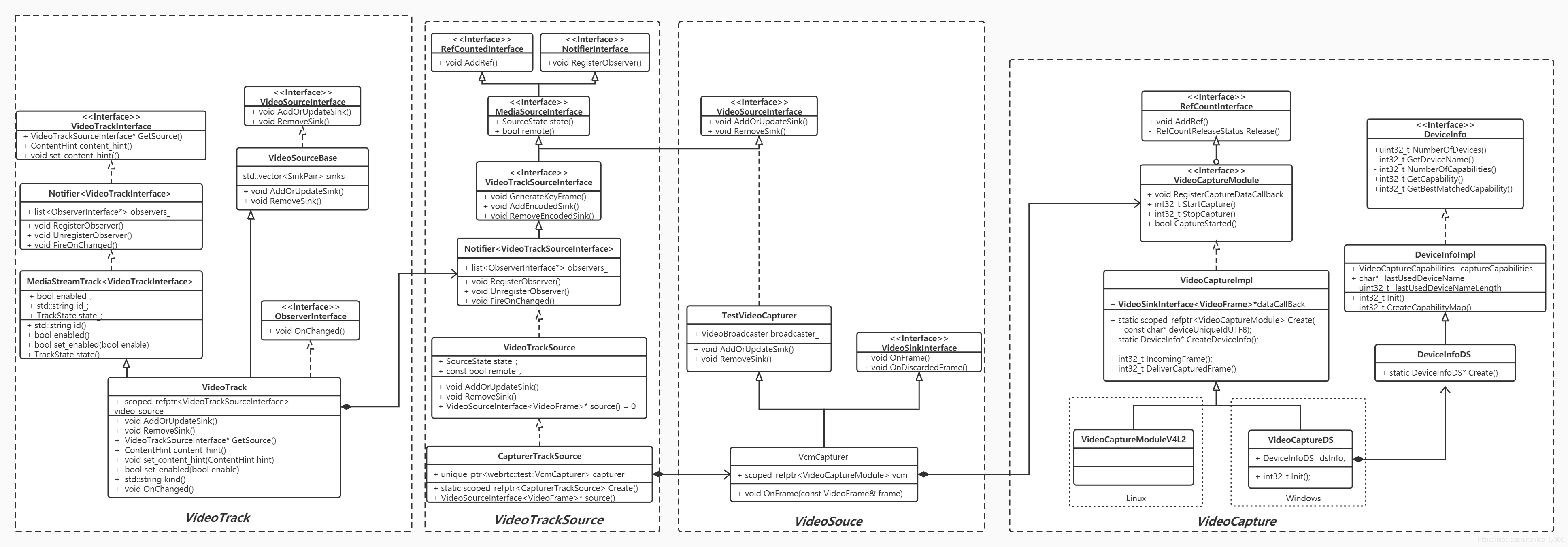
我们可以认为视频数据原始帧从VideoCapture流向了VideoSource,然后又流向了VideoTrackSource,然后流向VideoTrack。向VideoTrack注册的Sink又可以进一步获取到视频原始帧。
虽然比较细致地拆解了视频源为VideoTrackSource、VideoSource、VideoCapture,但从宏观概念上,我们要知晓:可以直接认为VideoTrackSource是视频源。数据从视频源流向视频轨。
视频轨既要从视频源获取视频数据,还要观察视频源地状态,从而同步更改自己地状态。
2.4 添加视频轨到PeerConnection
由于VideoTrack同AudioTrack一样,都实现了MediaStreamTrackInterface接口,对于PC而言,视频轨和音频轨并无实质区别,因为都是通过如下方法进行添加的。因此,在此处就不再赘述VideoTrack如何被添加?存储在PC的何处?是否将引发PC状态的改变? 等等,见上篇文章:WebRTC源码分析-呼叫建立过程之四(上)(创建并添加本地音频轨到PeerConnection)
RTCErrorOr<rtc::scoped_refptr<RtpSenderInterface>> AddTrack(
    rtc::scoped_refptr<MediaStreamTrackInterface> track,
    const std::vector<std::string>& stream_ids) override;
3 总结
行文知此,大致对如何创建一个视频轨并添加到PC进行了一个较细致的分析。即便忘记了细节,那么如下要点是需要记住的
- 视频轨的实体对象是VideoTrack类,对于应用层返回的是其代理对象VideoTrackProxy,这是WebRTC为了防止线程乱入所作的常规操作。
- WebRTC中,媒体数据总是从Source流向Sink。
- 某个对象要想从VideoTrack获取到视频帧,那么它需要实现VideoSinkInterface,并注册到VideoTrack中。实质上向VideoTrack注册的Sink会被传递到VideoTrack所持有的VideoSource的VideoBroadcast成员对象中,从那儿可以获得从VideoCapture传递来的视频帧。
- 记住VideoTrack提供了ContentHint这样一个属性以及设置这个属性的接口。该属性描绘了视频帧的内容,这个会影响到编码器的降级策略(当网络带宽资源 && CPU资源受限时,无法按照既定的编码参数进行编码输出,那么就需要降级编码)是保持帧率,还是保持分辨率。当我们做远程桌面、电子白板这种应用时,我们认为内容清晰度比流畅性更重要,此时就需要保持分辨率,降低一些帧率。那么将VideoTrack的ContentHint属性设置为kDetailed or kText,那么就暗示了编码器保持分辨率;当我们做音视频会话时,我们需要保证音视频的流畅性、连贯性,因此,一般会采取保帧率,降分辨率的策略,那么可以将VideoTrack的ContentHint属性设置为kFluid,那么暗示编码器保持帧率。
原文出处:WebRTC源码分析-呼叫建立过程之四(下)(创建数据通道DataChannel)
目录
- 引言
- 数据通道的创建
- 2.1 PeerConnection::CreateDataChannel方法
- 2.1.1 初始化参数DataChannelInit
- 2.1.2 PeerConnection.datachannel_controller.datachannel_type
- 2.2 DataChannelController::InternalCreateDataChannel方法
- 2.3 DataChannel::Create方法
- 2.3.1 DataChannel构造
- 2.3.2 DataChannel初始化
- 2.3.3 DataChannel与底层Transport的关联
- 总结
1. 引言
创建完PeerConnectionFactory 和 PeerConnection这两个API层的操盘对象之后,紧接着需要初始化本地的媒体,也即创建本地的音频轨、视频轨、数据通道,并将这些本地的媒体轨道添加到PeerConnection对象中。如图中红色标注所示。
本文将详细描述上述数据通道的创建细节。
2. 数据通道的创建
应用层通过调用PC的CreateDataChannel方法来创建DataChannel,PC有两个CreateDataChannel方法,其中一个入参是mid值,另外一个如下源码所示。
2.1 PeerConnection::CreateDataChannel方法
rtc::scoped_refptr<DataChannelInterface> PeerConnection::CreateDataChannel(
    const std::string& label,
    const DataChannelInit* config) {
  // 1. 判断是否运行于信令线程,输出日志
  RTC_DCHECK_RUN_ON(signaling_thread());
  TRACE_EVENT0("webrtc", "PeerConnection::CreateDataChannel");

  // 2. 是否为第一个数据通道?
  //    PC.data_channel_controller_有三个成员变量记录了DataChannel,分别是
  //    map<std::string, rtc::scoped_refptr<DataChannel>> rtp_data_channels_;
  //    vector<rtc::scoped_refptr<DataChannel>> sctp_data_channels_;
  //    vector<rtc::scoped_refptr<DataChannel>> sctp_data_channels_to_free_;
  //    第一个记录的是rtp作为datachannel底层传输的数据通道,并且记录label->DataChannel的映射
  //    第二个记录的是sctp作为datachannel底层传输的数据通道
  //    第三个记录的是已经需要进行释放的sctp作为datachannel底层传输的数据通道
  //
  //    是否是第一个,取决于rtp_data_channels_和sctp_data_channels_是否为空,为空,则是第一个;
  //    不需要判断第三个记录,因为已经是需要销毁释放的datachannel了。
  bool first_datachannel = !data_channel_controller_.HasDataChannels();

  // 3. 创建DataChannel对象
  // 3.1 创建内部使用的DataChannel初始化参数InternalDataChannelInit
  std::unique_ptr<InternalDataChannelInit> internal_config;
  if (config) {
    internal_config.reset(new InternalDataChannelInit(*config));
  }
  // 3.2 通过InternalCreateDataChannel方法来创建DataChannel
  rtc::scoped_refptr<DataChannelInterface> channel(
      data_channel_controller_.InternalCreateDataChannel(label, internal_config.get()));
  if (!channel.get()) {
    return nullptr;
  }
  // 3.3 如果创建的是RTP DataChannel或者是第一个SCTP DataChannel,需要报告给PC的观察者
  //     进行重新协商
  // Trigger the onRenegotiationNeeded event for every new RTP DataChannel, or
  // the first SCTP DataChannel.
  if (data_channel_type() == cricket::DCT_RTP || first_datachannel) {
    Observer()->OnRenegotiationNeeded();
  }
  // 3.4 记录DATA_ADDED事件到PC的成员usage_event_accumulator_
  NoteUsageEvent(UsageEvent::DATA_ADDED);

  // 4. 返回DataChannel的代理对象DataChannelProxy
  return DataChannelProxy::Create(signaling_thread(), channel.get());
}
分四步对CreateDataChannel()方法进行了初步分析,其中一些知识点拎出来再说明下:
- 从判断是否已经存在DataChannel这么一个判断的方式上看,PC的
data_channel_controller_有两个成员存储了DataChannel,分别是成员rtp_data_channels_和成员sctp_data_channels_,从名称上可以看出这两个成员是用来保存不同传输协议实现的DataChannel:基于sctp 和 基于rtp。 - 创建DataChannel过程中出现了两个特别重要的参数,一个是应用层传入的DataChannelInit,一个是PC的成员
data_channel_type_。后续将对这两个主要的参数进行详细的阐述。 - WebRTC的PC成员
usage_event_accumulator_会以位去记录发生的事件,只要事件发生过一次,就会被usage_event_accumulator_标记上,这些事件大致如下:
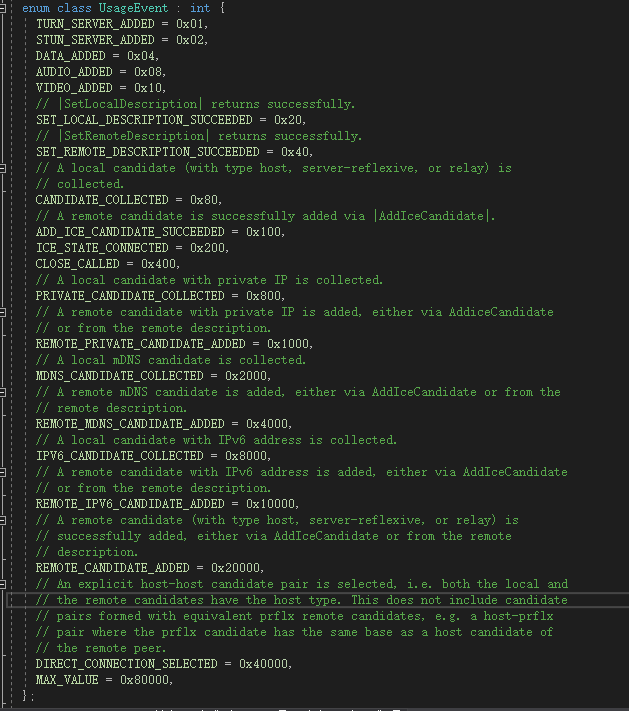
- 最终返给用户层的是DataChannelProxy,这是WebRTC防止线程乱入的一贯做法,此处不展开详述了。
接下来是时候好好看看那两个重要的参数了:DataChannelInit && data_channel_type_
2.1.1 初始化参数DataChannelInit
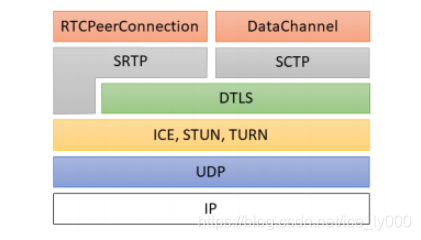
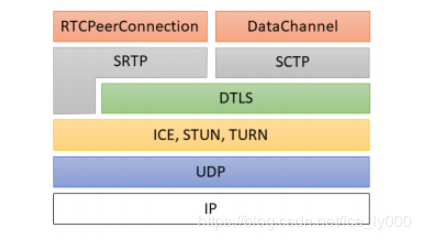
当我们在网上搜索SCTP时,会看到相关的描述,将SCTP介绍为与UDP,TCP同一层次的传输层协议。最早STCP是把窄带7号信令的可靠性传输机制引入到IP协议、优化TCP协议的不能分帧传输的局限性提出来的,不过后来应用不是很广泛。在WebRTC中实现数据通道使用的SCTP是基于改良剪切版的,有两个草案描述了该改良版本《draft-ietf-rtcweb-data-channel-13》、《draft-ietf-rtcweb-data-protocol-09》(此处描述来源于webrtc数据通道之SCTP over DTLS简介)。WebRTC要求使用SCTP必须开启DTLS,协议的分层图如下:可以得知WebRTC中的SCTP实际上是基于UDP在应用层提供的相关实现,而非常规意义上的OSI模型中的传输层。
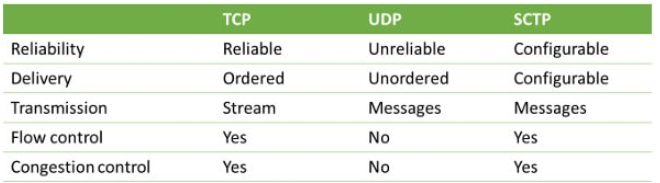
WebRTC根据实际的应用场景,提供了不同可靠程度的传输模式:可靠传输模式、部分可靠传输模式、不可靠传输模式。
采用哪种模式取决于结构体参数DataChannelInit,该参数包含的字段如下源码:
struct DataChannelInit {
  // Deprecated. Reliability is assumed, and channel will be unreliable if
  // maxRetransmitTime or MaxRetransmits is set.
  bool reliable = false;
  // True if ordered delivery is required.
  bool ordered = true;
  // The max period of time in milliseconds in which retransmissions will be
  // sent. After this time, no more retransmissions will be sent.
  //
  // Cannot be set along with |maxRetransmits|.
  // This is called |maxPacketLifeTime| in the WebRTC JS API.
  absl::optional<int> maxRetransmitTime;
  // The max number of retransmissions.
  //
  // Cannot be set along with |maxRetransmitTime|.
  absl::optional<int> maxRetransmits;
  // This is set by the application and opaque to the WebRTC implementation.
  std::string protocol;
  // True if the channel has been externally negotiated and we do not send an
  // in-band signalling in the form of an "open" message. If this is true, |id|
  // below must be set; otherwise it should be unset and will be negotiated
  // in-band.
  bool negotiated = false;
  // The stream id, or SID, for SCTP data channels. -1 if unset (see above).
  int id = -1;
};
- reliable、ordered 、maxRetransmitTime、maxRetransmits确定了传输是否是可靠的,不可靠情况下如何重传,包是否要求有序到达。
| 参数取值 | 传输可靠性 |
|---|---|
| reliable为true | 可靠传输 |
| reliable为false,maxRetransmitTime 或 maxRetransmits存在且有效 | 部分可靠传输 |
| reliable为false,且maxRetransmitTime && maxRetransmits均无效 | 不可靠传输 |
- protocol 字段描述DataChannel中传输数据的子协议,对于WebRTC来说是透明的
- negotiated 和 id字段确定了通道协商的手段是通过带外数据协商,还是通过DataChannel本身传输数据协商。当negotiated为真时,说明通过SDP进行带外数据协商,此时,id必须提供有效的SID值;当negotiated为假时,需要建立DataChannel时,在底层通道链路建立后发送Open消息进行带内协商。
InternalDataChannelInit结构参数扩展了DataChannelInit ,增加了一个字段OpenHandshakeRole:
struct InternalDataChannelInit : public DataChannelInit {
  enum OpenHandshakeRole { kOpener, kAcker, kNone };
  // The default role is kOpener because the default |negotiated| is false.
  InternalDataChannelInit() : open_handshake_role(kOpener) {}
  explicit InternalDataChannelInit(const DataChannelInit& base);
  OpenHandshakeRole open_handshake_role;
};
在需要带外协商时,open_handshake_role为kNone;带内协商时open_handshake_role默认为kOpener(一方为kOpener、另一方为kAcker),kOpener主动向kAcker发送Open控制消息,进行带内协商。
2.1.2 PeerConnection.datachannel_controller.datachannel_type
PeerConnection.data_channel_controller_.data_channel_type_成员是一个枚举类型的变量,该变量影响到在创建DataChannel时,DataChannel底层使用的协议。
enum DataChannelType {
  // 不允许创建DataChannel;
  DCT_NONE = 0,
  // 基于RTP协议的DataChannel;
  DCT_RTP = 1,
  // 基于SCTP协议的DataChannel;
  DCT_SCTP = 2,
  // 有待解惑
  // Data channel transport over media transport.
  DCT_MEDIA_TRANSPORT = 3,
  // 基于UDP协议的DataChannel,与上一个相比行为一致,但不使用DTLS
  // Data channel transport over datagram transport (with no fallback).  This is
  // the same behavior as data channel transport over media transport, and is
  // usable without DTLS.
  DCT_DATA_CHANNEL_TRANSPORT = 4,
  // 基于UDP传输(使用SCTP协商语法,并可回退到SCTP)。必须使用DTLS。
  // Data channel transport over datagram transport (with SCTP negotiation
  // semantics and a fallback to SCTP).  Only usable with DTLS.
  DCT_DATA_CHANNEL_TRANSPORT_SCTP = 5,
};
PeerConnection.data_channel_controller_.data_channel_type_参数在PC初始化函数中赋值,之前在分析创建PC的文章中粗略地分析过PeerConnection::Initialize()方法,再次把其中与当前议题相关的部分截取出来以供分析:
if (use_datagram_transport_for_data_channels_) {
  if (configuration.enable_rtp_data_channel) {
    RTC_LOG(LS_ERROR) << "enable_rtp_data_channel and "
                          "use_datagram_transport_for_data_channels are "
                          "incompatible and cannot both be set to true";
    return false;
  }
  if (configuration.enable_dtls_srtp && !*configuration.enable_dtls_srtp) {
    RTC_LOG(LS_INFO) << "Using data channel transport with no fallback";
    data_channel_controller_.set_data_channel_type(
        cricket::DCT_DATA_CHANNEL_TRANSPORT);
  } else {
    RTC_LOG(LS_INFO) << "Using data channel transport with fallback to SCTP";
    data_channel_controller_.set_data_channel_type(
        cricket::DCT_DATA_CHANNEL_TRANSPORT_SCTP);
    config.sctp_factory = sctp_factory_.get();
  }
} else if (configuration.enable_rtp_data_channel) {
  // Enable creation of RTP data channels if the kEnableRtpDataChannels is
  // set. It takes precendence over the disable_sctp_data_channels
  // PeerConnectionFactoryInterface::Options.
  data_channel_controller_.set_data_channel_type(cricket::DCT_RTP);
} else {
  // DTLS has to be enabled to use SCTP.
  if (!options.disable_sctp_data_channels && dtls_enabled_) {
    data_channel_controller_.set_data_channel_type(cricket::DCT_SCTP);
    config.sctp_factory = sctp_factory_.get();
  }
}
- 首先,
use_datagram_transport_for_data_channels_参数是否为真,决定了是否使用DatagramTrasnport接口来收发DataChannel数据(该套接口是后引入的,早期版本应该只有rtp和sctp-dtls)。该参数是否为真一方面取决于应用层给PC传入的RTCConfiguration配置参数中同名字段取值,另一方面还需PeerConnectionFactory中提供MediaTransportFactory用于创建DatagramTrasnport。当二者都具备时,use_datagram_transport_for_data_channels_为真,此时,将创建基于DatagramTrasnport接口的底层收发包对象。如上代码所示,实质上只会创建DCT_DATA_CHANNEL_TRANSPORT或者DCT_DATA_CHANNEL_TRANSPORT_SCTP类别的DataChannel,分别是直接基于UDP的DatagramTrasnport接口和基于SCTP的DatagramTrasnport接口。没有DCT_MEDIA_TRANSPORT`这个类别的实现。 - 其次,当决定不使用DatagramTrasnport接口的实现时,判断是否使用RTP实现,即
DCT_RTP类别。取决于应用层给PC传入的RTCConfiguration配置参数是否开启enable_rtp_data_channel。 - 最后,当既不使用DatagramTrasnport接口,又不使用RTP传输时,启用SCTP-DTLS实现。
总之:
DataChannel最终的类别取决于PC的RTCConfiguration配置参数中的两个取值:use_datagram_transport_for_data_channels_和enable_rtp_data_channel;以及PC工厂类是否提供了MediaTransportFactory。
由于使用DatagramTrasnport接口来收发DataChannel数据的方式是后引入的,是一个实验特性,需要特意设置use_datagram_transport_for_data_channels_以及提供MediaTransportFactory来开启;
由于WebRTC中使用RTP来实现DataChannel是一个计划要淘汰的方式,因此,也需要外部设置RTCConfiguration.enable_rtp_data_channel来启用
由于SCTP是实现DataChannel最正式的方式,因此,在外界不提供额外设置的情况下,默认使用该方式。
2.2 DataChannelController::InternalCreateDataChannel方法
rtc::scoped_refptr<DataChannel> DataChannelController::InternalCreateDataChannel(
    const std::string& label,
    const InternalDataChannelInit* config) {
  // 1.判断PC状态是否已经关闭了
  if (IsClosed()) {
    return nullptr;
  }

  // 2. 若data_channel_type_为DCT_NONE,表示禁用DataChannel
  if (data_channel_type() == cricket::DCT_NONE) {
    RTC_LOG(LS_ERROR)
        << "InternalCreateDataChannel: Data is not supported in this call.";
    return nullptr;
  }

  // 3. 判断外部是否提供了InternalDataChannelInit,否则提供默认的
  InternalDataChannelInit new_config =
      config ? (*config) : InternalDataChannelInit();

  // 4. 如果DataChannel是类sctp类型,我们需要对sid进行处理
  //    类sctp已经在上文描述过
  if (DataChannel::IsSctpLike(data_channel_type_)) {
    // 4.1 如果new_config.id < 0,是无效的sid值,根据SSLRole是服务器还是客户端
    // 分配有效的sid
    if (new_config.id < 0) {
      rtc::SSLRole role;
      if ((GetSctpSslRole(&role)) &&
          !sid_allocator_.AllocateSid(role, &new_config.id)) {
        RTC_LOG(LS_ERROR)
            << "No id can be allocated for the SCTP data channel.";
        return nullptr;
      }
    // 4.2 如果new_config.id > 0,判断外部提供的new_config.id是否有效
    //     也即new_config.id是否超界或者已经被使用
    } else if (!sid_allocator_.ReserveSid(new_config.id)) {
      RTC_LOG(LS_ERROR) << "Failed to create a SCTP data channel "
                           "because the id is already in use or out of range.";
      return nullptr;
    }
  }

  // 5. DataChannel::Create根据datachannel类别,标签,参数来创建DataChannel
  rtc::scoped_refptr<DataChannel> channel(
      DataChannel::Create(this, data_channel_type(), label, new_config));
  if (!channel) {
    sid_allocator_.ReleaseSid(new_config.id);
    return nullptr;
  }

  // 6. 存储创建的DataChannel
  // 6.1 如果创建的是cricket::DCT_RTP类别的DataChannel,则放入成员rtp_data_channels_中
  if (channel->data_channel_type() == cricket::DCT_RTP) {
    if (rtp_data_channels_.find(channel->label()) != rtp_data_channels_.end()) {
      RTC_LOG(LS_ERROR) << "DataChannel with label " << channel->label()
                        << " already exists.";
      return nullptr;
    }
    rtp_data_channels_[channel->label()] = channel;
  // 6.2 如果创建的是类sctp的DataChannel,则放入成员sctp_data_channels_中
  } else {
    RTC_DCHECK(DataChannel::IsSctpLike(data_channel_type_));
    sctp_data_channels_.push_back(channel);
    // 绑定通道的关闭信号和PC对应的槽,让PC知道SCTP通道的关闭事件
    channel->SignalClosed.connect(this,
                                  &PeerConnection::OnSctpDataChannelClosed);
  }

  // 7. 发送通道创建的信号,一方面PC封装了DataChannelController的SignalDataChannelCreated_
  //    信号,PC肯定能获知该信号进行响应;另一方面RTCStatsCollector等对象通过关联PC封装的
  //    SignalDataChannelCreated信号也可以处理数据通道被创建的消息。
  SignalDataChannelCreated_(channel.get());
  return channel;
}
该函数就不展开分析了,最终调用了DataChannel::Create()方法来创建DataChannel。后续来看下DataChannel::Create()方法的内容。
2.3 DataChannel::Create方法
分两步:构造DataChannel + 初始化DataChannel
rtc::scoped_refptr<DataChannel> DataChannel::Create(
    DataChannelProviderInterface* provider,
    cricket::DataChannelType dct,
    const std::string& label,
    const InternalDataChannelInit& config) {
  // 1. 调用DataChannel的构造函数
  rtc::scoped_refptr<DataChannel> channel(
      new rtc::RefCountedObject<DataChannel>(provider, dct, label));
  // 2. 调用初始化方法
  if (!channel->Init(config)) {
    return NULL;
  }
  return channel;
}
2.3.1 DataChannel构造
初始化成员,各成员的用途
DataChannel::DataChannel(DataChannelProviderInterface* provider,
                          cricket::DataChannelType dct,
                          const std::string& label)
    : internal_id_(GenerateUniqueId()),
      label_(label),
      observer_(nullptr),
      state_(kConnecting),
      messages_sent_(0),
      bytes_sent_(0),
      messages_received_(0),
      bytes_received_(0),
      buffered_amount_(0),
      data_channel_type_(dct),
      provider_(provider),
      handshake_state_(kHandshakeInit),
      connected_to_provider_(false),
      send_ssrc_set_(false),
      receive_ssrc_set_(false),
      writable_(false),
      send_ssrc_(0),
      receive_ssrc_(0) {}
internal_id_:内部使用的自增id,从0开始,每创建一个DataChanel单调递增1;label_:通道的标识,与Track的label一样;observer_:通道的观察者,包含通道状态改变回调、通道获取数据回调、通道缓冲数据大小改变时回调;state_:通道的状态,包含kConnecting(通道连接中状态,无法发送数据)、kOpen(通道已连接状态,可发送数据,send_ssrc_和receive_ssrc_均有值)、kClosing(通道关闭中状态,不允许继续发送数据,但已在buffer中的数据将被发送)、kClosed(通道已关闭状态);messages_sent_ && bytes_sent_:发送消息个数和字节数;messages_received_ && bytes_received_:接收消息个数和字节数;buffered_amount_: DataChanel层发送缓存中缓存的还未发送的数据的字节数,当Transport要发送数据前该值增加,当发送成功后该值相应的减小;data_channel_type_:通道类型RTP?SCTP?还是基于DatagramTransport的那3钟provider_:实际上就DataChannelController,它继承实现了DataChannelProviderInterface,提供了实际上的数据发送功能,将把DataChannel要发送的数据代理到DataChannelTransport去发哦是那个。相当重要;handshake_state_:握手状态,需要进行带内协商时该状态起着作用;connected_to_provider_:是否与provider相关上;send_ssrc_set_ && receive_ssrc_set_:send_ssrc_ && receive_ssrc_是否已经设置, RTP协议类别的使用;writable_:通道是否已经准备ok,可以发送数据;send_ssrc_ && receive_ssrc_:发送端ssrc和接收端ssrc,RTP协议类别的使用,SCTP协议类别使用SID,保存在成员config_.sid中,见后面的DataChannel::Init方法。
2.3.2 DataChannel初始化
bool DataChannel::Init(const InternalDataChannelInit& config) {
  // 根据通道类别进行分类处理
  // 1. RTP类别的通道
  if (data_channel_type_ == cricket::DCT_RTP) {
    // 1.1 入参判断:
    //     RTP通道不能提供可靠传输,因此,reliable不能为真;
    //     RTP通道id必须为-1,因为sid是为sctp准备的,RTP通道不应该设置该值;
    //     RTP通道不提供按重传次数或者最大重传时间这种部分可靠性,因此,maxRetransmits
    //           maxRetransmitTime不可存在。
    if (config.reliable || config.id != -1 || config.maxRetransmits ||
        config.maxRetransmitTime) {
      RTC_LOG(LS_ERROR) << "Failed to initialize the RTP data channel due to "
                           "invalid DataChannelInit.";
      return false;
    }
    //1.2 RTP通道不需要带内协商,因此,握手状态为kHandshakeReady即可
    handshake_state_ = kHandshakeReady;

  // 2. 类sctp类别的通道
  } else if (IsSctpLike(data_channel_type_)) {
    // 2.1 判断参数的有效性
    if (config.id < -1 ||
        (config.maxRetransmits && *config.maxRetransmits < 0) ||
        (config.maxRetransmitTime && *config.maxRetransmitTime < 0)) {
      RTC_LOG(LS_ERROR) << "Failed to initialize the SCTP data channel due to "
                           "invalid DataChannelInit.";
      return false;
    }
    // 2.2 按最大重传次数或最大重传时间来确定重传规则,二者不能同时存在
    if (config.maxRetransmits && config.maxRetransmitTime) {
      RTC_LOG(LS_ERROR)
          << "maxRetransmits and maxRetransmitTime should not be both set.";
      return false;
    }
    config_ = config;
    // 2.3 根据握手角色,确定本端握手初始状态
    switch (config_.open_handshake_role) {
      // 2.3.1 KNone表示不在此进行协商,进行带外协商,因此,状态置为已协商完成的
      //       kHandshakeReady状态即可。
      case webrtc::InternalDataChannelInit::kNone:  // pre-negotiated
        handshake_state_ = kHandshakeReady;
        break;
      // 2.3.2 kOpener表示通道打开者,主动发送Open消息方,状态置为kHandshakeShouldSendOpen
      //       表示需要但还未发送Open消息
      case webrtc::InternalDataChannelInit::kOpener:
        handshake_state_ = kHandshakeShouldSendOpen;
        break;
      // 2.3.3 kAcker表示通道的被动打开方,因此状态设置为kHandshakeShouldSendAck
      //       表示下一次要发送Ack,但还未发送的状态
      case webrtc::InternalDataChannelInit::kAcker:
        handshake_state_ = kHandshakeShouldSendAck;
        break;
    }

    // 2.4 尝试关联provider提供的底层transport,以防transport已经创建好了,错过其发出的
    //   ready信号
    // Try to connect to the transport in case the transport channel already
    // exists.
    OnTransportChannelCreated();

    // 2.5 如果底层transport已经是可以发送数据的状态(因为初始化通道ok的信号可能先于
    //    DataChannel创建被发送),以异步的方式来执行OnChannelReady(true)是因为
    //    在当前方法返回前,上层的对象还没建立起连接.
    // Checks if the transport is ready to send because the initial channel
    // ready signal may have been sent before the DataChannel creation.
    // This has to be done async because the upper layer objects (e.g.
    // Chrome glue and WebKit) are not wired up properly until after this
    // function returns.
    if (provider_->ReadyToSendData()) {
      invoker_.AsyncInvoke<void>(RTC_FROM_HERE, rtc::Thread::Current(),
                                 [this] { OnChannelReady(true); });
    }
  }

  return true;
}
之前我们提到RTP是会被淘汰的方式,SCTP是当前主流方式,因此,我们逮着SCTP来说明。DataChannel初始过程中,最重要的莫过于调用OnTransportChannelCreated(),使得provider将上层的DataChannel与底层的Transport对象给联系起来。我们来重点看下该方法。
2.3.3 DataChannel与底层Transport的关联
void DataChannel::OnTransportChannelCreated() {
  // 1. 只有类SCTP才需要进行关联
  RTC_DCHECK(IsSctpLike(data_channel_type_));
  // 2. 进行关联
  if (!connected_to_provider_) {
    connected_to_provider_ = provider_->ConnectDataChannel(this);
  }
  // 3. 关联时,sid会被清掉,因此,再设置一次。
  // The sid may have been unassigned when provider_->ConnectDataChannel was
  // done. So always add the streams even if connected_to_provider_ is true.
  if (config_.id >= 0) {
    provider_->AddSctpDataStream(config_.id);
  }
}
进一步看下真正的关联实现:
bool DataChannelController::ConnectDataChannel(
    DataChannel* webrtc_data_channel) {
  // 1. 必须运行在信令线程
  RTC_DCHECK_RUN_ON(signaling_thread());

  // 2. 如果底层传输通道还不存在,则不需要绑定了
  //    rtp_data_channel是RTP协议的底层Transport
  //    data_channel_transport是sctp协议的底层transport
  if (!rtp_data_channel() && !data_channel_transport()) {
    // Don't log an error here, because DataChannels are expected to call
    // ConnectDataChannel in this state. It's the only way to initially tell
    // whether or not the underlying transport is ready.
    return false;
  }

  // 3. 如果sctp协议的底层transport存在,则进行相关信号绑定。请注意:
  //    信号的发射者是DataChannelController,而非transport本身;
  //    信号的接收者是上层的DataChannel对象;
  //    势必.....DataChannelController还得与底层transport进行
  //    对应的关联...如何关联,往后看
  if (data_channel_transport()) {
    // 3.1 底层Transport处于可写状态
    SignalDataChannelTransportWritable_s.connect(webrtc_data_channel,
                                                 &DataChannel::OnChannelReady);
    // 3.2 底层Transport收到data
    SignalDataChannelTransportReceivedData_s.connect(
        webrtc_data_channel, &DataChannel::OnDataReceived);
    // 3.3 底层Transport处于关闭过程中
    SignalDataChannelTransportChannelClosing_s.connect(
        webrtc_data_channel, &DataChannel::OnClosingProcedureStartedRemotely);
    // 3.4 底层Transport处于已关闭状态
    SignalDataChannelTransportChannelClosed_s.connect(
        webrtc_data_channel, &DataChannel::OnClosingProcedureComplete);
  }

  // 4. 如果是rtp协议的底层传输通道存在,则也进行相关信号绑定,状态没有sctp那么多
  //    并且与3应该是不会同时存在的,并且注意:
  //    信号发送者是底层传输通道,不需要provider做二道贩子
  //    信号接收者是上层DataChannel。
  if (rtp_data_channel()) {
    // 4.1 底层通道已处于可发送状态
    rtp_data_channel()->SignalReadyToSendData.connect(
        webrtc_data_channel, &DataChannel::OnChannelReady);
    // 4.2 底层通道有数据到达
    rtp_data_channel()->SignalDataReceived.connect(
        webrtc_data_channel, &DataChannel::OnDataReceived);
  }
  return true;
}
代码分析到这儿,DataChannel创建过程也分析完了,可能还会有懵逼的地方。比如,对于SCTP协议的传输,如上代码所示,DataChannelController做了二道贩子,在底层的Transport与DataChannel之间拉起了皮条。那么DataChannelController是如何与Transport勾搭上的呢?还有几个问题:
- DataChannelController这个对象是什么时候创建的呢?
- SCTP底层传输对象DataChannelTransportInterface到底实体类是哪个?什么时候创建的?
- DataChannelController与DataChannelTransportInterface是如何建立关联,又是在何时建立的关联?
由于本篇文章已经很长了,打算另起一篇文章来说明下DataChannel相关的这几个类,并回答上述几个问题。WebRTC源码分析——DataChannel及其相关类
3. 总结
回顾下上述所说内容,捡要点做下总结:
- DataChannel的底层传输实际上可以是SCTP传输,也可以是RTP传输。但是我们需要了解到RTP传输方式是将要被淘汰的方式。因此,以后分析只需要关注SCTP是如何做的即可。
- 创建PC时,应用层传输的RTCConfiguration中的几个字段决定了我们创建DataChannel是采用何种底层传输,细节可以再看看上文。当然,默认情况是采用SCTP。
- 创建DataChannel时传入的结构体DataChannelInit决定了底层传输数据的可靠级别:可靠、部分可靠、不可靠;也决定了协商方式:是进行带外协商,还是带内协商。
- 当使用带内协商时,SCTP传输在协商阶段是有角色的,一方是主动打开方,一方是被动打开方。主动打开方在底层通道链接建立后,需要主动发送Open消息,被动打开方需要回复Ack。
- WebRTC中的SCTP并非是OSI模型中的传输层协议,而是应用层协议,并且使用STCP时,必须使用DLS。如下图所示:
- DataChannel是WebRTC数据通道的顶层对象,底层根据选择的传输方式创建的底层传输对象是不一样的,比如支持SCTP协议的传输对象是实现了接口DataChannelTransportInterface的SctpDataChannelTransport对象;而支持RTP协议的传输对象层对象是RtpDataChannel对象。

- DataChannel需要与底层传输对象SctpDataChannelTransport建立关联以便监控传输状态以及收发数据包。但二者中间隔了DataChannelController对象,DataChannelController起着桥梁作用。