CocoaPods历险记03
原文出处:5. Podspec 文件分析
CocoaPods 历险记 这个专题是 Edmond 和 冬瓜 共同撰写,对于 iOS / macOS 工程中版本管理工具 CocoaPods 的实现细节、原理、源码、实践与经验的分享记录,旨在帮助大家能够更加了解这个依赖管理工具,而不仅局限于
pod install和pod update。
本文知识目录
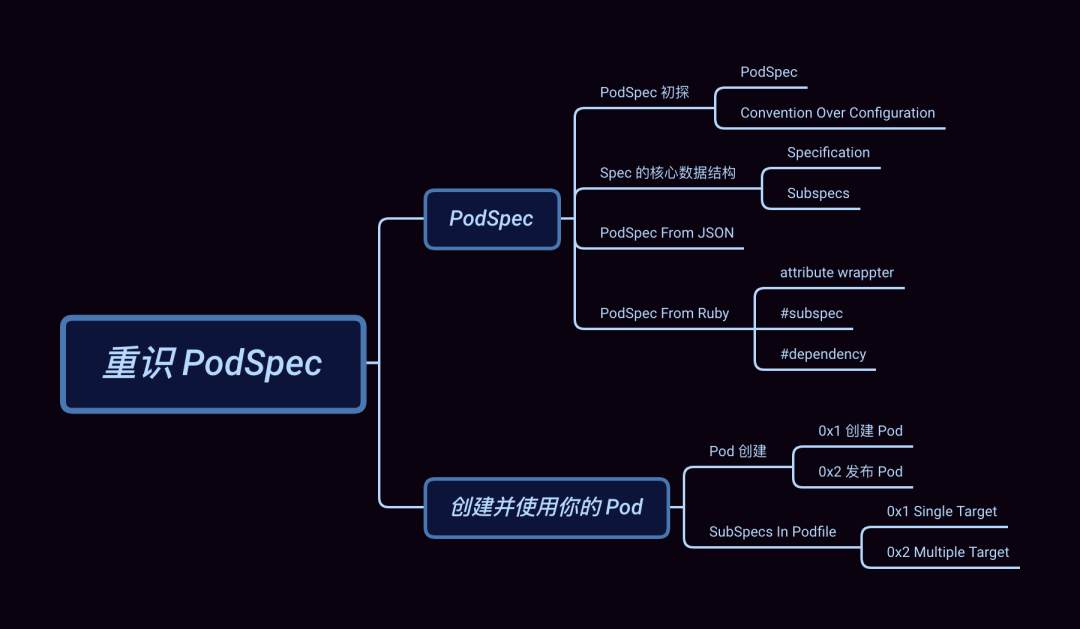
引子
在上文 Podfile 解析逻辑 中(建议先阅读这篇文章),我们以 Xcode 工程结构作为切入点介绍了 Podfile 背后对应的数据结构,剖析了Podfile 文件是如何解析与加载,并最终 "入侵" 项目影响其工程结构的。今天我们来聊一聊 CocoaPods-Core[2]中的另一个重要文件 --- Podspec 以及它所撑起的 CocoaPods 世界。
一个 Pod 的创建和发布离不开 .podspec 文件,它可以很简单也能复杂,如 QMUIKit[3](后续介绍)。
今天我们就直奔主题,来分析 Podspec 文件。
Podspec
Podspec 是用于 描述一个 Pod 库的源代码和资源将如何被打包编译成链接库或 framework 的文件 ,而 Podspec中的这些描述内容最终将映会映射到 Specification 类中(以下简称 Spec)。
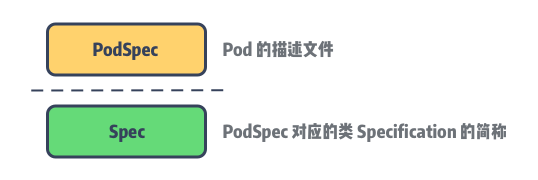
现在让我们来重新认识 Podspec。
Podspec 初探
Podspec 支持的文件格式为 .podspec 和 .json 两种,而 .podspec 本质是 Ruby 文件。
问题来了,为什么是 JSON 格式而不像 Podfile 一样支持 YAML 呢?
笔者的理解:由于 Podspec 文件会满世界跑,它可能存在于 CocoaPods 的 CDN Service[4]、Speces Repo[5]或者你们的私有 Specs Repo 上,因此采用 JSON 的文件在网络传输中会更友好。而 Podfile更多的场景是用于序列化,它需要在项目中生成一份经依赖仲裁后的 Podfile 快照,用于后续的对比。
Podspec
Pod::Spec.new do |spec|
  spec.name         = 'Reachability'
  spec.version      = '3.1.0'
  spec.license      = { :type => 'BSD' }
  spec.homepage     = 'https://github.com/tonymillion/Reachability'
  spec.authors      = { 'Tony Million' => 'tonymillion@gmail.com' }
  spec.summary      = 'ARC and GCD Compatible Reachability Class for iOS and OS X.'
  spec.source       = { :git => 'https://github.com/tonymillion/Reachability.git', :tag => "v#{spec.version}" }
  spec.source_files = 'Reachability.{h,m}'
  spec.framework    = 'SystemConfiguration'
end
上面这份 Reachability.podspec 配置,基本通过命令行 pod lib create NAME就能帮我们完成。除此之外我们能做的更多,比如,默认情况下 CococaPods 会为每个 Pod framework 生成一个对应的modulemap 文件,它将包含 Podspec 中指定的公共 headers。如果需要自定义引入的 header 文件,仅需配置moduel_map 即可完成。
下面是进阶版配置:
Pod::Spec.new do |spec|
  spec.name         = 'Reachability'
  # 省略与前面相同部分的配置 ...

  spec.module_name   = 'Rich'
  spec.swift_version = '4.0'
  spec.ios.deployment_target  = '9.0'
  spec.osx.deployment_target  = '10.10'
  spec.source_files       = 'Reachability/common/*.swift'
  spec.ios.source_files   = 'Reachability/ios/*.swift', 'Reachability/extensions/*.swift'
  spec.osx.source_files   = 'Reachability/osx/*.swift'
  spec.framework      = 'SystemConfiguration'
  spec.ios.framework  = 'UIKit'
  spec.osx.framework  = 'AppKit'
  spec.dependency 'SomeOtherPod'
end
像 👆 我们为不同的系统指定了不同的源码和依赖等,当然可配置的不只这些。
Podspec 支持的完整配置分类如下:
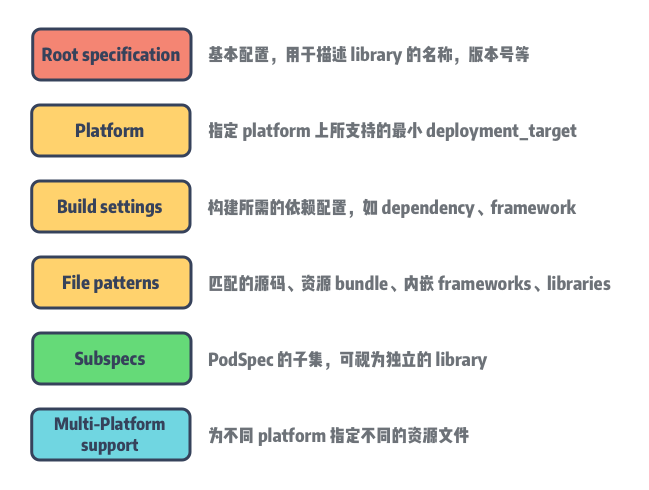
想了解更多的配置选项:传送门[6]。
Convention Over Configuration
说到配置,不得不提一下 CoC 约定大于配置。约定大于配置算是在软件工程较早出现的概念的了,大意是:为了简单起见,我们的代码需要按照一定的约定来编写(如代码放在什么目录,用什么文件名,用什么类名等)。这样既简化了配置文件,同时也降低了学习成本。
约定大于配置可以说是通过 Ruby on Rails[7] 发扬光大的。尽管它一直饱受争议,但是主流语言的依赖管理工具,如 Maven、npm等都遵循 CoC 进行不断演进的,因为 CoC 能够有效帮助开发者减轻选择的痛感,减少无意义的选择。一些新的语言也吸收了这个思想,比如 Go 语言。如果用 C/C++ 可能需要定义复杂的 Makefile 来定义编译的规则,以及如何运行测试用例,而在 Go 中这些都是约定好的。
举个 🌰 :Podfile 中是可以指定 pod library 所链接的 Xcode project,不过大多情况下无需配置,CocoaPods 会自动查找 Podfile 所在的同级目录下所对应的工程文件 .project 。
Spec 的核心数据结构
Specification
在数据结构上 Specification 与 TargetDefinition[8] 是类似的,同为多叉树结构。简化后的 Spec 的类如下:
require 'active_support/core_ext/string/strip.rb'
# 记录对应 platform 上 Spec 的其他 pod 依赖
require 'cocoapods-core/specification/consumer'
# 解析 DSL
require 'cocoapods-core/specification/dsl'
# 校验 Spec 的正确性,并抛出对应的错误和警告
require 'cocoapods-core/specification/linter'
# 用于解析 DSL 内容包含的配置信息
require 'cocoapods-core/specification/root_attribute_accessors'
# 记录一个 Pod 所有依赖的 Spec 来源信息
require 'cocoapods-core/specification/set'
# json 格式数据解析
require 'cocoapods-core/specification/json'

module Pod
  class Specification
    include Pod::Specification::DSL
    include Pod::Specification::DSL::Deprecations
    include Pod::Specification::RootAttributesAccessors
    include Pod::Specification::JSONSupport

    # `subspec` 的父节点
    attr_reader :parent
    # `Spec` 的唯一 id,由 name + version 的 hash 构成
    attr_reader :hash_value
    # 记录 `Spec` 的配置信息
    attr_accessor :attributes_hash
    # `Spec` 包含的 `subspec`
    attr_accessor :subspecs

    # 递归调用获取 Specification 的根节点
    def root
      parent ? parent.root : self
    end

  def hash
    if @hash_value.nil?
       @hash_value = (name.hash * 53) ^ version.hash
  end
      @hash_value
    end

    # ...
  end
end
Specification 同样用 map attributes_hash 来记录配置信息。
注意,这里的 parent 是为 subspec 保留的,用于指向其父节点的 Spec。
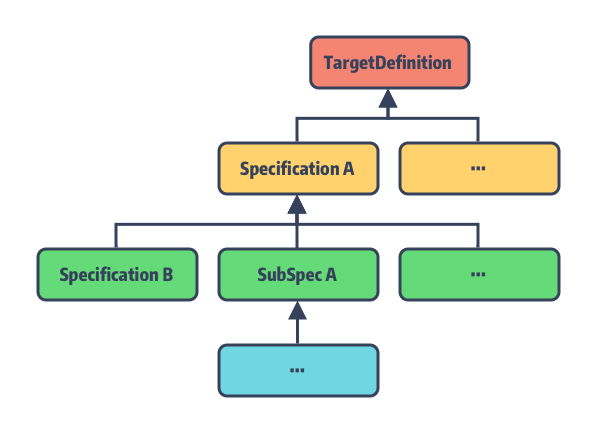
Subspecs
乍一听 Subspec 这个概念似乎有一些抽象,不过当你理解了上面的描述,就能明白什么是 Subspec 了。我们知道在 Xcode 项目中,target 作为最小的可编译单元,它编译后的产物为链接库或 framework。而在 CocoaPods 的世界里这些 targets 则是由Spec 文件来描述的,它还能拆分成一个或者多个 Subspec,我们暂且把它称为 Spec 的 子模块,子模块也是用Specification 类来描述的。
子模块可以单独作为依赖被引入到项目中。它有几个特点:
- 未指定
default_subspec的情况下,Spec的全部子模块都将作为依赖被引入; - 子模块会主动继承其父节点
Spec中定义的attributes_hash; - 子模块可以指定自己的源代码、资源文件、编译配置、依赖等;
- 同一
Spec内部的子模块是可以有依赖关系的; - 每个子模块在
pod push的时候是需要被 lint 通过的;
光听总结似乎还是云里雾里,祭出 QMUI 让大家感受一下:
Pod::Spec.new do |s|
  s.name             = "QMUIKit"
  s.version          = "4.2.1"
  # ...
  s.subspec 'QMUICore' do |ss|
    ss.source_files = 'QMUIKit/QMUIKit.h', 'QMUIKit/QMUICore', 'QMUIKit/UIKitExtensions'
    ss.dependency 'QMUIKit/QMUIWeakObjectContainer'
    ss.dependency 'QMUIKit/QMUILog'
  end

  s.subspec 'QMUIWeakObjectContainer' do |ss|
    ss.source_files = 'QMUIKit/QMUIComponents/QMUIWeakObjectContainer.{h,m}'
  end

  s.subspec 'QMUILog' do |ss|
    ss.source_files = 'QMUIKit/QMUIComponents/QMUILog/*.{h,m}'
  end

  s.subspec 'QMUIComponents' do |ss|
    ss.dependency 'QMUIKit/QMUICore'

    ss.subspec 'QMUIButton' do |sss|
      sss.source_files = 'QMUIKit/QMUIComponents/QMUIButton/QMUIButton.{h,m}'
    end
    # 此处省略 59 个 Components
  end
  # ...
end
不吹不黑,QMUI 是笔者见过国内开源作品中代码注释非常详尽且提供完整 Demo 的项目之一。
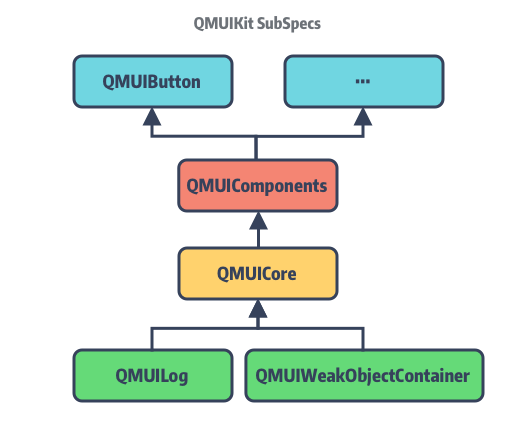
整个 QMUIKit 的 Spec 文件中,总共定义了 64 个 subspec 子模块,同时这些子模块之间还做了分层。比如QMUICore:
另外补充一点,CocoaPods 支持了不同类型的 SubSpec:
# lib/cocoapods-core/specification/dsl/attribute_support.rb
SUPPORTED_SPEC_TYPES = [:library, :app, :test].freeze
:app 和 :test 用于在项目中集成单元测试代码的 Subspec。
Podspec From JSON
有了上文 Podfile 的了解,这次我们对 Podspec 的文件加载会更加轻车熟路。首先是由 #from_file
方法进行文件路径和内容编码格式的检查,将加载的内容转入 #from_string:
def self.from_file(path, subspec_name = nil)
  path = Pathname.new(path)
  unless path.exist?
    raise Informative, "No Podspec exists at path `#{path}`."
  end
  string = File.open(path, 'r:utf-8', &:read)
  # Work around for Rubinius incomplete encoding in 1.9 mode
  if string.respond_to?(:encoding) && string.encoding.name != 'UTF-8'
    string.encode!('UTF-8')
  end
  from_string(string, path, subspec_name)
end

def self.from_string(spec_contents, path, subspec_name = nil)
  path = Pathname.new(path).expand_path
  spec = nil
  case path.extname
  when '.podspec'
    Dir.chdir(path.parent.directory? ? path.parent : Dir.pwd) do
      spec = ::Pod._eval_Podspec(spec_contents, path)
      unless spec.is_a?(Specification)
        raise Informative, "Invalid Podspec file at path `#{path}`."
      end
    end
  when '.json'
    spec = Specification.from_json(spec_contents)
  else
    raise Informative, "Unsupported specification format `#{path.extname}` for spec at `#{path}`."
  end

  spec.defined_in_file = path
  spec.subspec_by_name(subspec_name, true)
end
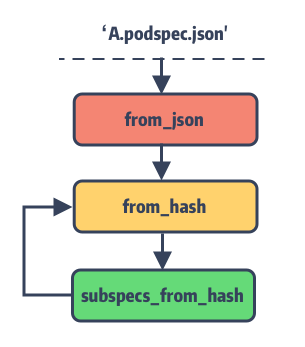
接着根据文件类型为 .podspec 和 .json 分别采用不同的解析方式。在 JSONSupport 模块内将#from_json 的逻辑拆成了两部分:
# `lib/cocoapods-core/specification/json.rb`
module Pod
  class Specification
    module JSONSupport
    # ①
    def self.from_json(json)
      require 'json'
      hash = JSON.parse(json)
      from_hash(hash)
    end
    # ②
    def self.from_hash(hash, parent = nil, test_specification: false, app_specification: false)
      attributes_hash = hash.dup
      spec = Spec.new(parent, nil, test_specification, :app_specification => app_specification)
      subspecs = attributes_hash.delete('subspecs')
      testspecs = attributes_hash.delete('testspecs')
      appspecs = attributes_hash.delete('appspecs')

      ## backwards compatibility with 1.3.0
      spec.test_specification = !attributes_hash['test_type'].nil?

      spec.attributes_hash = attributes_hash
      spec.subspecs.concat(subspecs_from_hash(spec, subspecs, false, false))
      spec.subspecs.concat(subspecs_from_hash(spec, testspecs, true, false))
      spec.subspecs.concat(subspecs_from_hash(spec, appspecs, false, true))

      spec
    end
    # ③
    def self.subspecs_from_hash(spec, subspecs, test_specification, app_specification)
      return [] if subspecs.nil?
      subspecs.map do |s_hash|
        Specification.from_hash(s_hash, spec,
                                :test_specification => test_specification,
                                :app_specification => app_specification)
      end
    end
  end
end
这里的逻辑也是比较简单:
- ① 将传入的字符串转换为 json;
- ② 将转换后的 json 转换为
Spec对象并将 json 转换为attributes_hash,同时触发 ③; - ③ 通过
self.subspecs_from_hash实现递归调用完成subspecs解析;
Tips: 方法 ② 里的 Spec 是对
Specification的别名。
Podspec From Ruby
QMUIKit.podspec 的文件内容,大家是否注意到其开头的声明:
Pod::Spec.new do |s|
  s.name             = "QMUIKit"
  s.source_files     = 'QMUIKit/QMUIKit.h'
  # ...
end
发现没 .podspec 文件就是简单直接地声明了一个 Specifiction 对象,然后通过 block 块定制来完成配置。像name、source_files 这些配置参数最终都会转换为方法调用并将值存入 attributes_hash中。这些方法调用的实现方式分两种:
- 大部分配置是通过方法包装器
attribute和root_attribute来动态添加的 setter 方法; - 对于复杂逻辑的配置则直接方法声明,如
subspec、dependency方法等(后续介绍)。
attribute wrappter
# `lib/cocoapods-core/specification/dsl.rb`
module Pod
  class Specification
    module DSL
      extend Pod::Specification::DSL::AttributeSupport
      # Deprecations must be required after include AttributeSupport
      require 'cocoapods-core/specification/dsl/deprecations'

      attribute :name,
                :required => true,
                :inherited => false,
                :multi_platform => false

      root_attribute :version,
                      :required => true
      # ...
    end
  end
end
可以看出 name 和 version 的方法声明与普通的不太一样,其实 attribute 和 root_attribute 是通过 Ruby 的方法包装器来实现的,感兴趣的同学看这里 「Python装饰器 与 Ruby实现[9]」。
Tips: Ruby 原生提供的属性访问器 ---
attr_accessor大家应该不陌生,就是通过包装器实现的。
这些装饰器所声明的方法会在其模块被加载时动态生成,来看其实现:
# `lib/cocoapods-core/specification/attribute_support.rb`
module Pod
  class Specification
    module DSL
      class << self
        attr_reader :attributes
      end

      module AttributeSupport
        def root_attribute(name, options = {})
          options[:root_only] = true
          options[:multi_platform] = false
          store_attribute(name, options)
        end

        def attribute(name, options = {})
          store_attribute(name, options)
        end

        def store_attribute(name, options)
          attr = Attribute.new(name, options)
          @attributes ||= {}
          @attributes[name] = attr
        end
      end
    end
  end
end
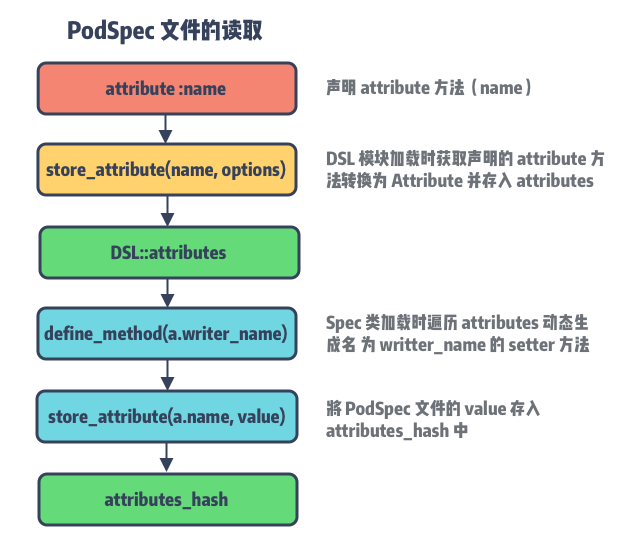
attribute 和 root_attribute 最终都走到了 store_attribute 保存在创建的 Attribute 对象内,并以配置的 Symbol 名称作为 KEY 存入 @attributes,用于生成最终的 attributes setter 方法。
最关键的一步,让我们回到 specification 文件:
# `/lib/coocapods-core/specification`
module Pod
  class Specification
    # ...

    def store_attribute(name, value, platform_name = nil)
      name = name.to_s
      value = Specification.convert_keys_to_string(value) if value.is_a?(Hash)
      value = value.strip_heredoc.strip if value.respond_to?(:strip_heredoc)
      if platform_name
        platform_name = platform_name.to_s
        attributes_hash[platform_name] ||= {}
        attributes_hash[platform_name][name] = value
      else
        attributes_hash[name] = value
      end
    end

    DSL.attributes.values.each do |a|
      define_method(a.writer_name) do |value|
        store_attribute(a.name, value)
      end
      if a.writer_singular_form
        alias_method(a.writer_singular_form, a.writer_name)
      end
    end
  end
end
Specification 类被加载时,会先遍历 DSL module 加载后所保存的 attributes,再通过 define_method动态生成对应的配置方法。最终数据还是保存在 attributes_hash 中。
Attribute
Attribute 是为了记录该配置的相关信息,例如,记录 Spec 是否为根节点、Spec 类型、所支持的 platforms、资源地址通配符等。
- 以
root_attribute包装的配置仅用于修饰Spec根节点,比如版本号version只能由Spec根节点来设置,另外还有source、static_framework、module_name等; - 以
attribute包装的配置则不限是否为Spec根结点。我们以 AFNetworking 的source_files为例:由于在 macOS 和 watchOS 上并没有 UIKit framwork,因此它单独将 UIKit 的相关功能拆分到了AFNetworking/UIKit中;
Pod::Spec.new do |s|
  # ...
  s.subspec 'NSURLSession' do |ss|
  # ...
  end
  s.subspec 'UIKit' do |ss|
    ss.ios.deployment_target = '9.0'
    ss.tvos.deployment_target = '9.0'
    ss.dependency 'AFNetworking/NSURLSession'
    ss.source_files = 'UIKit+AFNetworking'
  end
end
#subspec
除了 attribute 装饰器声明的 setter 方法,还有几个自定义的方法是直接通过 eval 调用的。
def subspec(name, &block)
  subspec = Specification.new(self, name, &block)
  @subspecs << subspec
  subspec
end

def test_spec(name = 'Tests', &block)
  subspec = Specification.new(self, name, true, &block)
  @subspecs << subspec
  subspec
end

def app_spec(name = 'App', &block)
  appspec = Specification.new(self, name, :app_specification => true, &block)
  @subspecs << appspec
  appspec
end
这三种不同类型的 Subspec 经 eval 转换为对应的 Specification 对象,注意这里初始化后都将 parent 节点指向self 同时存入 @subspecs 数组中,完成 SubSpec 依赖链的构造。
#dependency
对于其他 pod 依赖的添加我们通过 dependency 方法来实现:
def dependency(*args)
  name, *version_requirements = args
  # dependency args 有效性校验 ...
  attributes_hash['dependencies'] ||= {}
  attributes_hash['dependencies'][name] = version_requirements
  unless whitelisted_configurations.nil?
    # configuration 白名单过滤和校验 ...
    attributes_hash['configuration_pod_whitelist'] ||= {}
    attributes_hash['configuration_pod_whitelist'][name] = whitelisted_configurations
  end
end
dependency 方法内部主要是对依赖有效性的校验,限于篇幅这里不列出实现,核心要点如下:
- 检查依赖循环,根据
Spec名称判断Spec与自身,Spec与SubSpec之间是否存在循环依赖; - 检查依赖来源,
Podspec中不支持:git或:path形式的来源指定,如需设定可通过Podfile来修改; - 检查 configuation 白名单,目前仅支持 Xcode 默认的
Debug和Release的 configuration 配置;
创建并使用你的 Pod
最后一节来两个实践:创建 Pod 以及在项目中使用 SubSpecs。
Pod 创建
pod 相关使用官方都提供了很详尽的都文档,本小节仅做介绍。
1. 创建 Pod
仅需一行命令完成 Pod 创建(文档[10]):
$ pod lib create `NAME`
之后每一步都会输出友好提示,按照提示选择即可。在添加完 source code 和 dependency 之后,你还可以在 CocoaPods 为你提供的Example 项目中运行和调试代码。
准备就绪后,可以通过以下命令进行校验,检查 Pod 正确性:
$ pod lib lint `[Podspec_PATHS ...]`
2. 发布 Pod
校验通过后就可以将 Pod 发布了,你可以将 PodSepc 发布到 Master Repo 上,或者发布到内部的 Spec Repo 上。
CocoaPods Master Repo
如果发布的 CocoaPods 的主仓库,那么需要通过 CocoaPods 提供的 Trunk 命令:
$ pod trunk push `[NAME.podspec]`
不过使用前需要先通过邮箱注册,详情查看文档[11]。
Private Spec Repo
对于发布到私有仓库的,可通过 CocoaPods 提供的 Repo 命令:
$ pod repo push `REPO_NAME` `SPEC_NAME.podspec`
文档详情 --- 传送门[12]。
SubSpecs In Podfile
在 SubSpec 一节提到过,在 CocoaPods 中 SubSpec 是被作为单独的依赖来看待的,这里就借这个实操来证明一下。
在上文的实践中,我们知道每一个 Pod 库对应为 Xcode 项目中的一个个 target,那么当明确指定部分 SubSpec时,它们也将被作为独立的 target 进行编译。不过这里需要明确一下使用场景:
1. Single Target
当主项目中仅有一个 target 或多个 target 引用了同一个 pod 库的多个不同 SubSpec 时,生成的 target
只会有一个。我们以 QMUIKit 为例,项目 Demo.project 下的 Podfile 配置如下:
target 'Demo' do
  pod 'QMUIKit/QMUIComponents/QMUILabel', :path => '../QMUI_iOS'
  pod 'QMUIKit/QMUIComponents/QMUIButton', :path => '../QMUI_iOS'
end
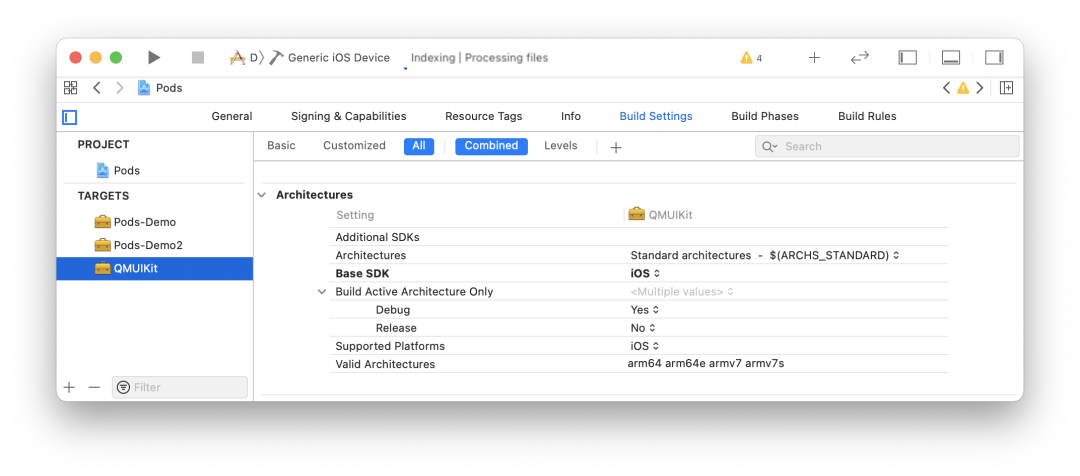
此时 Pods.project 下的 QMUIKit 的 target 名称为 QMUIKit。
2. Multiple Target
如果我们的主项目中存在多个 target 且使用同一个 pod 库的不同 SubSpec 时,结果则有所不同。
现在我们在步骤 1 的基础上添加如下配置:
target 'Demo2' do
 pod 'QMUIKit/QMUIComponents/QMUILog', :path => '../QMUI_iOS'
end
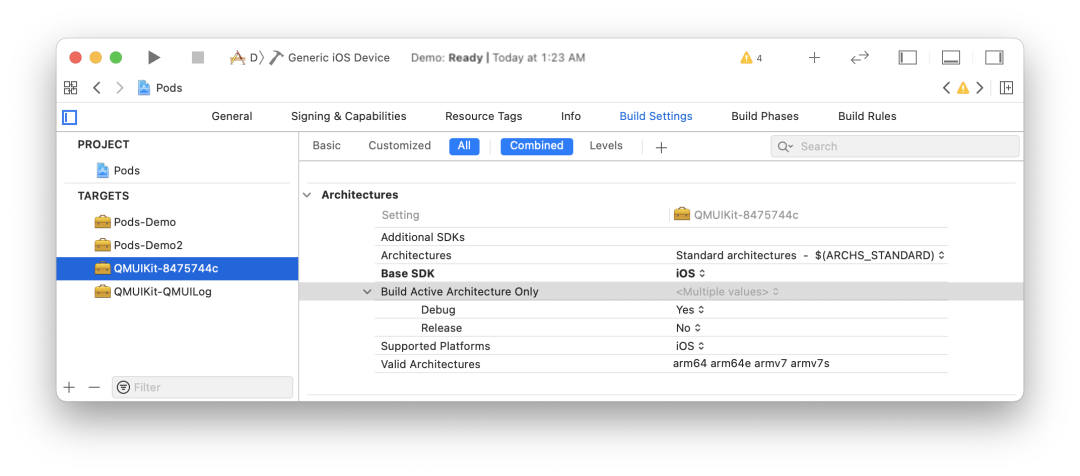
可以发现,CocoaPods 为每个 tareget 对应的 SubSpec 依赖生成了不同的 QMUIKit targets。
Tips: 当主工程 target 依赖的
Subspec数量过多导致的名称超过 50 个字符,将会对 subspec 后缀做摘要处理作为唯一标识符。
总结
本文是 CocoaPods-Core 的第二篇,重点介绍了 Podspec 的类构成和解析实现,总结如下:
- 初探
Podspec让我们对其能力边界和配置分类有了更好的了解; - 深入
Podspec我们发现其数据结构同Podfile类似,都是根据依赖关系建立对应的树结构; Podspec针对单个库的源码和资源提供了更精细化的管理,SubSpec结构的推出让大型 library 的内部分层提供了很好的工具;- 装饰器模式结合 Ruby 的动态特性,让
Podspec的 DSL 特性的实现起来更加优雅;
知识点问题梳理
这里罗列了四个问题用来考察你是否已经掌握了这篇文章,如果没有建议你加入收藏 再次阅读:
- 说说
Podspec所支持的配置有几类,分别具有哪些功能 ? Podspec与SubSpec之间有哪些关系 ?- 说说
SubSpec的特点以及作用 ? - 谈谈
Podspec中的 DSL 解析与Podfile的解析实现有哪些区别 ?
参考资料
[1]Podfile 解析逻辑: /2020/09/16/cocoapods-story-4.html [2]CocoaPods-Core:https://link.zhihu.com/?target=https%3A//github.com/CocoaPods/Core [3]QMUIKit: https://github.com/Tencent/QMUI_iOS/blob/master/QMUIKit.podspec [4]CDN Service: https://cdn.cocoapods.org/ [5]Speces Repo: https://github.com/CocoaPods/Specs [6]传送门: https://guides.cocoapods.org/syntax/Podspec.html [7]Ruby on Rails: https://www.wikiwand.com/en/Ruby_on_Rails [8]TargetDefinition: https://looseyi.github.io/post/sourcecode-cocoapods/04-cocoapods-podfile/#targetdefinition [9]Python装饰器 与 Ruby实现: https://github.com/mxchenxiaodong/haha_day/issues/3# [10]文档: https://guides.cocoapods.org/making/using-pod-lib-create.html [11]文档: https://guides.cocoapods.org/making/getting-setup-with-trunk.html [12]传送门: https://guides.cocoapods.org/making/private-cocoapods.html
原文出处:6. PodSpec 管理策略
引子
本文是 Core 的最后一篇,它与另外两篇文章Podfile 解析逻辑 和PodSpec 文件分析 共同支撑起 CocoaPods 世界的骨架。
CocoaPods-Core 这个库之所以被命名为 Core 就是因为它包含了 Podfile -> Spec Repo -> PodSpec这条完整的链路,将散落各地的依赖库连接起来并基于此骨架不断地完善功能。
从提供各种便利的命令行工具,到依赖库与主项目的自动集成,再到提供多样的 Xcode 编译配置、单元测试、资源管理等等,最终形成了我们所见的CocoaPods。
今天我们就来聊聊 Spec Repo 这个 PodSpec 的聚合仓库以及它的演变与问题。
Source
作为 PodSpec 的聚合仓库,Spec Repo 记录着所有 pod 所发布的不同版本的 PodSpec 文件。该仓库对应到Core 的数据结构为 Source,即为今天的主角。
整个 Source 的结构比较简单,它基本是围绕着 Git 来做文章,主要是对 PodSpec 文件进行各种查找更新操作。结构如下:
# 用于检查 spec 是否符合当前 Source 要求
require 'cocoapods-core/source/acceptor'
# 记录本地 source 的集合
require 'cocoapods-core/source/aggregate'
# 用于校验 source 的错误和警告
require 'cocoapods-core/source/health_reporter'
# source 管理器
require 'cocoapods-core/source/manager'
# source 元数据
require 'cocoapods-core/source/metadata'

module Pod
  class Source
    # 仓库默认的 Git 分支
    DEFAULT_SPECS_BRANCH = 'master'.freeze
    # 记录仓库的元数据
    attr_reader :metadata
    # 记录仓库的本地地址
    attr_reader :repo
    # repo 仓库地址 ~/.cocoapods/repos/{repo_name}
    def initialize(repo)
      @repo = Pathname(repo).expand_path
      @versions_by_name = {}
      refresh_metadata
    end
    # 读取 Git 仓库中的 remote url 或 .git 目录
    def url
      @url ||= begin
        remote = repo_git(%w(config --get remote.origin.url))
        if !remote.empty?
          remote
        elsif (repo + '.git').exist?
          "file://#{repo}/.git"
        end
      end
    end

    def type
      git? ? 'git' : 'file system'
    end
    # ...
  end
end
Source 还有两个子类 CDNSource 和 TrunkSource,TrunkSouce 是 CocoaPods 的默认仓库。
在版本 1.7.2 之前 Master Repo 的 URL 指向为 GitHub 的 Specs 仓库[1],这也是造成我们每次 pod install 或 pod update 慢的原因之一。
它不仅保存了近 10 年来 PodSpec 文件同时还包括 Git 记录,再加上墙的原因,每次更新都非常痛苦。
而在 1.7.2 之后 CocoaPods 的默认 Source 终于改为了 CDN 指向,同时支持按需下载,缓解了 pod 更新和磁盘占用过大问题。
Source 的依赖关系如下:
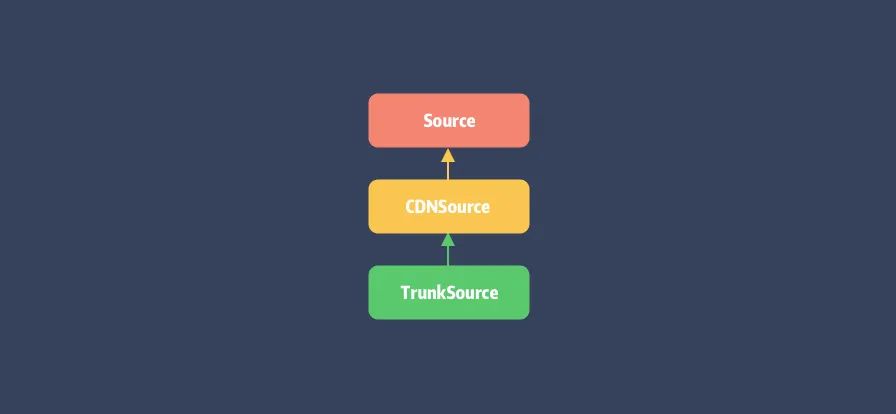
回到 Source 来看其如何初始化的,可以看到其构造函数 #initialize(repo) 将传入的 repo 地址保存后,直接调用了#refresh_metadata 来完成元数据的加载:
def refresh_metadata
  @metadata = Metadata.from_file(metadata_path)
end

def metadata_path
  repo + 'CocoaPods-version.yml'
end
Metadata
Metadata 是保存在 repo 目录下,名为 CocoaPods-version.yml 的文件,用于记录该 Source 所支持的CocoaPods 的版本以及仓库的分片规则。
autoload :Digest, 'digest/md5'
require 'active_support/hash_with_indifferent_access'
require 'active_support/core_ext/hash/indifferent_access'

module Pod
  class Source
    class Metadata
      # 最低可支持的 CocoaPods 版本,对应字段 `min`
      attr_reader :minimum_cocoapods_version
      # 最高可支持的 CocoaPods 版本,对应字段 `max`
      attr_reader :maximum_cocoapods_version
      # 最新 CocoaPods 版本,对应字段 `last`
      attr_reader :latest_cocoapods_version
      # 规定截取的关键字段的前缀长度和数量
      attr_reader :prefix_lengths
      # 可兼容的 CocoaPods 最新版本
      attr_reader :last_compatible_versions
      # ...
    end
  end
end
这里以笔者 💻 环境中 Master 仓库下的 CocoaPods-version.yml 文件内容为例:
---
min: 1.0.0
last: 1.10.0.beta.1
prefix_lengths:
- 1
- 1
- 1
最低支持版本为 1.0.0,最新可用版本为 1.10.0.beta.1,以及最后这个 prefix_lengths 为 [1, 1, 1]的数组。那么这个 prefix_lengths 的作用是什么呢 ?
要回答这个问题,我们先来看一张 Spec Repo 的目录结构图:
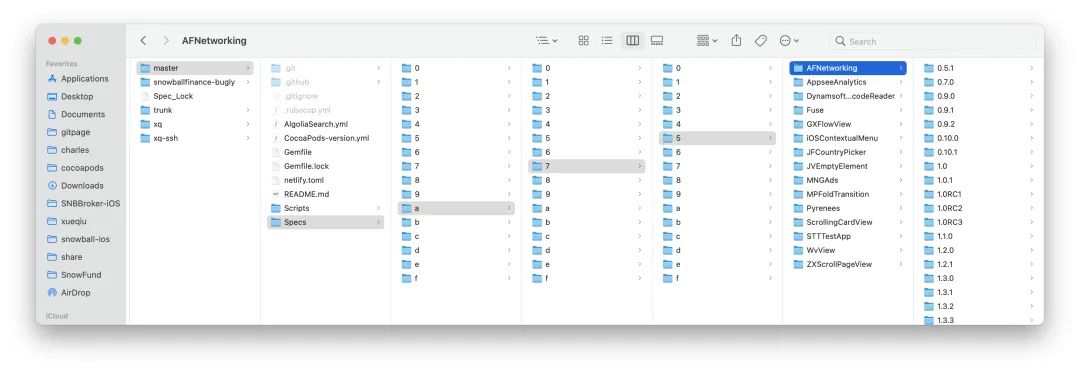
再 🤔 另外一个问题,为什么 CocoaPods 生成的目录结构是这样 ?
其实在 2016 年 CocoaPods Spec 仓库下的所有文件都在同级目录,不像现在这样做了分片。这个是为了解决当时用户的吐槽:GitHub下载慢[2],最终解决方案的结果就如你所见:将 Git 仓库进行了分片。
那么问题来了,为什么分片能够提升 GitHub 下载速度?
很重要的一点是 CocoaPods 的 Spec Repo 本质上是 Git 仓库,而 Git 在做变更管理的时候,会记录目录的变更,每个子目录都会对应一个 Git model。
而当目录中的文件数量过多的时候,Git 要找出对应的变更就变得十分困难。有兴趣的同学可以查看官方说明[3]。
另外再补充一点,在 Linux 中最经典的一句话是:一切皆文件,不仅普通的文件和目录,就连块设备、管道、socket 等,也都是统一交给文件系统管理的。
也就是说就算不用 Git 来管理 Specs 仓库,当目录下存在数以万计的文件时,如何高效查找目标文件也是需要考虑的问题。
备注:关于文件系统层次结构有兴趣的同学可以查看FHS 标准[4],以及这篇文章:[「一口气搞懂「文件系统」,就靠这 25 张图了」](https://mp.weixin.qq.com/s?__biz=MzUxODAzNDg4NQ%3D%3D&idx=1&mid=2247485446&scene=21&sn=2c525f008622b98bc08a66f2b4dcfee8#wechat_redirect)
回到 CocoaPods,如何对 Master 仓库目录进行分片就涉及到 metadata 类中的关键方法:
def path_fragment(pod_name, version = nil)
  prefixes = if prefix_lengths.empty?
               []
             else
               hashed = Digest::MD5.hexdigest(pod_name)
               prefix_lengths.map do |length|
                 hashed.slice!(0, length)
               end
             end
  prefixes.concat([pod_name, version]).compact
end
#path_fragment 会依据 pod_name 和 version 来生成 pod 对应的索引目录:
- 首先对 pod_name 进行 MD5 计算获取摘要;
- 遍历
prefix_lengths对生成的摘要不断截取指定的长度作为文件索引。
以 AFNetworking 为例:
$ Digest::MD5.hexdigest('AFNetworking')
"a75d452377f3996bdc4b623a5df25820"
由于我们的 prefix_lengths 为 [1, 1, 1] 数组,那么它将会从左到右依次截取出一个字母,即:a、7、5,这三个字母作为索引目录,它正好符合我们 ???? 目录结构图中 AFNetworking 的所在位置。
Versions
要找到 Podfile 中限定版本号范围的 PodSpec 文件还需要需要最后一步,获取当前已发布的 Versions 列表,并通过比较Version 得出最终所需的 PodSpec 文件。
在上一步已通过 metadata 和 pod_name 计算出 pod 所在目录,接着就是找到 pod 目录下的 Versions 列表:
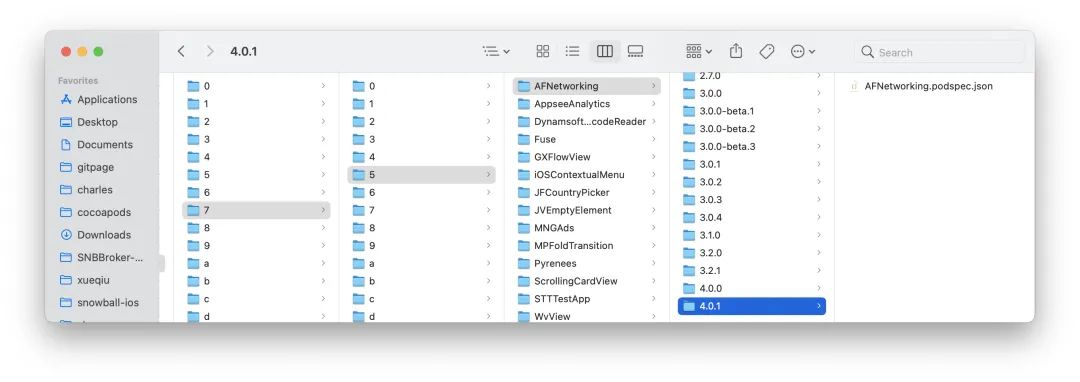
获取 Versions:
def versions(name)
  return nil unless specs_dir
  raise ArgumentError, 'No name' unless name
  pod_dir = pod_path(name)
  return unless pod_dir.exist?
  @versions_by_name[name] ||= pod_dir.children.map do |v|
    basename = v.basename.to_s
    begin
      Version.new(basename) if v.directory? && basename[0, 1] != '.'
    rescue ArgumentError
    raise Informative, 'An unexpected version directory ...'
    end
  end.compact.sort.reverse
end
该方法重点在于将 pod_dir 下的每个目录都转换成为了 Version 类型,并在最后进行了 sort 排序。
#versions方法主要在pod search命令中被调用,后续会介绍。
来搂一眼 Version 类:
class Version < Pod::Vendor::Gem::Version
  METADATA_PATTERN = '(\+[0-9a-zA-Z\-\.]+)'
  VERSION_PATTERN = "[0-9]+(\\.[0-9a-zA-Z\\-]+)*#{METADATA_PATTERN}?"
  # ...
end
该 Version 继承于 Gem::Version[6] 并对其进行了扩展,实现了语义化版本号的标准,sort 排序也是基于语义化的版本来比较的,这里我们稍微展开一下。
Semantic Versioning
语义化版本号(Semantic Versioning[7] 简称:SemVer)绝对是依赖管理工具绕不开的坎。
语义化的版本就是让版本号更具语义化,可以传达出关于软件本身的一些重要信息而不只是简单的一串数字。
我们每次对 Pod 依赖进行更新,最后最重要的一步就是更新正确的版本号,一旦发布出去,再要更改就比较麻烦了。
SemVer[8] 是由 Tom Preston-Werner 发起的一个关于软件版本号的命名规范,该作者为 Gravatars 创办者同时也是GitHub 联合创始人。
那什么是语义化版本号有什么特别呢 ?我们以 AFNetworking 的 release tag 示例:
3.0.0
3.0.0-beta.1
3.0.0-beta.2
3.0.0-beta.3
3.0.1
这些 tags 并非随意递增的,它们背后正是遵循了语义化版本的标准。
基本规则
- 软件的版本通常由三位组成,如:X.Y.Z。
- 版本是严格递增的,
- 在发布重要版本时,可以发布 alpha, rc 等先行版本,
- alpha 和 rc 等修饰版本的关键字后面可以带上次数和 meta 信息,
版本格式:
主版本号.次版本号.修订号
版本号递增规则如下:
| Code status | Stage | Example version |
|---|---|---|
| 新品首发 | 从 1.0.0 开始 | 1.0.0 |
| 向后兼容的 BugFix | 增加补丁号 Z | 1.0.1 |
| 向后兼容的 Feature | 增加次版本号 Y | 1.1.0 |
| 向后不兼容的改动 | 增加主版本号 X | 2.0.0 |
| 重要版本的预览版 | 补丁号后添加 alpha, rc | 2.1.0-rc.0 |
关于 CocoaPods 的 Version 使用描述,传送门[9]。
CDNSource
CocoaPods 在 1.7.2 版本正式将 Master 仓库托管到 Netlify 的 CDN 上,当时关于如何支持这一特性的文章和说明铺天盖地,这里还是推荐大家看官方说明[10]。另外,当时感受是似乎国内的部分 iOS 同学都炸了,各种标题党:什么最完美__的升级 等等。
所以这里明确一下,对于 CocoaPods 的 Master 仓库支持了 CDN 的行为,仅解决了两个问题:
- 利用 CDN 节点的全球化部署解决内容分发慢,提高 Specs 资源的下载速度。
- 通过 Specs 按需下载摆脱了原有 Git Repo 模式下本地仓库的磁盘占用过大,操作卡的问题。
然而,仅仅对 PodSpec 增加了 CDN 根本没能解决 GFW 导致的 GitHub 源码校验、更新、下载慢的问题。只能说路漫漫其修远兮。
PS:作为 iOS 工程师,就经常被前端同学吐槽:你看这 CocoaPods 也太垃圾了吧!!!一旦删掉
Pods目录重新 install就卡半天,缓存基本不生效,哪像 npm 多快 balabala ...
先来看 CDNSource 结构:
require 'cocoapods-core/source'
# ...
module Pod
  class CDNSource < Source
    def initialize(repo)
      # 标记是否正在同步文件
      @check_existing_files_for_update = false
      # 记录时间用于对比下载文件的新旧程度,以确认是否需要更新保存所下的资源
      @startup_time = Time.new
      # 缓存查询过的 PodSpec 资源
      @version_arrays_by_fragment_by_name = {}
      super(repo)
    end

    def url
      @url ||= File.read(repo.join('.url')).chomp.chomp('/') + '/'
    end

    def type
      'CDN'
    end
    # ...
  end
end
Source 类是基于 GitHub Repo 来同步更新 PodSpec,而 CDNSource 则是基于 CDN 服务所返回的Response,因此将 Source 类的大部分方法重写了一个遍,具体会在 SourceManager 一节来展开。
最后看一下 TrunkSource 类:
module Pod
  class TrunkSource < CDNSource
    # 新版落盘后仓库名称
    TRUNK_REPO_NAME = 'trunk'.freeze
    TRUNK_REPO_URL = 'https://cdn.cocoapods.org/'.freeze
    def url
      @url ||= TRUNK_REPO_URL
      super
    end
  end
end
核心就是重写了返回的 url,由于旧版 Spec 仓库名称为 master 为了加以区分,CDN 仓库则改名为 trunk。
Source Manager
Manager 作为 source 的管理类,其主要任务为 source 的添加和获取,而对 PodSpec 文件的更新和查找行为则交由source 各自实现。不过由于一个 pod 库可能对应多个不同的 source,这里又产生出 Aggregate 类来统一 PodSpec
的查询。
它们的关系如下:
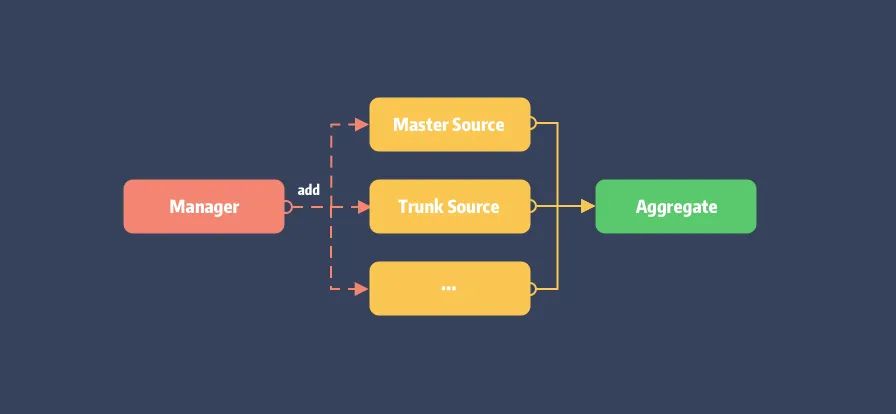
Manager 实现:
module Pod
  class Source
    class Manager
      attr_reader :repos_dir

      def initialize(repos_dir)
        @repos_dir = Pathname(repos_dir).expand_path
      end

      def source_repos
        return [] unless repos_dir.exist?
        repos_dir.children.select(&:directory?).sort_by { |d| d.basename.to_s.downcase }
      end

      def aggregate
        aggregate_with_repos(source_repos)
      end

      def aggregate_with_repos(repos)
        sources = repos.map { |path| source_from_path(path) }
        @aggregates_by_repos ||= {}
        @aggregates_by_repos[repos] ||= Source::Aggregate.new(sources)
      end

      def all
        aggregate.sources
      end
      # ...
    end
  end
end
Manager 类的初始化仅需要传入当前 repos 目录,即 ~/.cocoapods/repos,而 Aggregate 的生成则保存repos_dir 了目录下的 Source,用于后续处理。
先看 Source 的生成,在 #source_from_path 中:
def source_from_path(path)
  @sources_by_path ||= Hash.new do |hash, key|
    hash[key] = case
                when key.basename.to_s == Pod::TrunkSource::TRUNK_REPO_NAME
                  TrunkSource.new(key)
                when (key + '.url').exist?
                  CDNSource.new(key)
                else
                  Source.new(key)
                end
  end
  @sources_by_path[path]
end
以 repos_dir 下的目录名称来区分类型,而 CDNSource 则需要确保其目录下存在名为 .url 的文件。同时会对生成的 source进行缓存。
最后看 Aggregate 结构,核心就两个 search 方法:
module Pod
  class Source
    class Aggregate
      attr_reader :sources

      def initialize(sources)
        raise "Cannot initialize an aggregate with a nil source: (#{sources})" if sources.include?(nil)
        @sources = sources
      end

      # 查询依赖对应的 specs
      def search(dependency) ... end

      # 查询某个 pod 以发布的 specs
      def search_by_name(query, full_text_search = false) ... end

      # ...
  end
end
Source 源起
本节我们来谈谈 source 是如何添加到 repo_dir 目录下的。
由前面的介绍可知,每个 source 中自带 url,在 Source 类中 url 读取自 Git 仓库的 remote.origin.url或本地 .git 目录,而在 CDNSource 中 url 则是读取自当前目录下的 .url 文件所保存的 URL 地址。
那 CDNSource 的 .url 文件是在什么时候被写入的呢 ?
这需要从 Podfile 说起。很多老项目的 Podfile 开头部分大都会有一行或多行 source 命令:
source 'https://github.com/CocoaPods/Specs.git'
source 'https://github.com/artsy/Specs.git'
用于指定项目中 PodSpec 的查找源,这些指定源最终会保存在 ~/.cocoapods/repos 目录下的仓库。
当敲下 pod install 命令后,在 #resolve_dependencies 阶段的依赖分析中将同时完成 sources 的初始化。
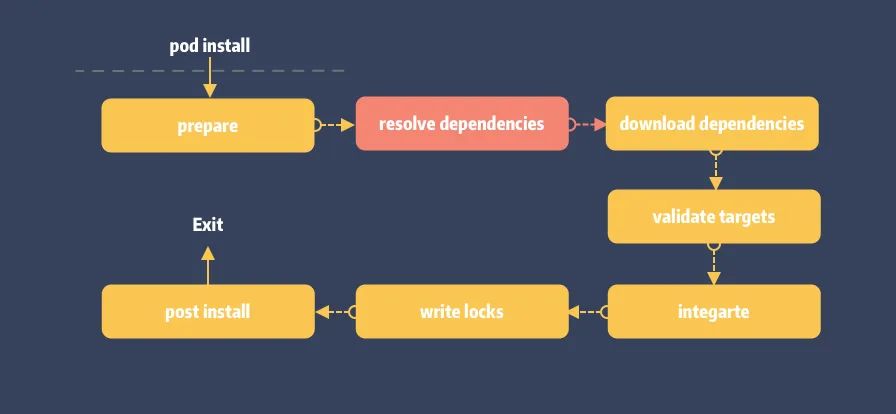
# lib/cocoapods/installer/analyzer.rb
def sources
  @sources ||= begin
    # 省略获取 podfile、plugins、dependencies 的 source url ...
    sources = ...

    result = sources.uniq.map do |source_url|
      sources_manager.find_or_create_source_with_url(source_url)
    end
    unless plugin_sources.empty?
      result.insert(0, *plugin_sources)
      plugin_sources.each do |source|
        sources_manager.add_source(source)
      end
    end
    result
  end
end
获取 sources url 之后会通过 sources_manager 来完成 source 更新,逻辑在 CocoaPods 项目的 Manager扩展中:
# lib/cocoapods/sources_manager.rb
module Pod
  class Source
    class Manager

      def find_or_create_source_with_url(url)
        source_with_url(url) || create_source_with_url(url)
      end

      def create_source_with_url(url)
        name = name_for_url(url)
        is_cdn = cdn_url?(url)
    # ...
        begin
          if is_cdn
            Command::Repo::AddCDN.parse([name, url]).run
          else
            Command::Repo::Add.parse([name, url]).run
          end
        rescue Informative => e
          raise Informative, # ...
        ensure
          UI.title_level = previous_title_level
        end
        source = source_with_url(url)
        raise "Unable to create a source with URL #{url}" unless source
        source
      end
      # ...
    end
  end
end
查找会先调用 #source_with_url 进行缓存查询,如未命中则会先下载 Source 仓库,结束后重刷 aggreate 以更新source。
# lib/cocoapods-core/source/manager.rb

def source_with_url(url)
  url = canonic_url(url)
  url = 'https://github.com/cocoapods/specs' if url =~ %r{github.com[:/]+cocoapods/specs}
  all.find do |source|
    source.url && canonic_url(source.url) == url
  end
end

def canonic_url(url)
  url.downcase.gsub(/\.git$/, '').gsub(%r{\/$}, '')
end
另外,仓库的下载的则会通过 #cdn_url? 方法区分,最后的下载则包裹在两个命令类中,概括如下:
- Repo::AddCDN:即
pod repo add-cdn命令,仅有的操作是将 url 写入.url文件中。 - Repo::Add:即
pod repo add命令,对于普通类型的 Source 仓库下载本质就是git clone操作。
简化后源的添加流程如下:
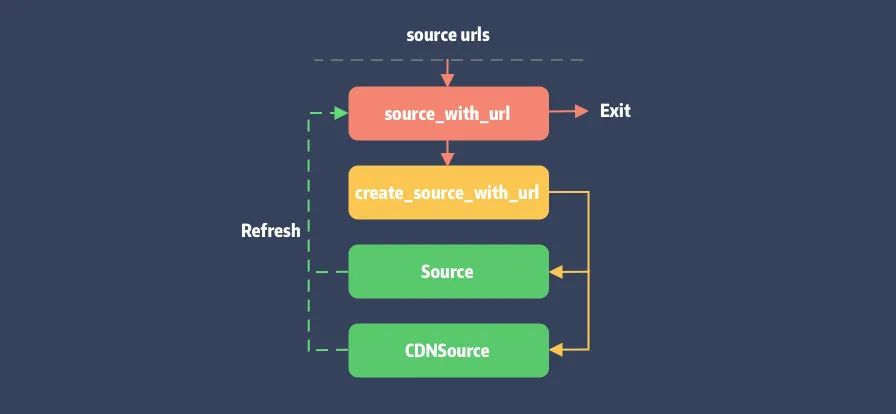
PodSpec 查询
同样在 #resolve_dependencies 的依赖仲裁阶段,当 Molinillo 依赖仲裁开始前,会触发缓存查询#find_cached_set 并最终调用到 Aggregate 的 #search。完整调用栈放在 gist[11] 上。
我们来看看 #search 入口:
# lib/cocoapods-core/source/aggregate.rb

def search(dependency)
  found_sources = sources.select { |s| s.search(dependency) }
  unless found_sources.empty?
    Specification::Set.new(dependency.root_name, found_sources)
  end
end
Aggregate 先遍历当前 sources 并进行 dependency 查找。由于 Git 仓库保存了完整的PodSpecs,只要能在分片目录下查询到对应文件即可,最终结果会塞入 Specification::Set 返回。
Specification::Set记录了当前 pod 关联的 Source,一个 pod 可能存在与多个不同的 Spec 仓库 中。
CDN 仓库查询
CDNSource 重写了 #search 实现:
# lib/cocoapods-core/cdn_source.rb

def search(query)
  unless specs_dir
    raise Informative, "Unable to find a source named: `#{name}`"
  end
  if query.is_a?(Dependency)
    query = query.root_name
  end

  fragment = pod_shard_fragment(query)
  ensure_versions_file_loaded(fragment)
  version_arrays_by_name = @version_arrays_by_fragment_by_name[fragment] || {}

  found = version_arrays_by_name[query].nil? ? nil : query

  if found
    set = set(query)
    set if set.specification_name == query
  end
end
逻辑两步走:
- 通过
#ensure_versions_file_loaded检查all_pods_versions文件,如果不存在会进行下载操作。 - 如果当前 source 包含查询的 pod,会创建
Specification::Set作为查询结果,并在#specification_name方法内完成PodSpec的检查和下载。
1. all_pods_versions 文件下载
依据前面提到的分片规则会将 pod 名称 MD5 分割后拼成 URL。
以 AFNetworking 为例,经 #pod_shard_fragment 分割后获取的 fragment 为 [a, 7, 5],则拼接后的 URL 为
https://cdn.cocoapods.org/all_pods_versions_a_7_5.txt,下载后的内容大致如下:
AFNetworking/0.10.0/0.10.1/.../4.0.1
AppseeAnalytics/2.4.7/2.4.8/2.4.8.0/...
DynamsoftBarcodeReader/7.1.0/...
...
所包含的这些 pod 都是分片后得到的相同的地址,因此会保存在同一份 all_pods_versions 中。
def ensure_versions_file_loaded(fragment)
  return if !@version_arrays_by_fragment_by_name[fragment].nil? && !@check_existing_files_for_update
  index_file_name = index_file_name_for_fragment(fragment)
  download_file(index_file_name)
  versions_raw = local_file(index_file_name, &:to_a).map(&:chomp)
  @version_arrays_by_fragment_by_name[fragment] = versions_raw.reduce({}) do |hash, row|
    row = row.split('/')
    pod = row.shift
    versions = row
    hash[pod] = versions
    hash
  end
end

def index_file_name_for_fragment(fragment)
  fragment_joined = fragment.join('_')
  fragment_joined = '_' + fragment_joined unless fragment.empty?
  "all_pods_versions#{fragment_joined}.txt"
end
另外每一份 pods_version 都会对应生成一个文件用于保存 ETag,具体会在下一节会介绍。
2. PodSpec 文件下载
#specification_name 将从 all_pods_versions 索引文件中找出该 pod 所发布的版本号,依次检查下载对应版本的PodSpec.json 文件。
module Pod
  class Specification
    class Set
      attr_reader :name
      attr_reader :sources

      def specification_name
        versions_by_source.each do |source, versions|
          next unless version = versions.first
          return source.specification(name, version).name
        end
        nil
      end

      def versions_by_source
        @versions_by_source ||= sources.each_with_object({}) do |source, result|
          result[source] = source.versions(name)
        end
      end
      # ...
    end
  end
end
绕了一圈后回到 Source 的 #versions 方法,由于 CDN Source 不会全量下载 pod 的 PodSpec 文件,在#version[12] 的检查过程会进行下载操作。
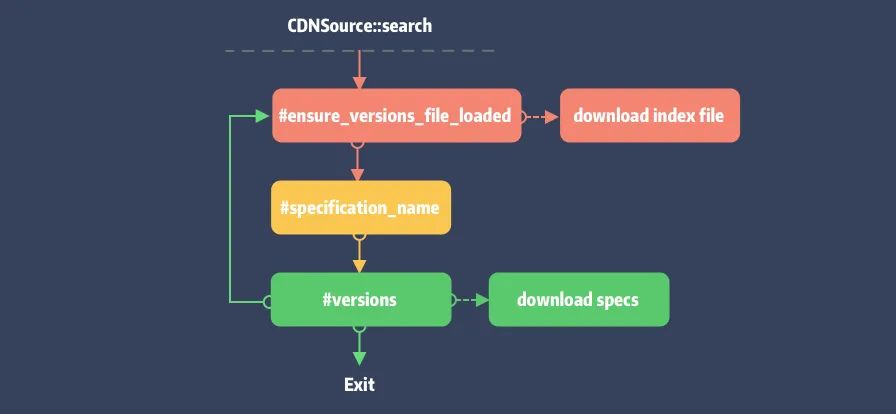
Pod Search 查询命令
CocoaPods 还提供了命令行工具 cocoapods-search 用于已发布的 PodSpec 查找:
$ pod search `QUERY`
它提供了 Web 查询和本地查询。本地查询则不同于 #search,它需要调用 Aggregate 的 #search_by_name ,其实现同#search 类似,最终也会走到 Source 的 #versions[13] 方法。
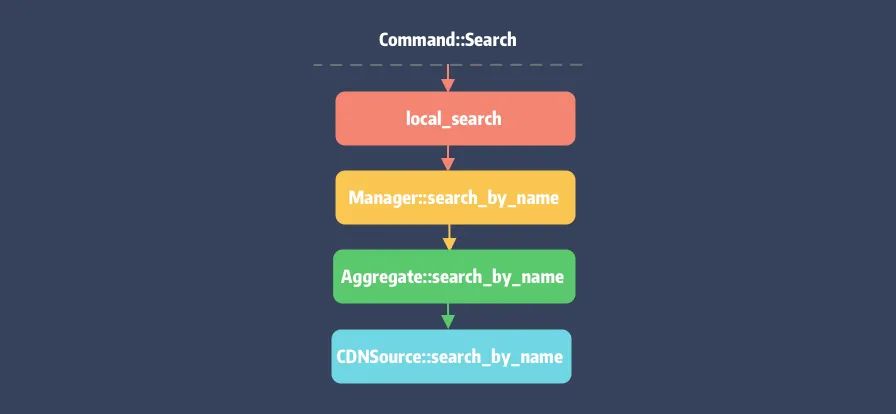
注意,Gti 仓库的
#search_by_name查询仍旧为文件查找,不会调用其#versions方法。
Repo 更新
pod install 执行过程如果带上了 \--repo-update 命令则在 #resolve_dependencies 阶段会触发#update_repositories 更新 Spec 仓库:
# lib/cocoapods/installer/analyzer.rb

def update_repositories
  sources.each do |source|
    if source.updateable?
      sources_manager.update(source.name, true)
    else
      UI.message "Skipping ..."
    end
  end
  @specs_updated = true
end
不过 #update 的实现逻辑在 CocoaPods 项目的 Manager 扩展中:
# lib/cocoapods/sources_managers.rb

def update(source_name = nil, show_output = false)
  if source_name
    sources = [updateable_source_named(source_name)]
  else
    sources = updateable_sources
  end

  changed_spec_paths = {}

  # Do not perform an update if the repos dir has not been setup yet.
  return unless repos_dir.exist?

  File.open("#{repos_dir}/Spec_Lock", File::CREAT) do |f|
    f.flock(File::LOCK_EX)
    sources.each do |source|
      UI.p "Updating spec repo `#{source.name}`" do
        changed_source_paths = source.update(show_output)
        changed_spec_paths[source] = changed_source_paths if changed_source_paths.count > 0
        source.verify_compatibility!
      end
    end
  end
  update_search_index_if_needed_in_background(changed_spec_paths)
end
- 获取指定名称的 source,对 aggregate 返回的全部 sources 进行 filter,如未指定则 sources 全量。
- 挨个调用
source.update(show_output),注意 Git 和 CDN 仓库的更新方式的不同。
Git 仓库更新
Git 仓库更新本质就是 Git 操作,即 git pull、git checkout 命令:
def update(show_output)
  return [] if unchanged_github_repo?
  prev_commit_hash = git_commit_hash
  update_git_repo(show_output)
  @versions_by_name.clear
  refresh_metadata
  if version = metadata.last_compatible_version(Version.new(CORE_VERSION))
    tag = "v#{version}"
    CoreUI.warn "Using the ..."
    repo_git(['checkout', tag])
  end
  diff_until_commit_hash(prev_commit_hash)
end
#update_git_repo 就是 git fetch + git reset --hard [HEAD] 的结合体,更新后会进行 cocoapods 版本兼容检查,最终输出 diff 信息。
CDN 仓库更新
Git 仓库是可以通过 Commit 信息来进行增量更新,那以静态资源方式缓存的 CDN 仓库是如何更新数据的呢 ?
像浏览器或本地缓存本质是利用 ETag 来进行 Cache-Control,关于 CDN 缓存可以看这篇:传送门[14]。
而 ETag 就是一串字符,内容通常是数据的哈希值,由服务器返回。首次请求后会在本地缓存起来,并在后续的请求中携带上 ETag 来确定缓存是否需要更新。如果ETag 值相同,说明资源未更改,服务器会返回 304(Not Modified)响应码。
Core 的实现也是如此,它会将各请求所对应的 ETag 以文件形式存储:
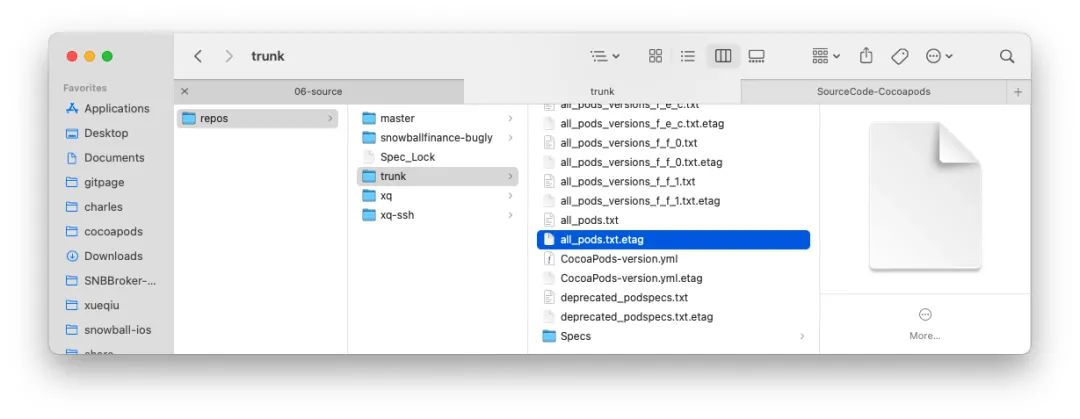
注意,在这个阶段 CDNSource 仅仅是更新当前目录下的索引文件,即 all_pods_versions_x_x_x.txt。
def update(_show_output)
  @check_existing_files_for_update = true
  begin
    preheat_existing_files
  ensure
    @check_existing_files_for_update = false
  end
  []
end

def preheat_existing_files
  files_to_update = files_definitely_to_update + deprecated_local_podspecs - ['deprecated_podspecs.txt']
  concurrent_requests_catching_errors do
    loaders = files_to_update.map do |file|
      download_file_async(file)
    end
    Promises.zip_futures_on(HYDRA_EXECUTOR, *loaders).wait!
  end
end
Pod Repo 更新命令
CocoaPods 对于 sources 仓库的更新也提供了命令行工具:
$ pod repo update `[NAME]`
其实现如下:
# lib/cocoapods/command/repo/update.rb
module Pod
  class Command
    class Repo < Command
      class Update < Repo
        def run
          show_output = !config.silent?
          config.sources_manager.update(@name, show_output)
          exclude_repos_dir_from_backup
        end
        # ...
      end
    end
  end
end
在命令初始化时会保存指定的 Source 仓库名称 @name,接着通过 Mixin 的 config 来获取 sources_manager
触发更新。
最后用一张图来收尾 CocoaPods Workflow:
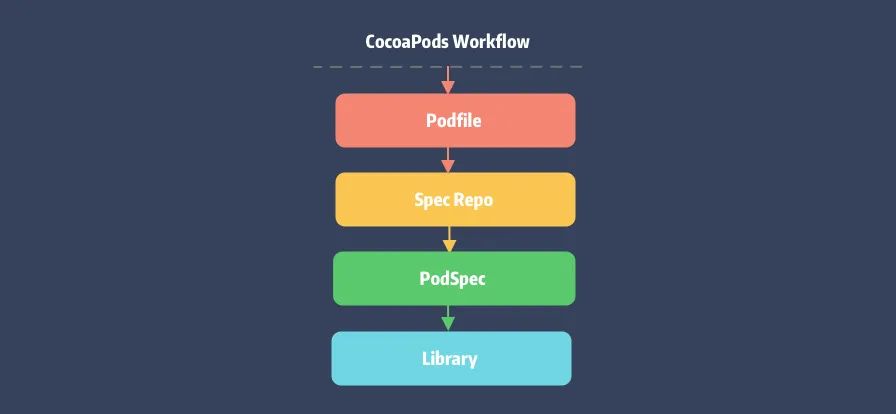
总结
最后一篇 Core 的分析文章,重点介绍了它是如何管理 PodSpec 仓库以及 PodSpec 文件的更新和查找,总结如下:
- 了解 Source Manager 的各种数据结构以及它们之间的相互关系,各个类之间居然都做到了权责分明。
- 通过对 Metadata 的分析了解了 Source 仓库的演变过程,并剖析了存在的问题。
- 掌握了如何利用 CDN 来改造原有的 Git 仓库,优化 PodSpec 下载速度。
- 发现原来 CLI 工具不仅仅可以提供给用户使用,内部调用也不是不可以。
知识点问题梳理
这里罗列了五个问题用来考察你是否已经掌握了这篇文章,可以在评论区依次作答。如果没有掌握建议你加入收藏再次阅读:
逻辑两步走:
PodSpecs的聚合类有哪些,可以通过哪些手段来区分他们的类型?- 说说你对
Aggregate类的理解,以及它的主要作用? Source类是如何更新PodSpec?- Core 是如何对仓库进行分片的,它的分片方式是否支持配置?
- CDN 仓库是如何来更新
PodSpec文件?
参考资料
[1]Specs 仓库: https://github.com/CocoaPods/Specs [2]GitHub 下载慢: https://github.com/CocoaPods/CocoaPods/issues/4989#issuecomment-193772935 [3]官方说明: https://blog.cocoapods.org/Master-Spec-Repo-Rate-Limiting-Post-Mortem/#too-many-directory-entries [4]FHS 标准: https://www.wikiwand.com/en/Filesystem_Hierarchy_Standard [5]传送门: https://zhuanlan.zhihu.com/p/183238194#tocbar--13f51dj [6]Gem::Version: https://www.rubydoc.info/github/rubygems/rubygems/Gem/Version [7]Semantic Versioning: https://semver.org/ [8]SemVer: https://github.com/semver/semver [9]传送门: https://guides.cocoapods.org/using/the-podfile.html#specifying-pod-versions [10]官方说明: https://blog.cocoapods.org/CocoaPods-1.7.2/ [11]gist: https://gist.github.com/looseyi/492b220ea7e933e972b65876e491886f [12]#version: https://www.rubydoc.info/gems/cocoapods-core/Pod/CDNSource#versions-instance_method [13]#versions: https://www.rubydoc.info/gems/cocoapods-core/Pod/Source/Aggregate#search_by_name-instance_method [14]传送门: https://zhuanlan.zhihu.com/p/65722520